Trending Topics

 Trending
Is there any way around Zoom’s 40-minute limit?

Table Of Contents−
- The free way to get around Zoom's 40-minute limit
- The more expensive way to get around Zoom's 40-minute limit
- How to automatically schedule recurring meetings
- What happens when the 40-minute limit hits?
- How to quickly send out the meeting link mid-call
- Can rivals beat Zoom's 40-minute limit?
- Is there a free video meeting service with no time limits?
- More explainers
Zoom shot to prominence during the Covid pandemic, quickly becoming everyone’s go-to video meeting service – but it’s always had one drawback, a 40-minute limit on free accounts. The good news is that, even if you don’t want to pay for an account, there are ways around that 40-minute shut down.
Indeed, if you’re not wedded to Zoom, there are meeting services that let you hold video conferences with no time limits at all… Read on to discover where to find that.
Related reading: How to make Zoom calls on Apple TV 4K
The free way to get around Zoom’s 40-minute limit
The free – and relatively easy way – to circumvent Zoom’s time limit is simply to re-enter the same room again.
To ensure this happens, it’s best to get the meeting organiser to send out a link to the meeting instead of inviting participants directly.
To do this, open the Zoom app and log in, if you haven’t already done so (you can sign in with Google or Facebook account credentials if you don’t want the palaver of creating a fresh username and password).
Now click Schedule and work your way through the various settings, paying particular attention to details such as whether you want to put a password on the meeting.
When you get to the bottom of the schedule window, click Other Calendars under the Calendar option.
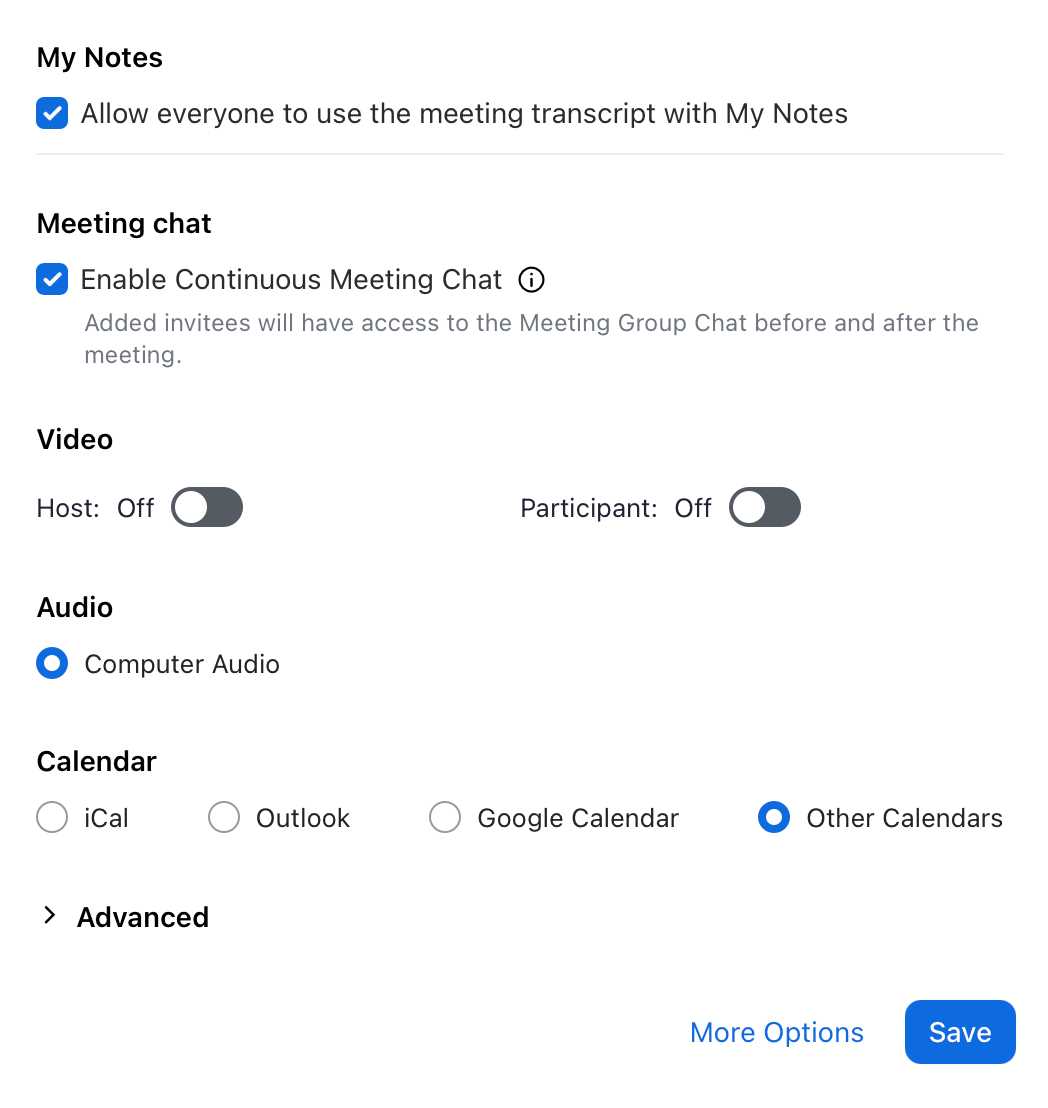
This will throw up another window that allows you to copy the meeting details, including the all-important meeting link, which can be emailed/WhatsApped/whatever you like to participants.
To rejoin the meeting, the host simply has to exit and then everyone clicks on the original link to start another 40-minute session. If nothing else, that enforced break provides a chance to top up your coffee/water/beer/wine and take a comfort break, as our American friends call it.
The more expensive way to get around Zoom’s 40-minute limit
If that sounds like too much pfaffing around – and it might well be if you’re running a business meeting with clients – then you can avoid Zoom’s 40-minute limit by paying for a Pro account. Note that if anyone in a meeting has a Pro account (it doesn’t have to be the host), the 40-minute limit is waived.
Bought annually, Zoom Pro costs £11.66 (£13.99 inc VAT) per month in the UK. That extends the maximum meeting duration to 30 hours, which should be long enough for even the most laborious PowerPoint presenter/pilates teacher. In the EU, it’s €13.33 before VAT, while it costs $14.16 in the USA.
Zoom Pro throws in other benefits, such as unlimited AI meeting notes taking and the ability to record meetings.
How to automatically schedule recurring meetings
If you’re regularly hosting meetings with the same group of people — whether it’s a weekly catch-up, virtual quiz night, or remote yoga class — you can make things easier by setting up a recurring meeting in Zoom. This way, the meeting ID and link remain the same, so there’s no need to send out fresh invites each time.
To do this, when scheduling a meeting in Zoom, simply tick the recurring meeting checkbox. You can then choose how often it repeats and whether there’s a fixed time, or if it’s a rolling meeting, you can start whenever you like. This is a handy way to keep things simple for regular gatherings without fiddling with new links.
What happens when the 40-minute limit hits?
If you’ve never been in a Zoom call when it reaches the 40-minute mark, it might help to know exactly what to expect. A visible countdown clock appears on screen for the host and participants, with a warning when five minutes remain. Once the time is up, the meeting window will close for everyone simultaneously, with a message explaining that the meeting has ended.
There’s no need to panic, though — as long as you’ve shared the meeting link in advance, everyone can click the same link to jump straight back into a new session.
How to quickly send out the meeting link mid-call
Zoom makes it easy to copy and distribute the meeting details during an active call. In the meeting window, click the Participants button on the toolbar, then choose Invite. From there, you’ll see an option to copy the meeting invitation or link, which can be dropped into a group chat, email, or messenger app to get everyone back together if the meeting times out.
Can rivals beat Zoom’s 40-minute limit?
Zoom is tighter with its free limits than either of its two main rivals: Google Meet and Microsoft Teams.
On Google Meet, one-on-one calls can run for up to 24 hours! If the meeting has three or more participants, the time limit is capped at one hour.
Microsoft Teams has exactly the same limits on its free accounts, so if you’re doing a one-on-one call in particular, you may wish to use one of the alternatives.
Is there a free video meeting service with no time limits?
If you’re holding a meeting with more than two participants and you need to it last for longer than an hour, without interruption, then we suggest trying Jitsi Meet. We’ve used it for committee meetings with many online participants and never hit a time limit. It’s completely free and if you need a “moderated meeting” where the host has controls to mute or kick participants, you can book a URL for the meeting in advance.
Better still, there’s no need to register or sign-in with an account on Jitsi. You can just roll up and have a meeting started in seconds.
This article was updated on 29 June 2026.
More explainers
About The Author

Barry Collins
NEXT UP