Shocking news: Microsoft is introducing a Windows Copilot key to its standard keyboard design, its first “significant change” since the Windows key. This arrived in 1994, one year before Windows 95, and has become a major weapon for keyboard junkies due to the numerous associated shortcuts.
We realise this isn’t the most shocking news you will read in 2024, but it’s a further sign of Microsoft betting its house on AI. After all, this is the year when we expect to see Microsoft 365 Copilot rolled out to the masses. Right now, only businesses with at least 300 employees (and deep pockets) can take advantage.
What will the Windows Copilot key do?
Sadly, we aren’t aware of any shortcuts when you press the new Windows Copilot key. Pressing it will simply launch Copilot in Windows, Microsoft’s AI helper based on GPT-4. Unexciting as that may be, it avoids the hassle of pressing the Copilot button or searching for it.
Users of Windows 10 and Windows 11 should now have the Copilot button sitting on their taskbar. If it isn’t there, head to Personalisation | Taskbar and switch on the “Copilot (preview)” button. See the screenshot below.
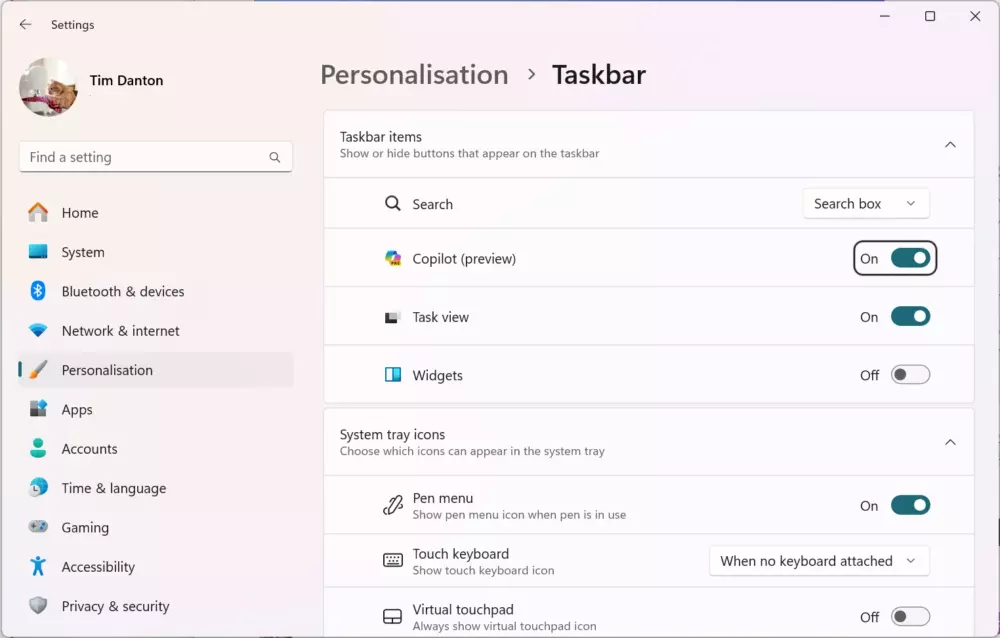
If you can’t see this option in your Settings menu, chances are that you’re running an old version of Windows 10 or 11.
Microsoft says that “many of the new Windows 11 PCs” announced at CES 2024 will include the new key. You can expect these laptops and all-in-one PCs to go on sale from late February, so be still your beating heart. Not long to wait.
If you’re hoping to buy a standalone keyboard with the Windows Copilot key then you will have to wait longer still. When we asked our contacts at Cherry if it had new keyboards with the Copilot key standing at the ready, the answer was a firm no.
Where will the Copilot key sit on keyboards?

So far, the only clue we have regarding the Windows Copilot key’s placement is this grab from the 20-second intro video. Here, it’s placed right next to the cursor keys, towards the bottom-right of the keyboard.
We suspect that Microsoft will dictate to its partners that this is the correct position for the Windows Copilot key, with the main Windows key likely to sit on the left-hand side.
Tim has worked in IT publishing since the days when all PCs were beige, and is editor-in-chief of the UK's PC Pro magazine. He has been writing about hardware for TechFinitive since 2023.
To provide the best experiences, we and our partners use technologies like cookies to store and/or access device information. Consenting to these technologies will allow us and our partners to process personal data such as browsing behavior or unique IDs on this site and show (non-) personalized ads. Not consenting or withdrawing consent, may adversely affect certain features and functions.
Click below to consent to the above or make granular choices. Your choices will be applied to this site only. You can change your settings at any time, including withdrawing your consent, by using the toggles on the Cookie Policy, or by clicking on the manage consent button at the bottom of the screen.
Functional
Always active
The technical storage or access is strictly necessary for the legitimate purpose of enabling the use of a specific service explicitly requested by the subscriber or user, or for the sole purpose of carrying out the transmission of a communication over an electronic communications network.
Preferences
The technical storage or access is necessary for the legitimate purpose of storing preferences that are not requested by the subscriber or user.
Statistics
The technical storage or access that is used exclusively for statistical purposes.The technical storage or access that is used exclusively for anonymous statistical purposes. Without a subpoena, voluntary compliance on the part of your Internet Service Provider, or additional records from a third party, information stored or retrieved for this purpose alone cannot usually be used to identify you.
Marketing
The technical storage or access is required to create user profiles to send advertising, or to track the user on a website or across several websites for similar marketing purposes.
To provide the best experiences, we use technologies like cookies to store and/or access device information. Consenting to these technologies will allow us to process data such as browsing behaviour or unique IDs on this site. Not consenting or withdrawing consent, may adversely affect certain features and functions.
Functional
Always active
The technical storage or access is strictly necessary for the legitimate purpose of enabling the use of a specific service explicitly requested by the subscriber or user, or for the sole purpose of carrying out the transmission of a communication over an electronic communications network.
Preferences
The technical storage or access is necessary for the legitimate purpose of storing preferences that are not requested by the subscriber or user.
Statistics
The technical storage or access that is used exclusively for statistical purposes.The technical storage or access that is used exclusively for anonymous statistical purposes. Without a subpoena, voluntary compliance on the part of your Internet Service Provider, or additional records from a third party, information stored or retrieved for this purpose alone cannot usually be used to identify you.
Marketing
The technical storage or access is required to create user profiles to send advertising, or to track the user on a website or across several websites for similar marketing purposes.