Trending Topics

 Trending
ChatGPT and Claude are coming for Google Workspace: Should you switch?

ChatGPT, Claude and other AI systems have always been good at creating documents and spreadsheets. It’s one of their core strengths, in fact.
But now OpenAI and Anthropic are encouraging users to create, store and share their own documents inside the AI services. It’s a direct hit on rivals such as Google Workspace and Microsoft 365.
AI has already largely replaced Google search for many people: is it time to surrender Google Workspace too?
ChatGPT Space
OpenAI was the first company to launch this attack, with the release of ChatGPT Space. The service – which is only available on Pro, Business and Enterprise plans – gives users a Google Drive-like environment where they can creates Pages (word documents) and Slides. Spreadsheets are pledged as “coming soon”, but not available at the time of writing.
Much like Google Docs, you can start with a blank canvas and write your own ChatGPT Pages from scratch, but there’s obviously a prompt window on hand to help you with the creation process. Pages and Slides have a reasonably limited set of editing tools, certainly nothing to compare with the tools Google Docs and Slides have amassed over the years.
In some ways it falls back to the old arguments that Microsoft used to face when it was accused of stuffing features that “nobody used” into its Office apps. Yes, people might only use 1% of the available tools in Office, but everyone has a different 1%. It’s highly likely that ChatGPT Pages will be missing something you rely on, even if only on occasion.
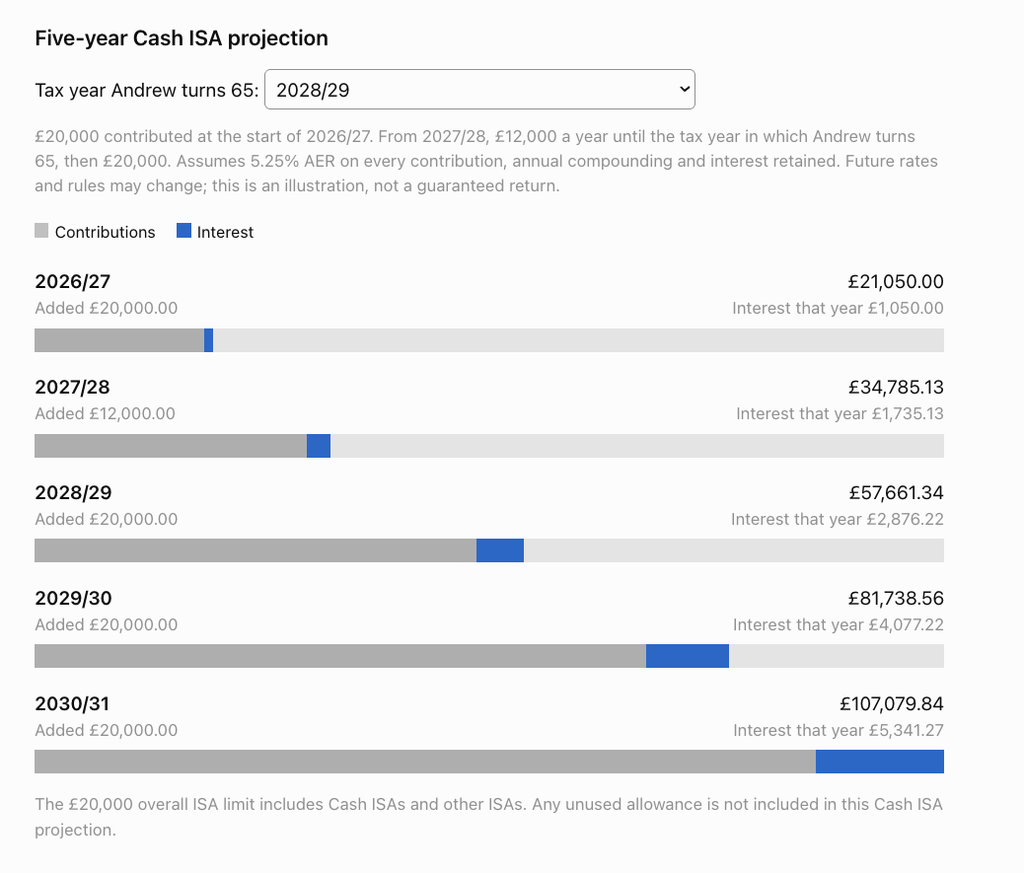
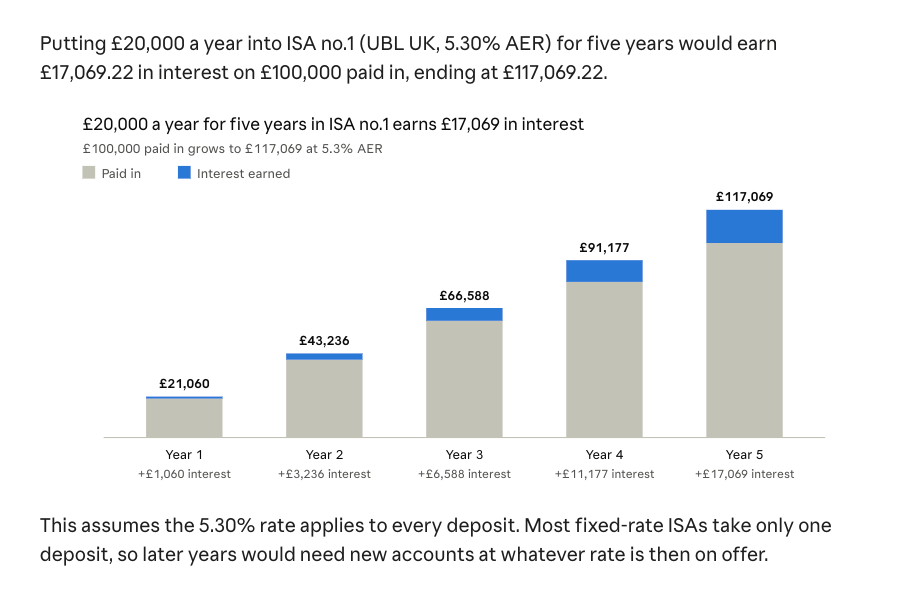
ChatGPT Pages is capable of far more than bashing out vast reams of text in documents. For example, I asked it to create a Page that listed the five ISAs with the best interest rates. It pulled information from sites such as MoneySavingExpert.com before listing the top-earning accounts.
I then asked it to create a visualisation for a client. I wanted to show how much they would earn from the top-ranked ISA if they invested the maximum £20,000 each year for five years. (You can see this in the screenshot above).
It even added an interactive calculator that varied the level of return based on when the client retired, which they could select from a drop-down menu.
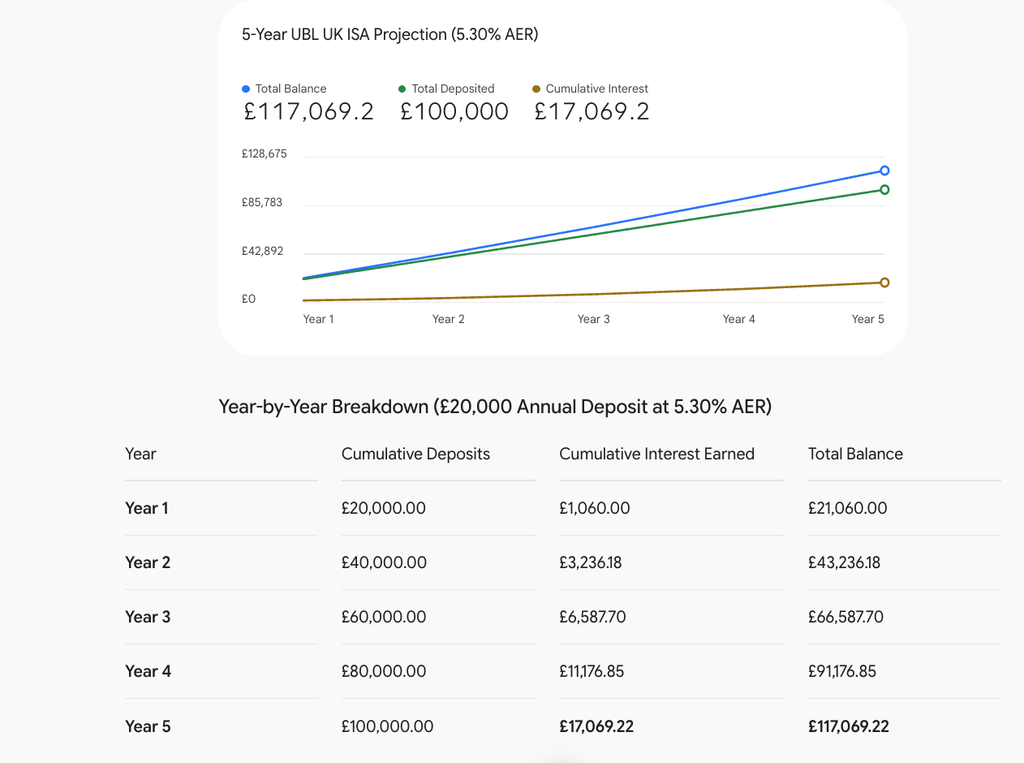
I ran the same prompts with Gemini in Google Docs. It produced a chart and table with comparable information, but wasn’t presented as elegantly.
Claude Docs/Slides/Sheets and more

Earlier this month, Claude threw its hat into the ring too.
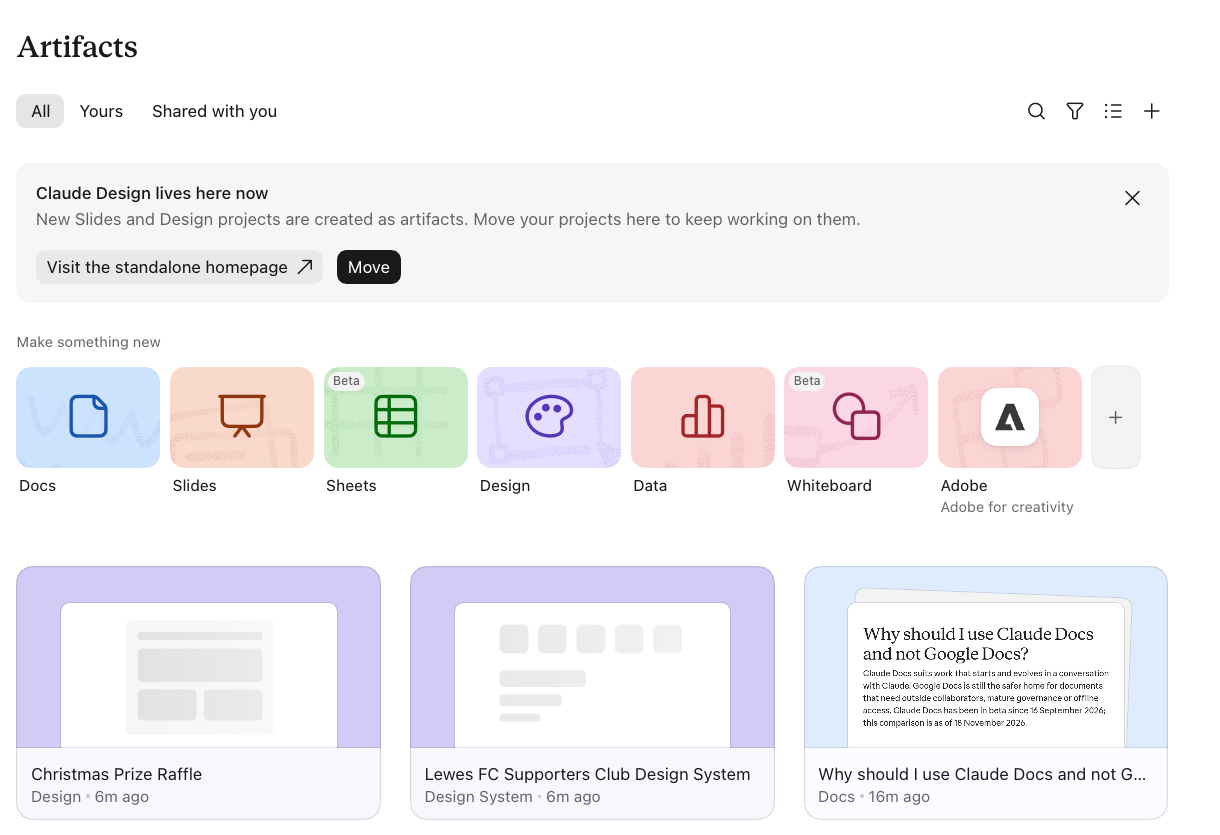
It’s offering is already more rounded out than ChatGPT’s. In Claude you can create Docs, Slides and Sheets. It’s also incorporated a revamped version of Claude Design into the suite, as well as a Data visualiser for creating dashboards, “scrollytellers” (give me five minutes and a set of thumbscrews with whoever came up with that name) and short infographic videos. There’s also a whiteboard feature for brainstorming ideas.
Again, these tools are relatively early in their development and only come with a modicum of editing features. In Docs, for example, you can have any font as long as its the one that Claude gives you. The only thing you can change is the size/weight. Likewise, you can insert photos into documents and resize them, but you can’t wrap text around images.
In other ways, it’s much more advanced than the tools you’ll get in Google Workspace/Microsoft 365. Using the Design element, for example, I was able to create two different visual treatments for a promotion and compare them side-by-side on an artboard (see screenshot above). Using the “tweaks” option, I could easily change the angle at which the raffle ticket is displayed in the right-hand option shown above.
I also asked it to do the same ISA test I threw at ChatGPT Space and Google Docs. It passed that test with aplomb, creating a visualisation that wasn’t as sophisticated as ChatGPT’s effort, but certainly more impactful than the one Google Gemini created.
Time to drop Google Workspace?
So, should your business abandon Google Workspace or Microsoft 365 account in favour of the AI services? Especially if you’ve already got business or enterprise accounts for ChatGPT or Claude?
I’d say it’s too early. These services are still primitive. They lack features, have limited export options and sharing content created in them with the outside world isn’t as easy as it could be. For example, sharing stuff in Google Workspace is as easy as creating a link and deciding whether the people you share it with can view, comment or edit. In Claude, they can only view or edit. There’s no comment-only access, and they need to have their own Claude account either way.
Given that both Claude and ChatGPT integrate fairly seamlessly with Google Workspace and Microsoft 365, there’s little reason to abandon those established, feature-rich services in favour of the AI rivals at this stage.
In the longer term, with more improvements to the products, the case for migrating may be stronger, especially when it comes to cost savings. However, the AI firms are capricious and remove features at short notice. Would we want to bank our business documents in as newly launched service with no guarantee that the facility will even exist in six or 12 months’ time? Not a chance.
There are features inside the AI services, particularly Claude, that you can’t get in Google Workspace or Microsoft 365. The more creative Design and data tools being two obvious examples. But I’d still leave my day-to-day documents with the established giants and use the AI tools as and when I need them, not as the first port of call.
About The Author

Barry Collins
NEXT UP