Trending Topics

 Trending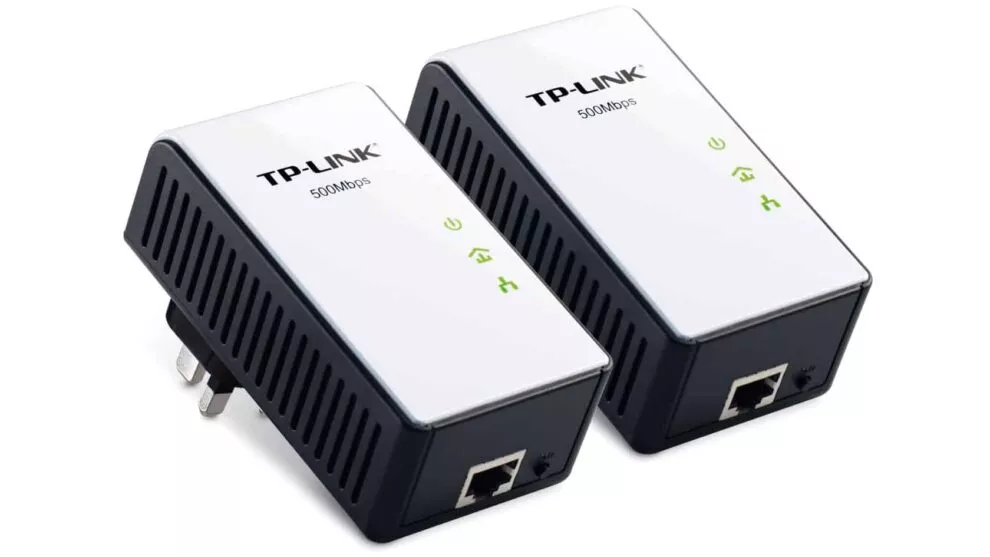
What do the lights on a TP-Link powerline adapter mean?

If you’re using a TP-Link powerline adapter to extend your home network, then you’ll know there are three lights on the front of each adapter. Hopefully, they’re all green. If not, what does this mean and what can you do about it?
What does each light on a TP-Link powerline adapter indicate?
Running in either a horizontal or vertical line, from top to bottom or left to right, the LEDs represent power, your powerline connection and, finally, your Ethernet connection.
If the adapter also supports Wi-Fi too, then there will be an additional LED for this.
What do the colours mean?
Power LED
This should be on and green. If not, then make sure it’s plugged into your wall socket correctly and switched on. If so, try another mains socket.
Powerline LED
Once set up, the powerline LED should be on. However, it will switch off when in power-safe mode or if it doesn’t detect another powerline adapter to connect to.
If you have a TL-PA511/TL-PA551 adapter then there are three possible colours:
- Green – the data rate is greater than or equal to 80Mbits/sec
- Orange – the data rate is between 48 and 80Mbits/sec
- Red – the data rate is less than or equal to 48Mbits/sec
For models such as the TL-PA8010P or TL-PA8030P, the meanings are more vague
- Yellow-green – the network is in good condition
- Red – the network is in a poor condition. Try the adapter in a different mains socket
Ethernet LED
- Light is on – an Ethernet device is connected
- No light – no Ethernet device has been found
- Flashing (only some adapters) – data transfer is occurring
Wi-Fi LED
- Light is on or flashing rapidly – a wireless connection is enabled
- Light is flashing slowly – Wi-Fi cloning is in progress (this means the powerline network is copying your main router’s Wi-Fi settings)
- No light – Wi-Fi is switched off
Additional explainers you might be interested in
About The Author