Trending Topics

 Trending
Adobe expands its pick-and-mix range of creative AI tools

Adobe is expanding its range of AI tools that can use third-party models, including partners such as ElevenLabs and Topaz Labs for the first time.
Earlier this year, Adobe began offering access to Google Gemini and other models when generating images in the beta version of Photoshop, meaning creators didn’t have to keep switching between apps if they wanted to use models other than Adobe’s own.
Now it seems Adobe is going all-in on this approach, bringing third-party models to products such as Firefly, Adobe Express and the full release of Photoshop v27.
Adobe is still drawing a none-too-subtle distinction between its own AI models and that of its partners. Adobe has long insisted its AI models are only trained on content that the company has full rights to, a claim it’s not making for third-party tools from companies such as OpenAI and Google.
Hence, when you pick which model you’d like to generate images within, say, Adobe Express, Adobe’s Firefly appears at the top of the list with the label “commercially safe”, while other models are listed separately with no such claims about their safety.
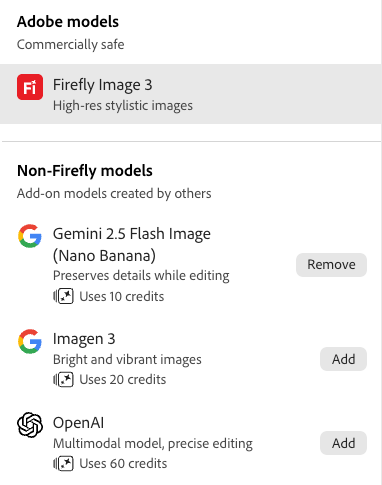
Interestingly, different models also come at varying cost. To generate an image with Google’s Nano Banana model costs only 10 credits in Adobe Express, whereas OpenAI comes at six times that cost.
Perhaps the most eye-catching of the new model additions for professional users is that of Topaz Labs, specialists in AI upscaling. One of the big criticisms of Adobe’s generative images in apps such as Photoshop was that they were relatively low-res, making them difficult to use in print or high-res digital media. Adobe claims the addition of Topaz Labs’ technology will allow users to “upscale low-resolution images to 4K”, again negating the need to use two separate (and costly) apps to make images usable.
New Adobe Firefly generation tools
Adobe Firefly now includes three new audio tools: Generate Soundtrack and Generate Speech.
Generate Soundtrack creates “studio-quality” music to run alongside video footage, while Generate Speech lets you create voiceover tracks from text.
Currently, it seems Adobe is only providing a selection of voices using American accents, which isn’t great if you’re running a British advertising campaign. The AI tools allow you to correct the way AI pronounces words, encouraging you to enter a phonetic pronunciation if the AI gets it wrong. (Amusingly, the AI struggled to pronounce the phrase “AI” in my tests.)
You can also change the tone of voice used for certain phrases or sentences. Apparently, the final sentence in the example we created below is using a “persuasive” tone of voice.
Meanwhile, even the addition of third-party models in the video generation hasn’t ironed out all of AI’s foibles. Using the Firefly video generator, we initially asked for a video of a “young woman in an office closing her laptop, putting on her coat and leaving the office”.
The Firefly video generator has a new tool to “enhance prompts” and when we clicked that on the prompt above, it transformed the prompt to:
A young female office worker, wearing a gray blouse and a navy blue coat, is seen closing her laptop with a satisfied smile. She stands up from her desk, gathers her belongings, and puts on her coat. The office environment is modern and well-lit, with a clock on the wall and shelves filled with books and plants. The background shows colleagues working at nearby desks, creating a bustling yet professional atmosphere. The lighting is bright, suggesting it might be late afternoon. The camera remains steady, capturing the woman from a medium shot as she gathers her things and exits the office. The overall visual style is clean and professional, emphasizing the transition from work to the end of the day.
However, even this level of verbiage wasn’t enough to save the final result, which was generated using Google’s Veo 3.1 model and is embedded below:
The AI even generated its own Thai narration (which we didn’t ask for), which according to ChatGPT translates as: “First of all, hello everyone. Welcome! Today we’re going to introduce a simple but very effective method for everyone to try and follow.”
That eight-second video cost 400 Adobe credits to generate, which is roughly 10% of the monthly allowance afforded to Creative Cloud subscribers.
Related articles
About The Author