Trending Topics

 Trending
Jay Wu, President BenQ Europe: “If you have a good setup in your desktop, you immediately feel, oh, I’m pumped to work, right?”

BenQ has seen the light. Many lights in fact, with pride of place at its IFA 2026 stand going to the six generations of its popular, desktop-illuminating ScreenBar adorning a giant wall display. Which handily serves as a backdrop for my picture of Jay Wu, President of BenQ Europe, taken at the show.
This was apt, because I was keen to talk with Jay about the changing face of BenQ.
For years, I’ve associated the brand with monitors alone. But that ignores the company’s growing focus on making life at a desk more pleasurable and productive. The series of ScreenBars is one example of this, but also BenQ’s newest brand – launched at IFA – called INFTYLAB. Squarely aimed at Mac users, this comprises of a monitor arm for the Apple Studio, a mouse and a desk mat.
(A little confusingly, BenQ also released the iScreenBar for iMacs outside of the INFTYLAB branding.)
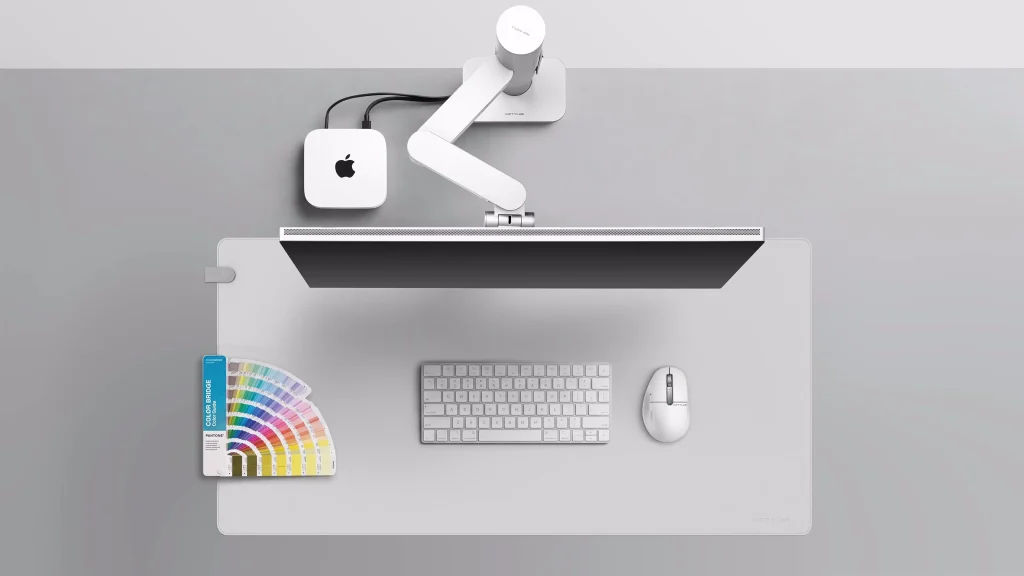
Birth of BenQ’s screen bar concept
Perhaps the most telling comment came from Jay Wu right at the start of our interview, when he explained that BenQ is “a visual company”. He added that its embrace of light bars is logical, as the company has been using a single row of LEDs to illuminate monitors for two decades. Now it’s using the same technology but to illuminate people’s desks.
In monitors, manufacturers diffuse the light from a single source – a strip of LED lights – so that it covers the panel. BenQ’s ScreenBars do the reverse, using the same row of LEDs to illuminate the user’s desktop.
“Traditionally, we have a lamp that hangs over your desktop, and you can only cover [a certain] area of the environment in light, but in the modern workspace, you have a monitor in front of you, you have a PC and you have a lamp.”
That’s crowded, Jay points out. “So we thought, what can we do? Because we sell mostly monitors, what kind of product expansion can we do? So we thought about the LED light, the benefit of LED lights compared to the traditional lamp.”

Benefits such as being able to precisely control the temperature of the lighting, from a cold, white light to a warmer hue.
One key benefit of a ScreenBar being that it illuminates the whole of the space rather than a small area, making it much more convenient if you’re reading a set of documents. BenQ also knew from the start how important it was to keep the LED lights from shining on the monitor, which is why it has a light guide similar to a monitor’s.
BenQ’s latest offering, the ScreenBar Halo 2, goes further still. “Later on, we wanted to create a better atmosphere, so we we added another light behind the screen bar, to make your work environment better.”
Its new iScreenBar release comes because BenQ is aware that iMac users don’t really want a black bar on top of their colourful computer. “That’s why we have a new product line,” said Jay. “It’s tailor-made for for iMac, different colours, and then you will see… it looks like one design.”
Monitor ergonomics: the beginning
Whilst I definitely appreciate a nicer-looking, better lit desk, I was keen to see if BenQ could convince managers that it was worth investing in this. In short, is a better lit employee a happier, more productive employee?
To answer this, Jay walked me through the gradual improvements we’ve seen in the workspace over the years. First, many people used laptops on their desk. “When you sit there and work, your posture usually is…” at this point he slumped his shoulders in a way we will all recognise. “Your shoulder moves inwards, your head is downwards, like that.”
One obvious improvement is to buy a monitor, but initially most were fixed height. “Then we learned that people have different body structures. To help you have a more ergonomic feel, or feel more comfortable in at your workplace, then we put a height-adjustable stand on the monitor. So that you can lift it up, so you can sit straight.”
This, he explained, not only makes people more comfortable but improves productivity. Tough to argue with. Which is why the monitor industry extend the height range even further, to give people more options..
Monitor arms provide a similar service, with the extra benefit of clawing back workspace when you don’t need the screen: just push it back to the maximum extent. This also opens up the possibility of having a multi-monitor setup without consuming extra desk space.
Monitor ergonomics: seeing the light
Jay argues that the next step in workplace comfort, and thus increased productivity, boils down to light. “If you work in a modern workplace, the light will be like this, distributed quite evenly.” At this point I looked up at the harsh fluorescent lights above us in our windowless meeting room, tucked away in the ageing Messe Berlin building. Aesthetics more suited to torture than workplace productivity, but the light was certainly bright.
“In European countries, you have a lot of ancient buildings with lots of history and culture, but that doesn’t mean you can have even lighting across all the office space,” he said. “So this is the time you can help your [staff]. You can buy a screen bar so that everybody can have enough lighting so that they feel better.
“If you have a good setup in your desktop, you immediately feel, oh, I’m pumped to work, right? That’s my personal experience.”
More screens, more productivity?

At this point Ming Hsu, Head of Business Line Managers at BenQ Europe, suggested that dual screens could increase productivity too. But before the idea of “all work and no play” could dominate, Yvonne Liu added that BenQ doesn’t “want people to misunderstand that we want them to work longer, but become more efficient.”
She added that BenQ cares “a lot about people’s eyes fatigue… We help people to feel better or feel healthier when they’re working, and not only our visual experience like monitors. Our light bars also have a lot of eye-care features.” And this isn’t merely theory, Yvonne insisted, saying that BenQ has scientific data that “proves our monitors can improve your eye muscle fatigue”.
At this point I explained that I’ve been keen for years to find data that shows how larger monitors, or a dual-screen setup, can improve productivity. Personally, I feel a huge difference in productivity (and happiness!) between working on a laptop screen and sitting at my desk with a 27in 4K monitor, but it would be nice if BenQ had data to back up this feeling?
“I don’t have the data on it, but again, it’s my personal experience,” said Jay. “So as we know, when monitors were introduced, the resolution was around 1,280 [pixels] by 720. Then it became 1080p [1,920 x 1,080], 2K. Now we have 4K products and 5K products.
“So if your work [invovles], for example, a lot of spreadsheets, income statements, you want to see more information in one screen, so this is when you need a higher resolution. So that means you don’t need to scroll your mouse up and down. So when you need to compare numbers, then you want to see it all, right? If you want to see more contents on one screen, then you can choose for a higher resolution monitor, not necessarily a bigger one.
“A bigger monitor can [help] your eyes be more comfortable with a bigger screen. But with a higher resolution, you actually can see more. And that, in my experience, helps my productivity.”
All of which I totally agree with, but to misquote the film Jerry Maguire, “Show me the data!”
How is BenQ changing?
To come back to my opening point, then, how is BenQ changing? What’s clear from my discussion with Jay and the rest of his team is that the company has already changed. My perception of it as a monitor company still holds, but its focus is clearly extending to our workspace. If it sits on your desk, it’s a target.
I wouldn’t be at all surprised to see the company invading the space traditionally occupied by Logitech, but with a focus on the high-end (including Macs). It wants to make your working life more comfortable and easier, so surely webcams, keyboards, mice and other desktop paraphernalia are all within its grasp?
(I should add that all this is speculation, but note that INFTYLAB’s first products included both a mouse and a mouse mat.)
Personally, I welcome the shift: BenQ really does make excellent monitors (I’ve reviewed dozens over the years) and if it can extend that expertise beyond light bars then everyone will benefit.
Related articles
- Best of IFA 2026: Business laptops, monitors, phones, routers and innovations
- AMD announces we’re “entering the era of personal AI” at IFA 2026 – and the Halo Threadripper Station
- First look at Lenovo Yoga Pro 9n and what it tells us about the RTX Spark platform
- What we learned about Windows 11 K2 at IFA 2026: “Unmetered intelligence on every desk”
- First impressions of the colourful Dell 14S from IFA 2026
About The Author