Trending Topics

 Trending
How do I check my Dropbox storage limit?

Admit it, you’re a Dropbox freeloader, desperately trying to avoid being lumbered with another subscription. But the problem with not paying for Dropbox is that you’re constantly in danger of flouting the Dropbox storage limit.
Go over your storage limit and Dropbox will simply stop syncing your files, potentially leaving you without something crucial the next time you log on from a different machine.
We’ve already written an article that reveals how to get more Dropbox storage space for free, but how do you find out how much storage space you’ve got to play with in the first place?
How to check your Dropbox storage limit in Windows
- Look for the little Dropbox icon in the notifications panel, near the clock, in the bottom right of your screen
- Right-click on that icon and click on the small settings cog in the top-right of the window that appears
- You should now see a readout of how much storage space you have in your Dropbox account and what percentage of that allocation you’re using. Here, for example, we’re using almost 95% of our free storage allocation. Eek!

How to check your Dropbox storage limit in the mobile app
- Open the Dropbox mobile app
- Click the menu (three lines) button in the top left of the screen
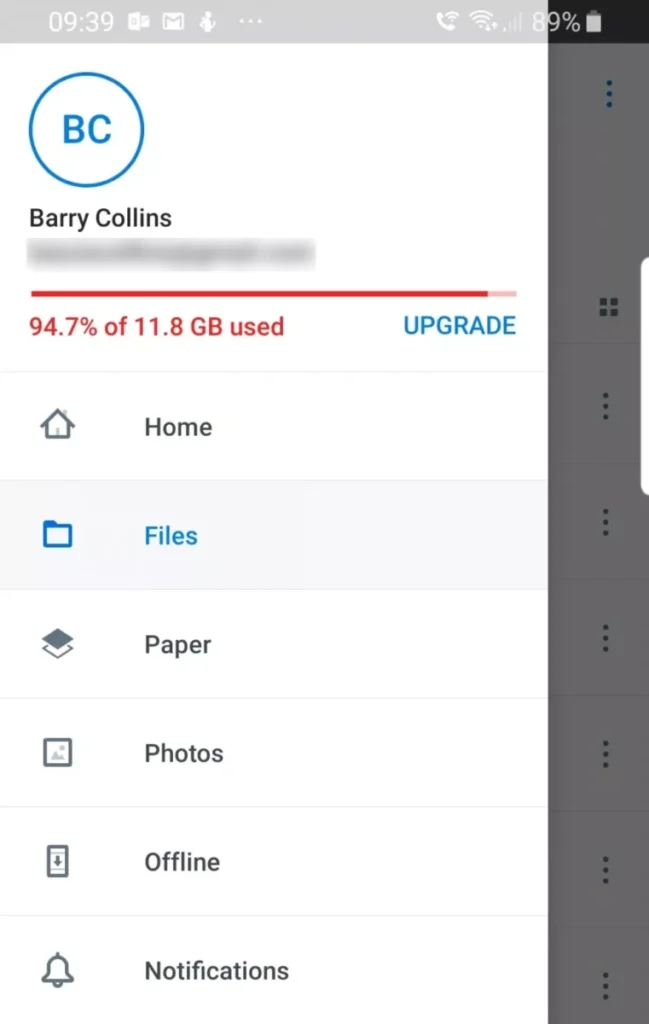
- Your storage usage should be displayed in the panel that appears on the left-hand side of the screen
How to check your Dropbox storage limit from the Dropbox website
- Go to dropbox.com and log in if you’re not already signed in
- Click on the little account face icon, next to the bell, in the top-right of the screen
- A window will pop up showing how much storage space you have left
Also from our storage category
About The Author

Barry Collins
NEXT UP


