Trending Topics

 Trending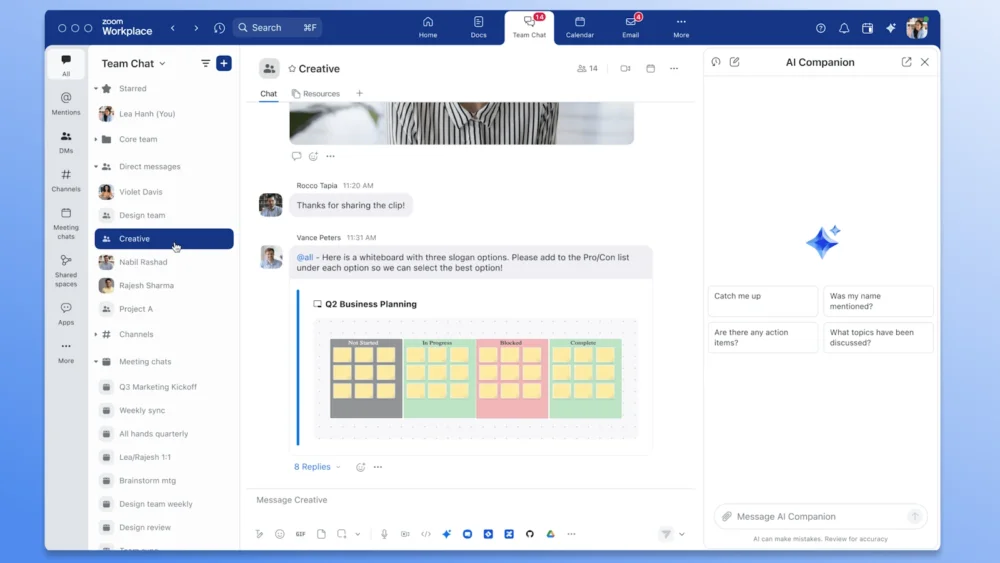
Zoom adds new features for productivity and collaboration

Communication and collaboration software giant, Zoom, recently announced the launch of a redesign of its Team Chat interface, as well as some new features designed to increase collaboration and productivity for teams using its platform. We take a peek at some of these new offerings and discuss how they can help employees become more efficient.
Zoom features update
In addition to an updated Team Chat sidebar, which adds customisations for organising chats and channels, Zoom has also added several productivity upgrades to its core product offering. These new features include:
- Redesigned Team Chat
- AI-powered Contact Center agents
- Enhanced language captions and translation
Zoom Team Chat redesign

As part of its overhaul for Zoom Workplace, the communication software giant has redesigned its Zoom Team Chat sidebar. This allows users to customise their chat interface in several new ways. For instance, they can reorder and pin tabs, customise notifications and sort or filter past conversations to easily find information.
Another interesting update to the Chat sidebar is the ability to add code blocks and in-line code, adding an additional layer of formatting to conversations. This is helpful when you need certain portions of text to be highlighted or stand out.
Other upgrades to Zoom Team Chat include:
- A more intuitive and user-friendly layout
- An AI Companion capable of generating action item lists from conversations
- AI-generated conversation summaries
AI-powered Contact Center agents
Contact Center agents enhance customer interactions and experiences, making it easier to resolve customer issues. Those customer-centric features just got enhanced with the adoption of several new advanced AI tools aimed at optimising client engagement processes.
For starters, Zoom users can now configure Smart Notes as part of the post-engagement process using AI. Generate AI Smart Notes by format, tone, word count, sentiment, agent names and follow-up tasks. You can also use this feature to generate summaries of customer interactions.
There’s one more AI-powered feature of note: dynamic agent guides. These create scenario-based scripts capable of adapting in real-time to common customer problems. Dynamic agent guides can work in tandem with the Suggested Answer feature, which rapidly generates responses based on up to five knowledge base articles.
Enhanced language captions and translations
As meetings become more diverse and inclusive, it’s important to have communication and collaboration software that helps improve conversations and understanding before (and after) a call. As part of its newest update, Zoom has improved the caption and translation abilities of its conference tool for Japanese, Portuguese and Arabic speakers.
Also part of the language updates include an AI Companion capable of filtering profanity from a list of preselected words in 36 different languages.
Other Zoom feature updates and enhancements
Zoom has also added the following enhancements in its latest wave of updates:
- Custom AV for Zoom Rooms: Create custom gallery sizes, overlays and content displays
- Zoom Revenue Accelerator for Google Meets: Enables sales team members to automatically generate meeting notes, next step lists and conversation insights
- Zoom Phone Push to Talk: A simple way to create a phone call with a given group with the simple click of a button
Speaking about the new updates, Chief Product Officer Smita Hashim noted: “We’re all looking for ways to optimise how we work in the new year, and catching up on chats can be overwhelming.
“With Zoom Team Chat, you can do cross-product work and be more productive with Zoom Workplace’s AI-first products like Zoom Docs, Zoom Meetings, and Zoom Whiteboard. Our new Team Chat sidebar design takes this to the next level by empowering users to collaborate smarter and customize their workspace to fit their preferred workflow.”
She concluded: “With AI Companion included at no additional cost for our eligible paid users and enhanced Team Chat organization tools, users can triage and track their messages more easily, saving time and allowing them to focus on what matters most.”
You might also be interested in
About The Author

James Payne
NEXT UP


