Trending Topics

 Trending
Fireflies.ai alternative (2026): AI note taker without a bot

This is a sponsored article brought to you by Plaud AI.
Here is how I would choose: Fireflies.ai is stronger for automated team follow-up, while Plaud Note Pro covers meeting rooms, phone calls, and botless online meetings with audio to review.
If my work is mostly online meetings, and I need a bot that joins automatically, CRM updates, and team conversation analytics, I would stay with Fireflies.ai. If I need one way to record meeting rooms, phone calls, and online meetings, and I want to keep the audio without a bot in the meeting, I would pick Plaud Note Pro. Plaud Note Pro is a physical AI note taker for in-person meetings and phone calls, and Plaud Desktop handles online meetings. Fireflies.ai and Plaud Note Pro are both AI note takers, but they start recording in different places.
| Decision | Fireflies.ai | Plaud Note Pro |
| Best fit | Online teams that need auto-join, CRM updates, and conversation analytics | Botless recording across meeting rooms, phone calls, and supported online meetings |
| Main advantage | Team automation and more than 100 integrations | Dedicated capture hardware and audio that remains available for review |
| Main limitation | Botless desktop mode does not keep audio or formal speaker labels | No auto-join, and the device costs $189 before paid transcription plans |
What bothers me most about Fireflies.ai is that it splits a complete record and botless recording into two separate modes.
When Fireflies.ai Notetaker joins a meeting, I get the audio or video, speaker labels, transcript, summary, and Soundbites. With botless recording on the desktop app, the meeting looks cleaner, and live transcription and summaries are still there. But the system does not keep the audio or video, and speakers only show up as Speaker 1 and Speaker 2.
I can accept that exchange in an ordinary weekly meeting. In a client interview, a sales negotiation, or a group discussion, I often need two things at once. I want no extra bot during the meeting, and I want to click back to the original voice afterwards to confirm who made a commitment. Fireflies.ai has a hard time meeting both conditions today.
So when I look for a Fireflies.ai alternative, I consider Plaud Note Pro first. It records in-person meetings and phone calls, and Plaud Desktop records online meetings. Both entry points keep the audio, then produce a transcript, a summary, and action items.
Still, Fireflies.ai has a set of strengths that Plaud Note Pro should not try to take. Auto-join, a live assistant, team conversation analytics, and more than 100 integrations are the real reasons users stay. The practical question is whether those team features can make up for the gap left by the recording entry point.
Fireflies.ai is strongest in automated follow-up, and the summary is only the start
If a company wants every meeting to flow automatically into its CRM, project management, and team analytics, Fireflies.ai is more mature than an ordinary AI recording tool.
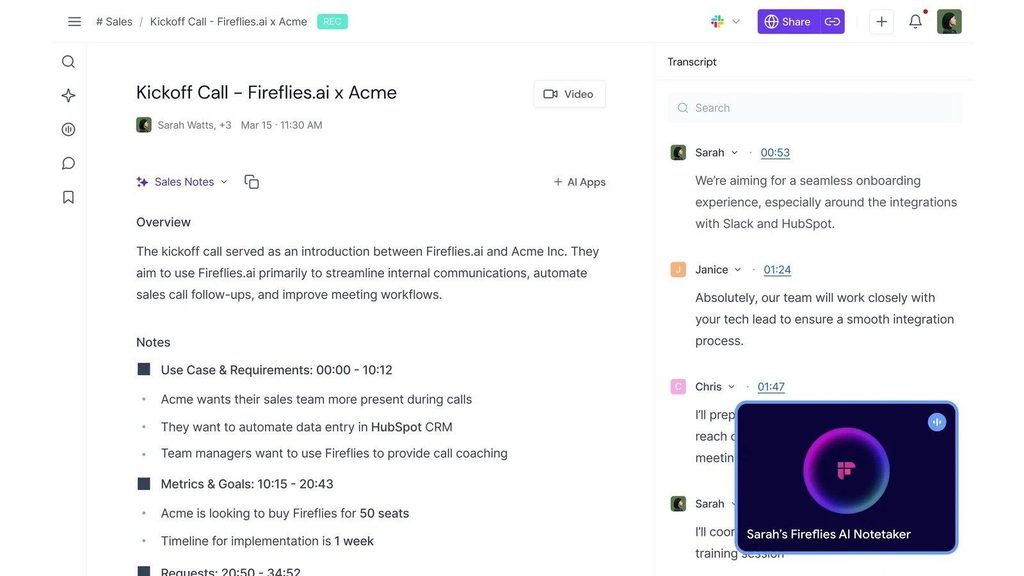
Once Google Calendar or Outlook is connected, Fireflies.ai Notetaker can join Zoom, Google Meet, and Microsoft Teams by rule. Even if I do not attend, Fireflies.ai can still record and bring back notes, as long as the meeting platform lets a guest bot in.
During the meeting, Live Assist shows live transcription and notes. If I arrive a few minutes late, I can ask Fred for a quick summary of what was just discussed. Sales teams can also use Sales Assist to see live suggestions when a client asks a question.
After the meeting, Fireflies.ai puts the overview, detailed summary, timestamps, action items, and full transcript into the Notebook. I can click a sentence to hear the matching audio. Smart Search can filter tasks, dates, questions, prices, and sentiment, so I do not have to drag the progress bar from the start.
Soundbites are especially handy for interviews and content teams. After I upload a podcast recording, Fireflies.ai can pick out a few clips on its own. I can also search for a quote by keyword and cut it into a shareable audio clip.
The bigger gap is in the automation that follows. Fireflies.ai lists more than 100 integrations, including Salesforce, HubSpot, Slack, Notion, Linear, Jira, Asana, and Zapier. After a meeting, AI Skills can update CRM fields, pull out client objections, create project tasks, or draft a follow-up email. A team does not have to copy the summary and paste it into another tool first.
Fireflies Business adds Conversation intelligence, Deal Intelligence, and team analytics. Managers can check each member’s talk-to-listen ratio, topic trends, sentiment, and sales risks. At that point Fireflies.ai is a sales or customer success system. I cannot replace it just because Plaud Note Pro picks up sound from farther away.
What really stopped me was the exchange between Fireflies.ai’s two recording modes
On the Fireflies.ai desktop app, I have to choose between Notetaker and Take Notes.
Notetaker mode lets Fred join the meeting as a participant. It can save audio and video, identify speakers, and run Sales Assist. The meeting host has to allow it in, and participants can see it on the attendee list. For internal recurring meetings and fixed sales processes, that visibility actually makes management easier.
Take Notes mode captures the computer’s system audio directly and does not send a bot into the meeting. It keeps live transcription, Live Assist, and post-meeting notes. It also works with apps such as Zoom, Google Meet, Microsoft Teams, Webex, Slack Huddle, FaceTime, and WhatsApp.
The cost is written in the official documentation. Take Notes does not save audio or video, and it does not give formal speaker labels. One side-by-side test of botless recording got the same result. Fireflies.ai produced a summary and timestamps quickly, but clicking a timestamp could not play the sound back, and Soundbites had no source recording to cut from.
This means one more decision before every meeting. If I want audio, speakers, and Sales Assist, I let the bot join. If I want a clean attendee list, I accept a transcript and summary only. As long as the team agrees on this rule, Fireflies.ai still works well. My problem is that many important meetings need both a botless setup and original audio I can check.
Automatic action items also need a human look. In one test meeting used to compare features, where no task was actually assigned, Fireflies.ai still generated several action items. That does not mean every judgment is wrong. It does remind me that tasks can be drafted automatically, while owners and deadlines still need a person to confirm.
Fireflies.ai can leave video meetings, but its recording front end still depends on a phone or computer
Fireflies.ai is no longer software that can only send a bot into online meetings.
The iOS and Android apps can record in-person conversations directly, and they can upload audio or video. After a meeting, I can check tasks, the transcript, AskFred, and Soundbites on my phone. For two or three people chatting in a quiet office or coffee shop, this approach has no extra hardware cost.
As the group grows, the result depends more on where the phone sits. With ten people on both sides of a long table, the people closest to the phone are usually easier to hear. The phone also has to handle notifications, incoming calls, and battery at the same time. I can add an external microphone, but that means one more device to connect and check before every meeting.
Phone call recording is possible too, but it goes through a computer. Mac users need to turn on Calls from iPhone and send the call audio to the computer through FaceTime. Windows users first need to connect an Android phone or iPhone with Phone Link. Fireflies.ai then transcribes from the computer’s system audio.
This method suits people who already make client calls at their desk. If I get an unplanned call while walking, or I do not want to keep the phone connected to the computer, there are more steps. More importantly, it is still desktop botless recording of system audio. So it does not save an audio file, and it has no formal speaker labels.
Plaud Note Pro gives me an audio record I can play back
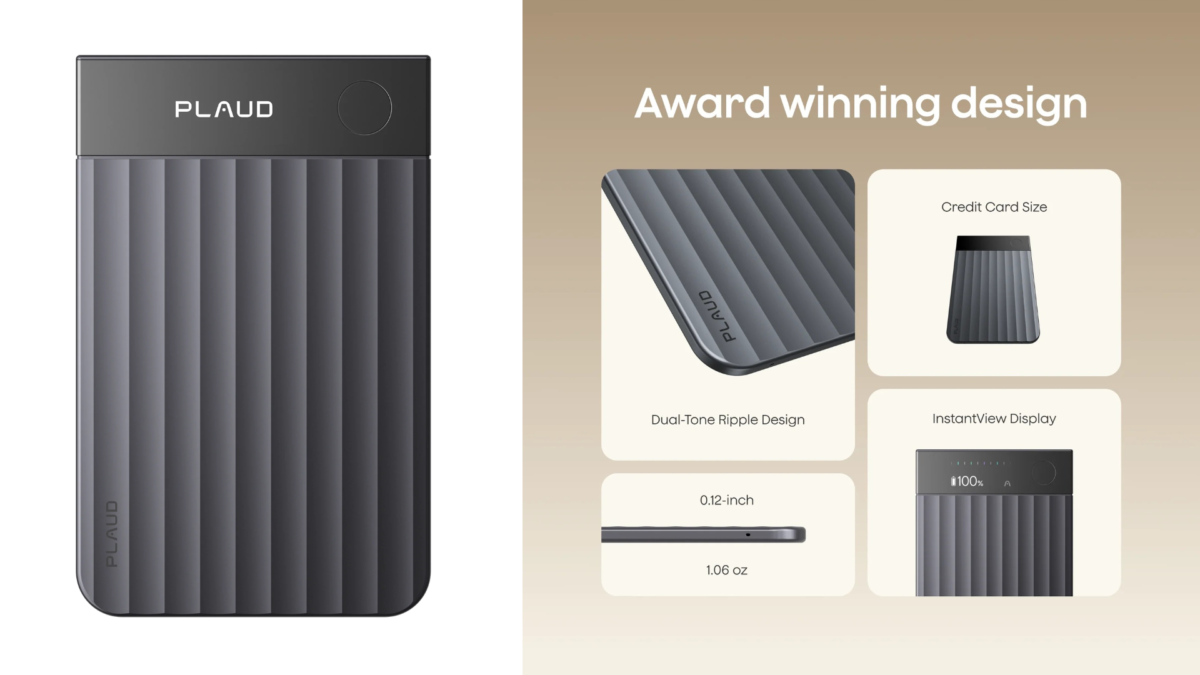
Plaud Note Pro hands the recording job to dedicated hardware, then lets Plaud Intelligence handle the text and the follow-up tasks.
In an in-person meeting, Plaud Note Pro uses 4 MEMS microphones and 1 VPU. The official pickup range is up to 16.4 feet, about 5 meters. Before the meeting starts, a long press on the physical button begins recording, and the InstantView AMOLED display shows the recording mode, battery level, and file status. When the table is long and many people are talking, I do not have to rely only on the phone’s built-in microphone.
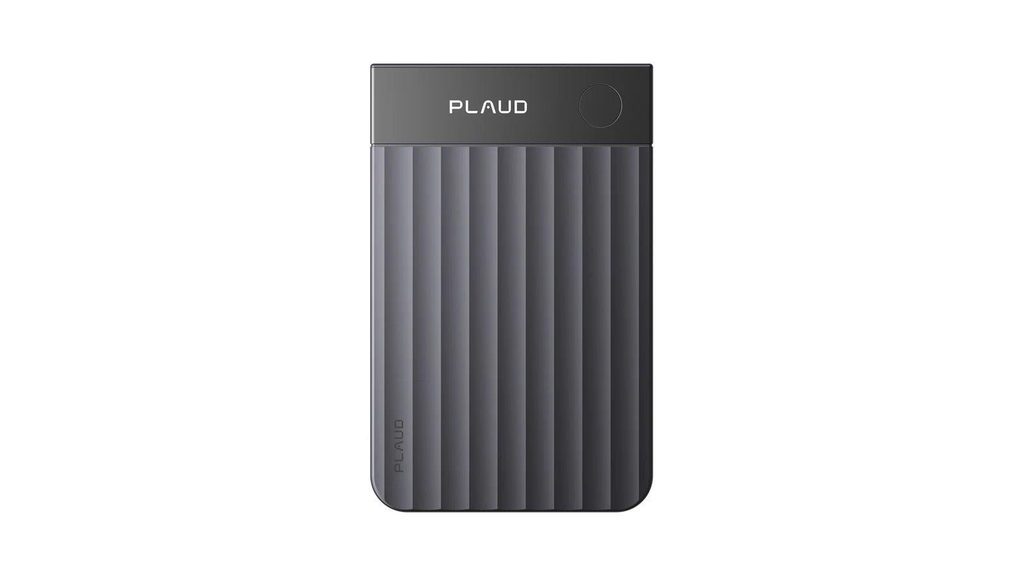
When I hear a key number, an objection, or a deadline, a short press on the record button adds a Highlight. The mark stays tied to the recording around it, so the summary knows which part I wanted to keep. I still check the action items, but I do not need to type during the conversation.
On a phone call, Plaud Note Pro attaches to the back of the phone with the magnetic case and uses the VPU to pick up call vibrations. Smart dual-mode recording switches between in-person meetings and calls automatically. Compared with routing the call to a Mac or Windows computer first, this suits a client call that comes in after I leave my desk.
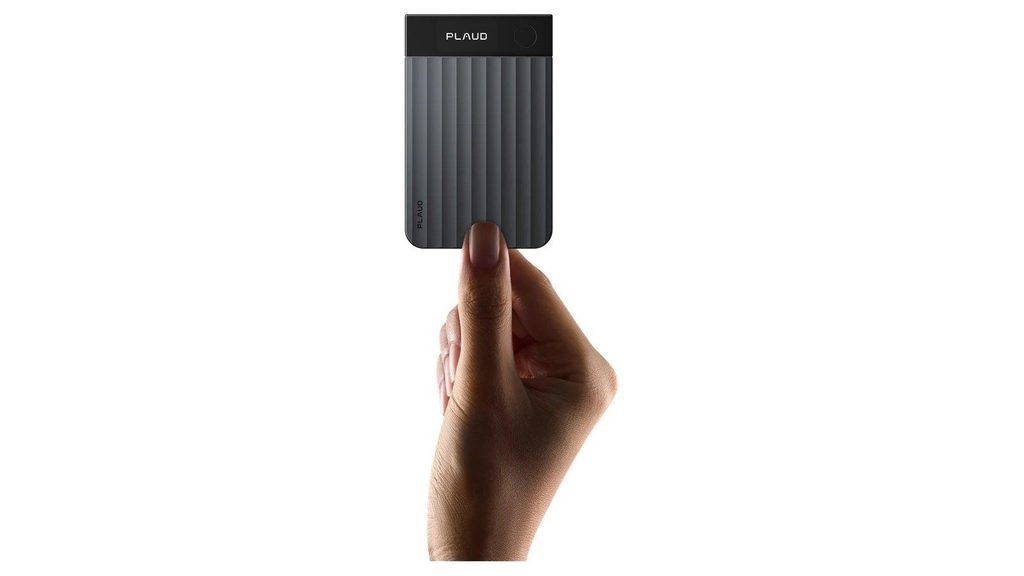
With 64GB of internal storage, Plaud Note Pro can keep the audio on the device first, then sync for transcription once it is online. The official figures are up to 30 hours of recording in Enhance mode and up to 50 hours in Endurance mode. During a full-day training, an interview, or a trade show, the phone does not have to carry the recording job the whole time.
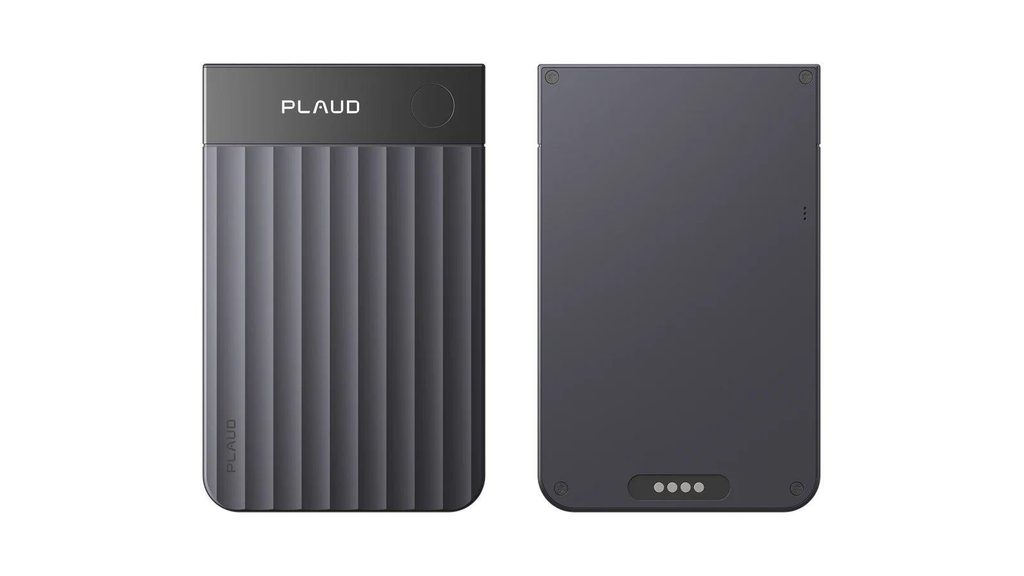
For online meetings, Plaud Desktop captures Mac or Windows computer audio directly, with no bot joining. The recording goes into the same Plaud account, and I can play it back in Plaud App or Plaud Web, then check the transcript and summary.
This closes the gap Fireflies.ai’s botless mode leaves for me. There is no extra participant in the meeting, and there is still sound to check afterwards. The condition is clear too. Individual users need to buy and bind a Plaud device first, and keep a Plaud Starter Plan or higher active, to use Plaud Desktop.
The software strengths point in different directions
Fireflies.ai is better at turning team meetings into data that can be analyzed and passed along automatically. Plaud Note Pro is better at capturing sound reliably from different settings, then keeping audio and text that can be traced back.
If a sales team already depends on Salesforce or HubSpot, the value of Fireflies.ai grows with team size. Managers can see call analysis across many members, AI Skills can update the CRM, and Voice Agents can even run screening interviews or routine calls on their own. Plaud Note Pro currently connects with Google Calendar, Slack, Notion, Linear, and others. It should not be described as a sales analytics platform of the same level.
If my material is mostly personal interviews, consulting notes, client calls, and meeting minutes, the Plaud Note Pro combination fits better. The device handles the room and the phone, and Plaud Desktop handles online meetings. Audio, Highlights, images, text notes, and summaries all land in Plaud App and Plaud Web. I am looking for one specific quote, not the whole team’s sales talk trends this month.
Language count is not a clear weakness on either side. Fireflies.ai officially lists more than 100 transcription languages and offers Multi-language Mode on the Business plan. Plaud Intelligence supports 112 or more languages. What really changes the choice is the recording method and whether the audio is kept. It also matters whether the content goes into a personal library or a team business system.
| Comparison | Fireflies.ai | Plaud Note Pro |
| Main form | AI meeting software, meeting bot, and team analytics platform | Card-style physical AI note taker plus Plaud Desktop |
| Auto-join | Notetaker can join from the calendar and record even when I am absent | Does not attend automatically on the user’s behalf |
| Botless online meetings | Desktop app captures system audio but does not save audio or video and has no formal speaker labels | Plaud Desktop captures computer audio and sends the recording to the Plaud account |
| In-person meetings | iOS, Android, or computer microphone | 4 MEMS microphones and 1 VPU, official pickup range up to about 5 meters |
| Phone calls | Routed to a computer through Calls from iPhone on Mac or Phone Link on Windows | Device attaches magnetically to the back of the phone and records calls through the VPU |
| Team automation | More than 100 integrations, AI Skills, CRM updates, Conversation intelligence | Common connections and post-meeting generation, with less team sales analytics |
| Offline on site | Mobile recording depends on the device and version, so check first | 64GB internal storage saves the audio first, then syncs for processing |
| Transcription languages | More than 100 languages | 112 or more languages |
| Better fit | Online meetings and sales teams that need auto-join, CRM, and team analytics | A mix of calls, meeting rooms, and online meetings that need botless recording and an audio record |
The price gap should be counted with team size
Fireflies Free offers unlimited transcription, limited AI summaries, 400 minutes of storage per team, and 20 AI credits. It supports more than 100 languages, live notes, AskFred, file uploads, and desktop and mobile apps. It does not include video recording, downloads, or the full set of AI Skills.
Fireflies Pro costs $10 per user per month billed annually, or $18 billed monthly. It includes unlimited AI summaries, 8,000 minutes of storage per seat, video recording, downloads, AI Skills, and unlimited integrations. Fireflies Business costs $19 per user per month billed annually, or $29 billed monthly. It adds unlimited storage, Multi-language Mode, Conversation intelligence, and team analytics.
Plaud Note Pro requires buying the $189 hardware first, and it comes with the Plaud Starter Plan at 300 minutes a month. The Plaud Pro Plan costs $99.99 billed annually and includes 1,200 minutes a month. The Plaud Unlimited Plan costs $239.99 billed annually and gives unlimited transcription.
For one person who only has online meetings, the first year of Fireflies Pro costs $120. That is clearly lower than $288.99 for Plaud Note Pro and the Plaud Pro Plan together. Fireflies.ai also means no extra device to carry.
As a team grows, the two sides count cost differently. Fireflies.ai charges by seat. A 10-person Business team billed annually pays $190 a month and gets team-wide analytics, CRM automation, and unlimited storage. The value of Plaud Note Pro sits with the people who actually need a recording device. Its hardware and subscription cost cannot be compared with a whole team system by looking at one user.
So I would not look only at which monthly fee is lower. I would first confirm whether the company is buying meeting data automation or reliable recording in mixed settings. The first fits Fireflies.ai better. Only the second gives a reason to pay for Plaud Note Pro hardware.
| Plan | Year 1 | 3 years | Main allowance |
| Fireflies Pro, one seat | $120 | $360 | Unlimited summaries and 8,000 storage minutes per seat |
| Fireflies Business, one seat | $228 | $684 | Unlimited storage and team analytics |
| Plaud Note Pro + Plaud Starter Plan | $189 | $189 | 300 minutes a month |
| Plaud Note Pro + Plaud Pro Plan | $288.99 | $488.97 | 1,200 minutes a month |
Fireflies.ai costs scale by seat, while Plaud Note Pro costs sit with each person who needs the device. Taxes and later price changes are excluded.
When I would keep using Fireflies.ai
When most of a team’s communication happens on Zoom, Google Meet, or Microsoft Teams, I would keep using Fireflies.ai. Notetaker can join from the calendar and bring back a record even when I am absent at the last minute. Plaud Desktop needs my computer to actually enter the meeting and start recording, so it cannot attend for me.
Sales, recruiting, and customer success teams also fit Fireflies.ai better. CRM updates, Deal Intelligence, candidate records, team talk-to-listen ratios, and topic tracking all revolve around managing a continuous series of meetings across many members. Plaud Note Pro can produce a clear minute for a single meeting. There is no need to pretend it fully copies that management ability.
If participants accept a visible Notetaker, I would also stay with Fireflies.ai. Bot mode keeps the audio, the speakers, and Soundbites, which avoids the limits of the desktop botless mode. When the meeting platform and company policy let it join reliably, the process is easy.
Last, people with a low budget who want to try software first can start with Fireflies Free. The 400 minutes of team storage is not much, but it is enough to judge whether live transcription, AskFred, and post-meeting summaries suit daily meetings.
When I would choose Plaud Note Pro
When botless recording and audio playback both have to exist, I would choose Plaud Note Pro. A client who does not want a bot in the meeting does not mean I can give up the original audio. Plaud Desktop sends the recording to my Plaud account, and I can still play it back and check it later. For that, I want a dedicated AI recording device rather than a meeting bot.
When one day includes client calls, meeting room discussions, and online meetings, I value a single recording entry point more. I do not have to work out whether a call can be routed to a computer, and I do not have to put a phone in the middle of a long table. The physical device handles the room and calls, Plaud Desktop handles online meetings, and the material ends up in the same account.
Interviews, consulting, legal preparation, and meetings with complex numbers raise the value of an audio record further. When a transcript reads smoothly, I may still need to confirm tone, conditions that were attached, and who spoke. Keeping the original sound makes review easier than a botless transcript that only says Speaker 1 and Speaker 2.
I would also choose Plaud Note Pro when I do a lot of offline and long on-site recording. The 64GB of local storage and the official 50 hours of continuous recording let the device handle the most basic job first, which is saving the sound. Transcription can wait until the network returns, so having no signal does not decide whether a conversation leaves a record.
How I would decide today, I would first look at who uses the material after the meeting
If the material goes to a whole sales or customer success team, Fireflies.ai fits better. It can join meetings automatically, analyze calls across members, update the CRM, and send tasks into the software the team already uses. As long as the company accepts Notetaker, audio, speakers, and automation can all be kept together.
If the material is mostly for my own review, and conversations often move between calls, meeting rooms, and the computer, I would choose Plaud Note Pro. It lets me keep the sound in a botless online meeting, and it reduces the problems of call routing, phone placement, and scattered files.
The core strength of Fireflies.ai is organizing automation after the meeting. The core strength of Plaud Note Pro is the recording entry point while the meeting happens. If my work depends more on CRM, team analytics, and auto-join, I would keep using Fireflies.ai. If it depends more on checking exact words and recording across settings, Plaud Note Pro is the more suitable Fireflies.ai alternative.
Whether I use a meeting bot, desktop system audio, or a physical device, I should tell participants clearly before recording or transcription starts. I should also obtain the consent that local law, industry rules, and company policy require. Fireflies.ai offers some meeting notice settings, and Plaud devices also need the user to give notice.
FAQ
Can Plaud Note Pro fully replace Fireflies.ai?
No. Plaud Note Pro is better for recording phone calls, in-person meetings, and botless online meetings while keeping the audio. Fireflies.ai is stronger in auto-join, CRM integrations, Conversation intelligence, and team analytics.
Does Fireflies.ai still require a bot to join meetings?
No. Fireflies Desktop can capture the computer’s system audio directly, and the Chrome extension can also record Google Meet without a bot. The Take Notes mode on the desktop app does not save audio or video and has no formal speaker labels.
Can Fireflies.ai record phone calls?
Yes, through a computer. On a Mac, I need to use Calls from iPhone and send the iPhone call to FaceTime. On Windows, I need to connect an Android phone or iPhone with Phone Link. Plaud Note Pro records phone calls directly through the magnetic case and the VPU.
Which one keeps the original audio, Fireflies.ai or Plaud Note Pro?
Fireflies.ai Notetaker mode saves the recording, and the desktop botless Take Notes mode does not save audio or video. Plaud Note Pro and Plaud Desktop save the recording in the Plaud account so I can play it back later.
Which is cheaper, Fireflies.ai or Plaud Note Pro?
Fireflies Free is ready to use right away. Fireflies Pro costs $10 per user per month billed annually. Plaud Note Pro requires buying the $189 hardware first, and it comes with the Plaud Starter Plan at 300 minutes a month. For online meetings only, Fireflies.ai costs less. Consider Plaud Note Pro when I need dedicated recording hardware and an audio record across settings.
About The Author