Trending Topics

 Trending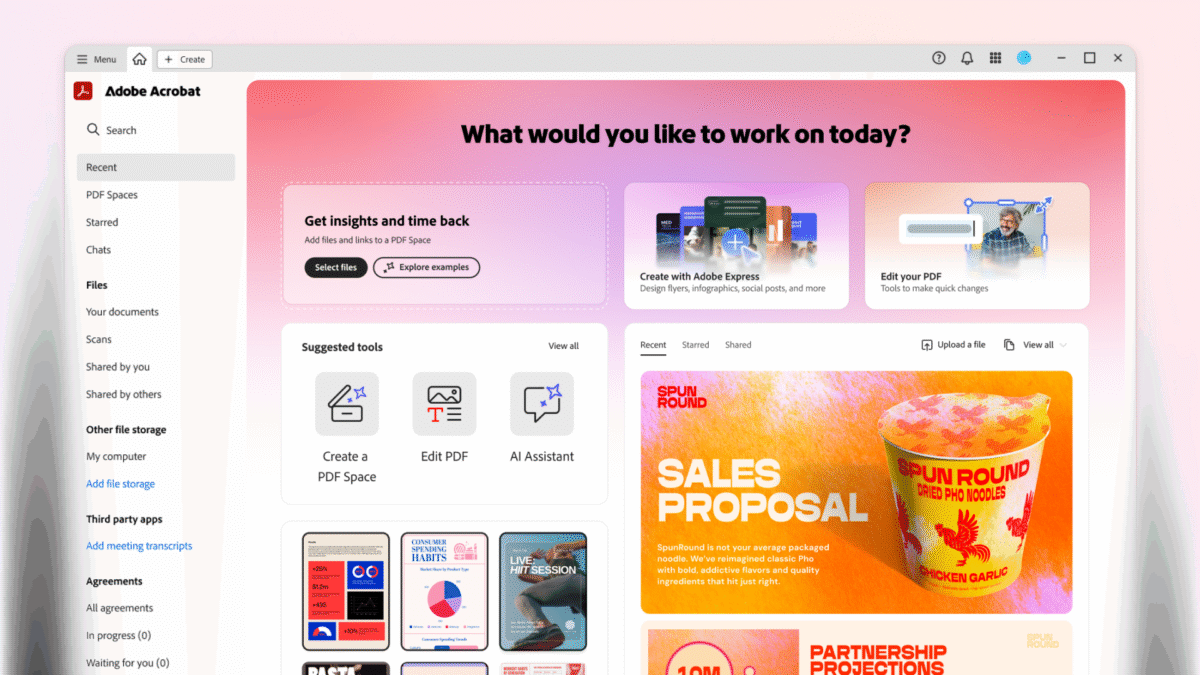
Help your teams work smarter with AI

When you invest in AI tools for your business, you need to think clearly about the return on investment – not merely in financial terms, but how exactly it will make teams work smarter.

Most discussions about AI focus on individual productivity – writing sharper sentences, summarizing documents, or creating images. But to deliver real benefits to your organization, you need to boost your entire team’s output, not just individual performance. No-one disputes the power of AI tools to do exactly that, but if you want to deliver real, noticeable benefits to your organization then you need to think big: you need to boost the whole team’s output, not just that of individuals.
This article explores AI tools that boost team performance. And by extension, the performance of the entire organization. We will also focus on the importance of security, of collaboration, and of creating a team ethos in today’s hybrid working world.
Finally, to keep it grounded, we will consider the return on investment that Forrester Consulting believes that a business-focused suite of AI tools can deliver.
Create a secure, shared knowledge workspace that allows teams to collaborate in real-time
The days of a team sitting sharing a set of desks in the office may be long gone, but we can still aspire to the same levels of collaboration. In fact, with modern AI tools, teams can collaborate more effectively than ever before. The key is to securely unlock information and make it accessible to everyone, not just individuals.
Adobe solves this problem with Acrobat Studio. In particular, it includes a unique feature called PDF Spaces where teams can upload and share relevant documents, whether those documents are PDFs, Microsoft 365 files, slides or even websites. It’s all underpinned by enterprise-grade encryption to create a safe, sandboxed environment.

As each document is uploaded it adds to the group intelligence, an intelligence each user can tap into thanks to the Acrobat AI Assistant. Not only can this answer natural-language questions, it can also deliver insights and extract the next steps you need to take. And every reference is indexed, not only ensuring trust among the team but allowing you to dig deeper.
Because it’s a shared workspace, colleagues can collaborate with each other in real-time – exactly like a real shared workspace. For example, a team might work together on a proposal for a new client, even creating on-brand graphics as they go using Adobe Express Premium. Which brings us to our next big benefit.
Give your team the tools they need to create compelling reports that conform to style
Not everyone is blessed with the ability to create gorgeous layouts, but there is a way to ensure all your team produces great-looking results that are also 100% on brand: design templates. These can be created by a professional designer, or anyone with design skills, and then reused by every member of the team.
Here, we’re going to stick with Adobe Studio as our example as it includes an Adobe Express Premium subscription for every user. Once you’ve centralized and approved your assets, your team can access them to create social media posts, infographics and videos from within the easy-to-use Adobe Express interface. They can even export to PDF to create, perhaps, a personalized report for a target client.
AI makes it easy for non-designers to create high-quality assets that follow brand guidelines. And thanks to the generative AI talents built into Adobe Express, they don’t ever need to leave the ringfenced security that Adobe provides.

Solve The Dilemma of Increasing Content Demand
The increasing demand for fast-turnaround content is putting design teams under greater pressure, and the stakes are high. Adobe Express solves the problem by empowering non-creatives to easily make on-brand content without always needing design support — which has the added benefit of freeing designers to do the higher-value work of creating fresh new content. Explore this solution guide to discover how Adobe Express can help.
Boost your team’s skillset: upskill everyone’s writing, design and analytic skills through AI
One of the best ways to boost your team is to expand their skillset. That doesn’t simply mean adding new skills, or strengthening weak skills: it also applies to people’s strengths. For example, turning someone with good writing skills into your organization’s go-to report writer.
Countless AI tools can help here. If you simply need to fix a team member’s regular grammatical errors or jarring tone, try services such as Grammarly and QuillBot. If you want to sharpen up your team’s marketing copy, give jasper a whirl. Or stick with Adobe and use its AI Assistant, which as integral part of Acrobat Studio. Team members can also ask for copy-writing assistance from within Adobe Express Premium.
Adobe Express is also an excellent choice for design assistance, particularly as it can make suggestions based on brand kits and the information you’ve shared in Adobe Spaces.
Or perhaps you want to sharpen your team’s SEO and social media skills. We’ve already mentioned jasper, which can fine-tune your keywords and structure based on top-ranking pages for your chosen search terms. Again, though, we would point you to Adobe Express Premium, which can not only help with messaging but also repurpose designs for different social media platforms.
Create a custom AI assistant just for your team
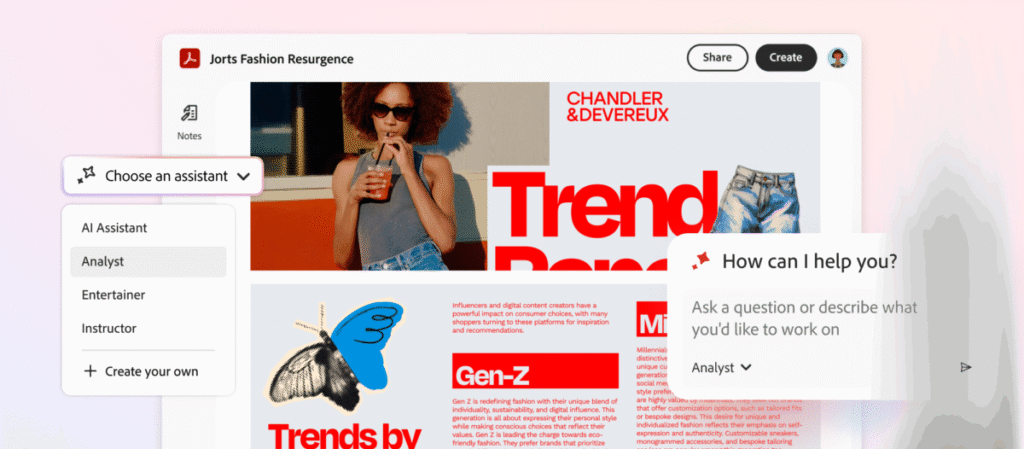
If your organization subscribes to Adobe Acrobat Studio then every user with a license has access to Acrobat Pro, PDF Spaces and Adobe Express Premium – and they also gain access to Acrobat AI Assistants. As you would expect from enterprise-grade software, this also comes with full administration control.
This adds an extra layer of security but also means you can deploy particular AI assistants to teams. This is in addition to the trio of AI Assistants that come a standard: Analyst (for critical thinking), Instructor (for learning support) and Entertainer (for creative thinking).
Any individual can train their own AI Assistant – you explain what you want it to do in natural language, so it’s easy to do – but if a team leader wants to create a specialist AI Assistant for a particular project then they only need to set it up once before sharing it with the rest of the team. And the team can keep on improving that assistant by giving feedback and instructions over time.
If that sounds like adding more members to your team for no extra expense, you’re not wrong. That’s also what Forrester Research indicates.
Will AI give my team a return on investment?
These ideas can help your team collaborate more creatively and deliver results faster. If you’re looking for concrete figures, however, you should read Forrester Consulting’s Total Economic Impact™ Report, commissioned by Adobe.
This investigates the efficiency improvements, financial impact and long-term value delivered by Acrobat AI Assistant. The results are based on a composite organization, based on six organizations who had already implemented Acrobat AI Assistant and that Forrester Research interviewed for the report.
For this composite organization, which had 5,000 employees, Forrester found that document summarization and analysis alone delivered efficiency improvements of up to 45%. “Over three years,” the report states, “the improved productivity is worth between £0.88 million and £1.67 million.” That’s roughly $1 million and $2 million respectively.
It also found content generation efficiency increased by up to 30%, all thanks to the AI Assistant. “Over three years, the efficiency improvement is worth between £286,482 and £454,062 to the composite organization,” to quote the report.
Of course, every organization is different. But what should be clear from all the above is that the real value of AI isn’t about the individual, but about how it can lift a whole team’s performance – and with it the whole organization.
You might also be interested
About The Author

Tim Danton
NEXT UP


