Trending Topics

 Trending
How do you check an Ethernet connection on a Mac?

If you want to check whether your Mac is connected to Wi-Fi, it’s pretty easy; you just look for the solid Wi-Fi icon in the Menu Bar at the top of the screen. It’s not so easy to check an Ethernet connection on a Mac, because nothing appears in the Menu Bar for a wired connection. So how do you check the status of an Ethernet connection?
How to check if an Ethernet connection is working on a Mac
If you’ve got a wired Ethernet connection to your Mac, either via a built-in Ethernet socket (rare on MacBooks), an adapter, or via a hub, you should be able to check the status of the connection in macOS’s System Settings.
Assuming you’re running the latest version of macOS (Ventura), then do the following:
- Click the Apple icon in the top-left of the screen
- Choose System Settings
- Select Network from the list of options in the left-hand tab
If you’ve got an active Ethernet connection, you should see something like the image below, with ‘connected’ next to an entry marked LAN:
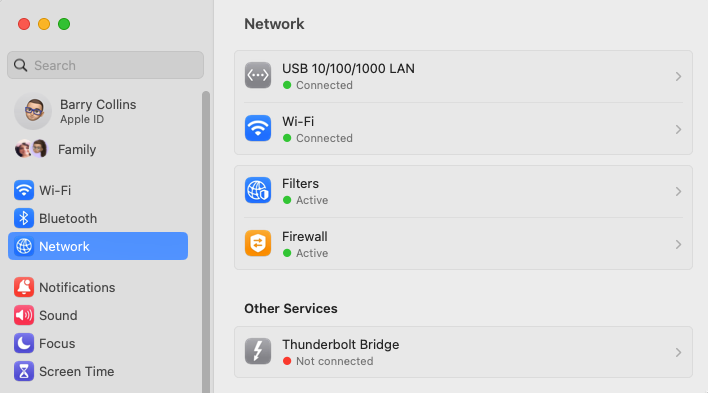
It’s perfectly possible to be connected to both Ethernet and Wi-Fi networks, as I am here. By default, the Mac will use the Ethernet connection, falling back on Wi-Fi if it loses internet access. Being connected to the Wi-Fi network also gives you access to networked devices such as printers or NAS drives.
Check Ethernet status in the Mac Menu Bar
If you want an easier way to check your Ethernet status on a Mac, you can use an app I’ve recommended so many times I should be on commission, called iStat Menus.
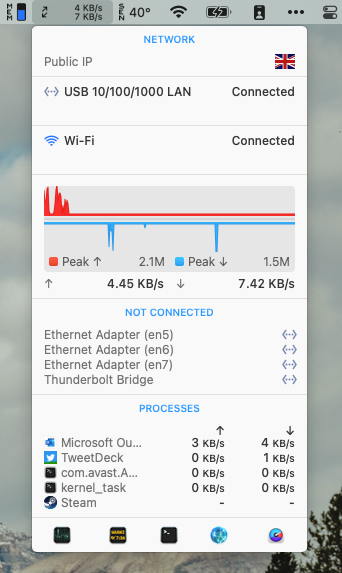
The app sits in the Menu Bar and provides all kinds of useful diagnostics, including a little counter showing network traffic. If you’re only connected via Ethernet, seeing the data rate (both up and down) in the Menu Bar will confirm you’ve got an active internet connection.
You can click on the network traffic for more detailed information too, as shown below (with my IP addresses erased from the image):
Additional explainers you might be interested in
About The Author

Barry Collins
NEXT UP


