Trending Topics

 Trending
Dell Pro Rugged 13 review: first look


As I mentioned in my story about Dell Plus laptops, Dell has totally changed its naming strategy for laptops, PCs and peripherals. That extends to its family of Dell Latitude rugged and semi-rugged laptops, which is why my eyebrows raised sharply when I saw the Dell Pro Rugged 13 on the MWC Barcelona 2025 showfloor.
This is by no means a full review of the Dell Pro Rugged 13. It’s based on a conversation with a Dell executive (who used to work for Panasonic’s Toughbook division) and a short amount of time handling the device. But, as someone who has previously reviewed rugged laptops from both Panasonic and Getac, my first impressions are entirely positive.
Before we dig into the review, here’s a reminder of Dell’s new branding.
| Category | Target audience | Previous equivalent laptop brands |
| Dell | Consumer, SMB | Inspiron, XPS |
| Dell Pro | SMB, Commercial | XPS, Latitude |
| Dell Pro Max | Performance | Precision |
Dell Pro Rugged 13 review: design
Much as I admire Panasonic’s rugged Toughbooks, they aren’t exactly lookers. They’re chunky beasts with huge bezels, as their primary function is to survive the most extreme scenarios.
While the Dell Pro Rugged 13 is, as its name suggests, a fully rugged laptop – so it can survive a drop from six feet – the priorities have clearly shifted more towards usability. And, whisper it, design. I’m not going to suggest this is a gorgeous, slim laptop, but you won’t be on the receiving end of sniggers on you daily commute. Unless you opt for the built-in handle, of course.


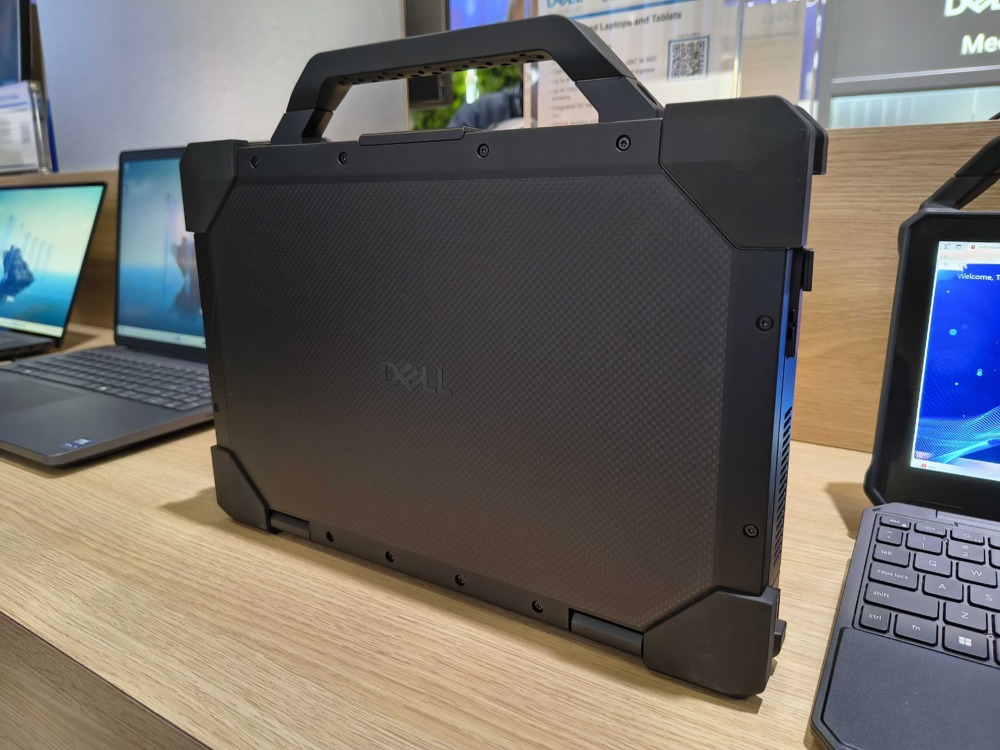
You lose some of the Toughbook’s flexibility. While you do have options in terms of the connectivity, as per the graphic from Dell’s US website below, it isn’t up to the variety from, say, the Panasonic Toughbook 40. But you can configure it for two batteries and then hot-swap them.

Dell Pro Rugged 13 review: screen
Another difference stems from the screen. While I’d be perfectly happy to use the Toughbook 40’s panel for work duties, it doesn’t offer rich colours. So if you want to enjoy entertainment on your laptop, it isn’t the one to choose. I haven’t measured the colour coverage of the Dell Pro Rugged 13’s panel, but it self-evidently covers a much wider gamut.
It’s a 13.3in panel using WVA technology, and while 1,920 x 1,080 isn’t a high resolution compared to consumer laptops, text still looked sharp. It has a 60Hz refresh rate, which is fine, and comes with an anti-glare coating. Add a peak brightness of 1,400 nits and I’m confident it will be easy to read outdoors even in the harshest of sunlight. But where the Toughbook 40 can drop down to under 1 candela, this panel only reaches around 40 – that means it isn’t suitable for field work by military users.
Dell also doesn’t specify how well the touchscreen works with gloves, which makes me think that it isn’t designed for them.
Dell Pro Rugged 13 review: speeds and feeds
Despite its newness, the Dell Pro Rugged 13 doesn’t come with Intel’s Core Ultra 200V chips. That means battery life is unlikely to stretch beyond ten hours per battery, and that you lose out on support for Microsoft’s Copilot+ PC scheme as the NPU is too basic. It does include one, but I suspect it will only be of use to blur the backgrounds in video calls.
Still, whether you choose the baseline Core Ultra 5 135U, Core Ultra 7 165U or the (significantly more powerful) Core Ultra 7 165H chips, there’s enough grunt to keep Windows 11 happy for many years. You can configure it with up to 64GB RAM and 2TB of storage too.
As a $10 upgrade, choosing Wi-Fi 7 makes a whole lot of sense, and there are a variety of mobile broadband offerings too. Thunderbolt 4, PCMIA cards and RF card readers are all optional extras.
Dell Pro Rugged 13 review: value and verdict
Naturally, all these extras will push up your price. At its base spec, it costs $4,429: you can trim money off that by, say, dropping the Wi-Fi card or choosing Windows 11 Home rather than Pro, but I wouldn’t. That falls into the category of “not cheap”. However, that includes three years of Dell ProSupport, which means on-site cover if you need it.
I can’t give a full verdict as I haven’t tested it as much as I would like to, but the early signs are very positive. And that’s why it’s walking away with a TechFinitive Best of Business MWC 2025 award.
Also happening at MWC Barcelona 2025…
About The Author

Tim Danton
NEXT UP


