Trending Topics

 Trending
PostgreSQL Client: how to hunt for smart but friendly features

This is a sponsored article brought to you by Devart.
It’s just another day at work. You face your PostgreSQL client again. It gave you lots of clickety-clacks from your keyboard and some crisp ticks from your mouse. When the day ends, it gets the job done.
But how does it feel?
Getting the job done is good. But how you get to tick off that database task is another story.
The feeling of working with a good PostgreSQL GUI tool is like wearing your favorite pair of jeans. You bend, you twist, and you stretch. The fabric follows your curves as you move around with ease. Every angle feels no resistance.
The point?
Your PostgreSQL management tool should be easy to work with. Working on your database stuff from A to Z is not only simple but it feels comfortable. The tools you need are there. The interface is easy for the eyes and moving around the menus, toolbars, and sidebars is like a walk in a park. And if you also work with other databases, MySQL, SQL Server, or Oracle, you can take things even further with dbForge Edge. It’s a powerful multi-database solution that brings all these environments together. dbForge Studio for PostgreSQL is also included, so you get all the smart, friendly PostgreSQL tools right out of the box. This way, you can work seamlessly no matter which database you’re managing.
And your interface preferences? It notes them down and follows them the next time you open it.
So, your productivity shoots to the roof. You get a sigh of relief after a day’s work because there’s little to no wall blocking you from finishing more tasks.
But does something like this exist?
The short answer is “yes!”. Hunting for the sought-after features is just a few scrolls away. By then, you’ll pick up the benefits you should expect. Then, you’ll know the smart but friendly features you should look for. Finally, I’ll introduce you to my best PostgreSQL buddy, dbForge Studio for PostgreSQL.
So, let’s dig in.
Benefits of Using a PostgreSQL Client
A PostgreSQL client is software with a modern graphical interface for managing PostgreSQL databases in the easiest way possible. It’s the bridge between you and your data. It can play any database role like a versatile actor. Be it a database designer, developer, administrator, or analyst.
It has everything you need to get all your database stuff done. So, you can navigate and work with your databases without getting lost in the sea of hundreds of commands.
Here’s what you will get from a top-notch PostgreSQL client and GUI tool:
- User-Friendly Interface: Feels like a welcoming home where everything is neatly organized. It’s not like a college desk full of clutter. But it’s also not a blank editor only waiting for your next command.
- Time-Savers and Productivity Boosters: Speeds up your tasks like a high-speed train, getting you to your destination faster. Using it feels like having an extra pair of hands, helping you do more in less time.
- Error Reduction: Catches mistakes early, like a safety net that prevents you from falling. So, you deliver more and fix less.
- Visualization Tools: Turns complex and dull numbers and texts into beautiful, understandable visuals, like turning fog into clear skies.
- Security Management: Keeps your data safe like a fortress, ensuring only the right people have access.
- Seamless Integration: Works well with other tools and systems, like a key fitting perfectly into a lock. Think of more data formats during import and export.
You’ll appreciate these benefits when you have an all-in-one package in a GUI tool.
Let’s have them next.
Key Features to Look for in a PostgreSQL Client
Before I jumped ship to PostgreSQL, I had extensive experience with SQL Server and also some years with MySQL. I also used Sybase System XI way back in the day. I have used GUI tools for these database flavors. And what works very well for me in those platforms are some of the things I expect in the PostgreSQL counterpart. Fast forward to today, I discovered more nifty and fun features to double my productivity.
I wanted to share these tips with you today. So, finding the right PostgreSQL client won’t feel like a hard nut to crack.
Here they are:
Easy-to-Use Modern User Interface
This one is obvious. You don’t want to work on a User Interface (UI) that is dull, old, and cluttered.
A good Postgres database manager is like wearing your favorite pair of shoes. It fits right, feels comfortable, and every step is a joy. The feeling is the same with the UI. It’s intuitive, friendly, and just makes sense right from the start.
No required reading of thick manuals.
The placing of the sidebars, menus, and toolbars including their captions and tooltips guides you naturally on what to do next. Forms and wizards also abound to help with input and sequential tasks.
Nothing feels strange. Even a newbie can start using PostgreSQL immediately.
Coding should also be a breeze. Do you have a friend who can finish your sentences for you? That’s how it feels having intelligent SQL coding. It suggests the next valid keywords and objects to use. And it knows all your database objects. It’s also context-aware and it checks your syntax as you type, reducing syntax errors. But all these features are not so intrusive so typing queries still feels smooth.
Even the look of code is not dull like Notepad. It pops different colors for keywords, functions, database objects, comments, and more. So, reading code is a joy and not a chore.
In the end, you double your productivity. It’s a coding paradise.
Query Optimization Tools
There are times when you will write slow queries. So, your PostgreSQL client should have an accelerator of sorts to push queries to full throttle.
A good PostgreSQL client is more than just letting you use EXPLAIN. It takes it to the next level by providing a visual diagram of how PostgreSQL thought of the query plans. A query plan is like a route to take you from one place to another on a map. Query optimization is finding the shortest and fastest route instead of getting stuck in traffic.
This tweaking will make your queries more efficient even if data volume increases.
The query optimization tool in your PostgreSQL client should let you analyze query plans and spot portions that consume a lot of resources. It’s like a map showing you roads with heavy traffic so you can avoid them.
Knowing where the problem lies and what type it is will prompt you to fix that portion. Do you need to add a table index? Or do you need to rewrite the query?
A good Postgres GUI tool not only shows you the visual query plan. It notes your exact query and its query plan together with other stats. This way you can compare the query plan from the previous query against the new and modified query. You can also compare before and after you added the new index. Then, you decide.
The result?
Query tuning becomes easier. So, your queries run faster than ever.
Security Features
It’s very embarrassing to have a data leak. It will shake you to the core. Adding data corruption to the mix adds the final nail to the coffin.
Your business is about to die.
These earth-shaking moments happen because of poor security. It’s like leaving your house unlocked and the thieves take everything they want and destroy the rest. That’s why your database should be in a fortress so to speak. Making these easy to do is a must in a good PostgreSQL client.
Why are robust security measures important?
- Data Protection: Security measures act as a solid fortress around your data. You only give keys to the people you trust. And your database should have several doors to lead trusted users to the only data they need, not everything. Apply strong encryption to hide sensitive information like passwords and personal info. This ensures your data is safe from prying eyes and malicious people.
- Regulatory Compliance: Many industries have strict data security regulations (think GDPR, HIPAA). A robust security setup helps you stay compliant, avoiding hefty fines and legal trouble.
- Trust and Credibility: When your data is secure, your clients and users feel that their information is in good hands. This is a plus for your reputation and credibility.
- Operational Continuity: Preventing breaches and attacks ensures your database remains operational without interruptions. It’s like your databases have a strong immune system that keeps them active and healthy.
- Peace of Mind: This means you have fewer worries about your data and you can focus more on your core tasks. So, you can sleep tight at night.
Backup and Recovery Options
Can you imagine the horror of data loss?
It’s terrible and numbing.
It’s like building a masterpiece for months only to see it destroyed in an instant. All your hard work, valuable insights, and important data vanished into thin air. This leaves you in a state of panic and despair. Like data leaks and corruption, it destroys your reputation and puts you in legal trouble.
That’s how data loss feels like.
Backup and restore features, both scheduled and manual, are like a safety net to avoid a hard fall. Automated backups are set and forgotten. You will only need to monitor them if they are successful or not. Using wizards for backup and restore makes it easy to do these routine tasks.
Other Niceties to Have in a Good PostgreSQL Client
The above are the must-haves in a Postgres GUI tool. But the following features are lifesavers too:
- Database Schema and Data Comparison: Great for comparing database copies from production and development. This is not an everyday thing for me, but it should be there when I need it.
- Data Generator: Every database in development needs test data. So, this is a must-have for me. Generating thousands to millions of realistic data is essential for development and performance tests.
- Data Reporting and Visualization: Great for those searching for insights and unearth the data stories hidden deep in the database.
- Broad Compatibility: Your PostgreSQL client is good for both on-premises and various cloud PostgreSQL databases.
Meet dbForge Studio for PostgreSQL
Everyone plays favorites with tools and stuff. When it comes to PostgreSQL, mine is dbForge Studio for PostgreSQL. I use it for creating databases for apps, generating test data, and coding queries and scripts.
I’m sharing my experiences with it, so who knows? One day, this can be your favorite too for all things Postgres.
Let’s begin with usability.
Easy-to-Use Modern User Interface
I’ve been using GUI tools for database design, development, and testing since my Sybase System XI days. That was 1998. So, I fairly know what works very well.
dbForge Studio for PostgreSQL’s fresh and modern interface follows today’s user interface standards. It doesn’t feel like Windows 3.1 or Windows 95.
It’s not a cluttered mess or a bland database editor. You can find what you need in the right places. Think of menus, toolbars, sidebars, bottom panels, captions, tooltips, wizards, and forms. It’s easy on the eyes and it’s configurable if some things don’t feel right.
For example, after installation, I want bigger texts in the Results Window to have a much better view of my data. So, I increased the font size. Then, it remembers this setting and uses it the next time I open dbForge Studio. It’s also theme-able and I switch from dark to light theme and back when I feel like it.
But the best part?
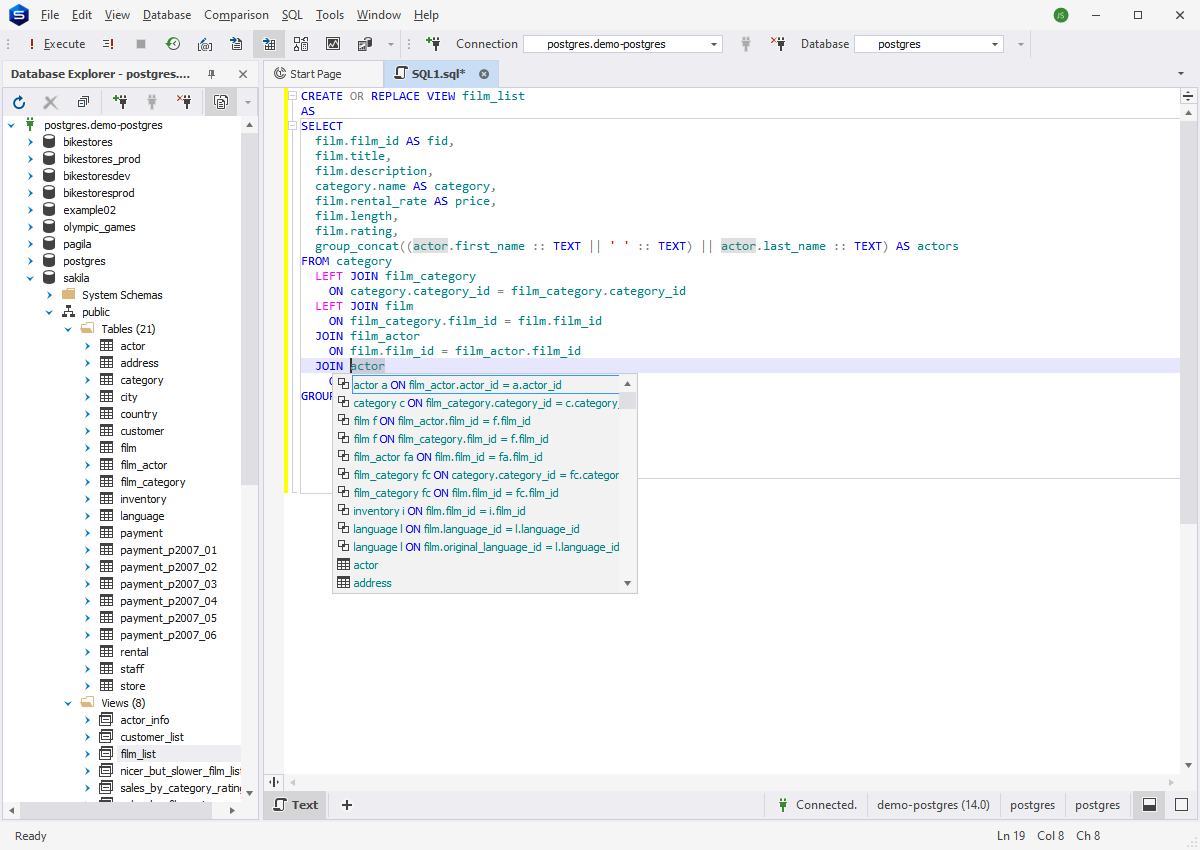
The coding experience is like no other. The code suggestions and the context-aware code completion are the two game-changing goodies for me. Going back to tools similar to pgAdmin feels old. For example, when I type INNER JOIN, it suggests the tables I can join based on foreign keys. It feels like mind-reading. Add the on-the-fly syntax checking and the snippets and I feel like a coding machine.
It’s snappy and always works.
Check out a sample below:
This is just the tip of the iceberg. You have to try it to see and feel the difference.
Query Optimization Tools
I aim for top speed when I craft my queries. It’s for my users and myself.
So, having dbForge Studio’s Query Profiler is a lifesaver when things don’t go as I want it. It has a Plan Tree similar to EXPLAIN results and a visual Plan Diagram (see image below). It also has Top Operations, where you see areas in the plan that consumed a lot of resources at the top of the list. When I hover over each node in the Plan Diagram, I see the resources consumed by that part of the query plan.
See a sample below:

But there’s more.
See the image above. The left pane of the Query Profiler shows two SELECT statements. This is the profiling history. I can compare query plan results as I add an index or rewrite the query.
It’s really cool if you ask me.
Security Features
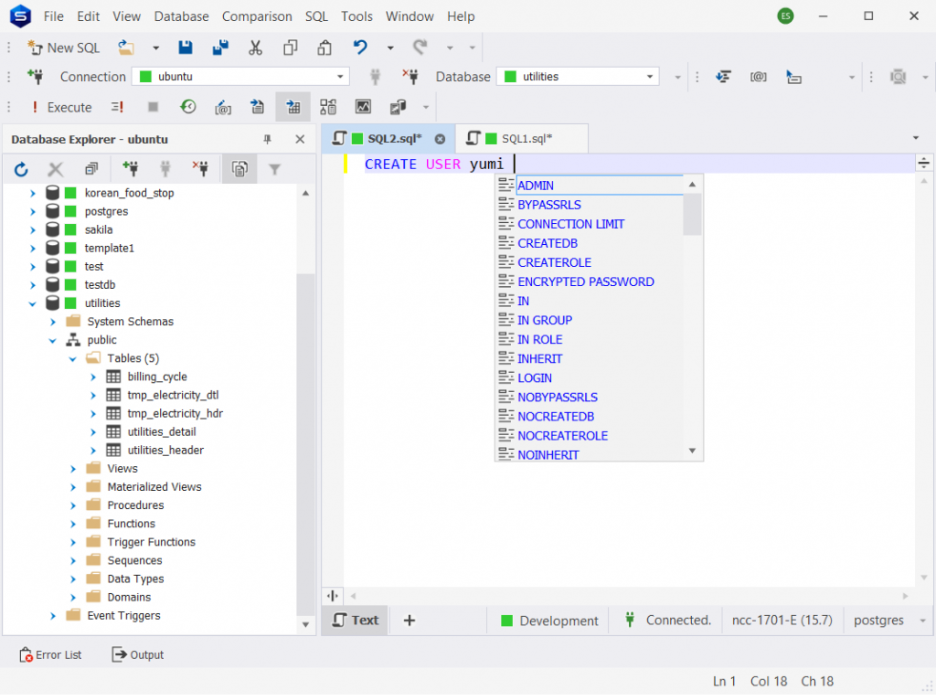
I can say that this part of dbForge Studio for PostgreSQL is adequate. It’s not like its sibling dbForge Studio for MySQL with a Security Manager to manage users and roles. But because of the top-notch code editor, you can use the code suggestion and other cool coding features to manage users and roles.
See a sample of code suggestions for creating a new user:
But I’m sure the team handling dbForge Studio for PostgreSQL is aware of this. Feature parity for all dbForge Studios will happen in the future.
Backup and Restore Tools
The Export and Import tools play as the GUI backup and restore tools. Again, it’s not the same as dbForge Studio for MySQL which has a dedicated backup and restore tools. But this is adequate for me as I am not an admin.
The backup trick is to export to SQL file format as you can see below:
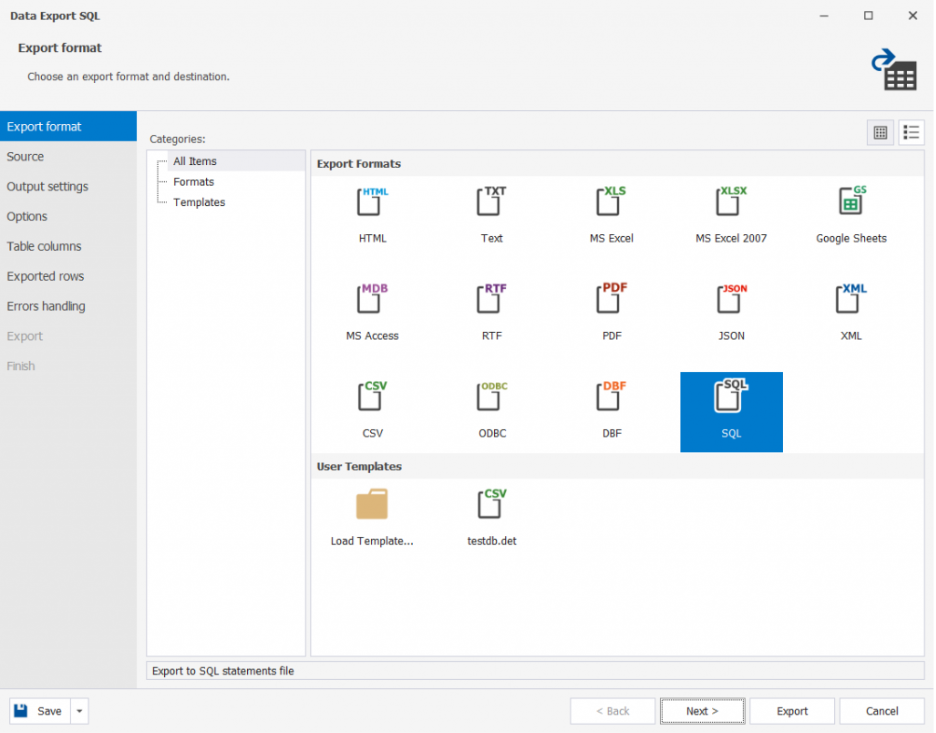
Exporting to JSON, XML, or CSV is also a good option. Then, you can restore using the Import tool.
Other Features of dbForge Studio for PostgreSQL
Data Generator
I also love this feature as it releases me from thinking of a lot of table data for my test cases. The test data can be realistic not just dummy ones that are obvious.
See the magic below. Check out the names.
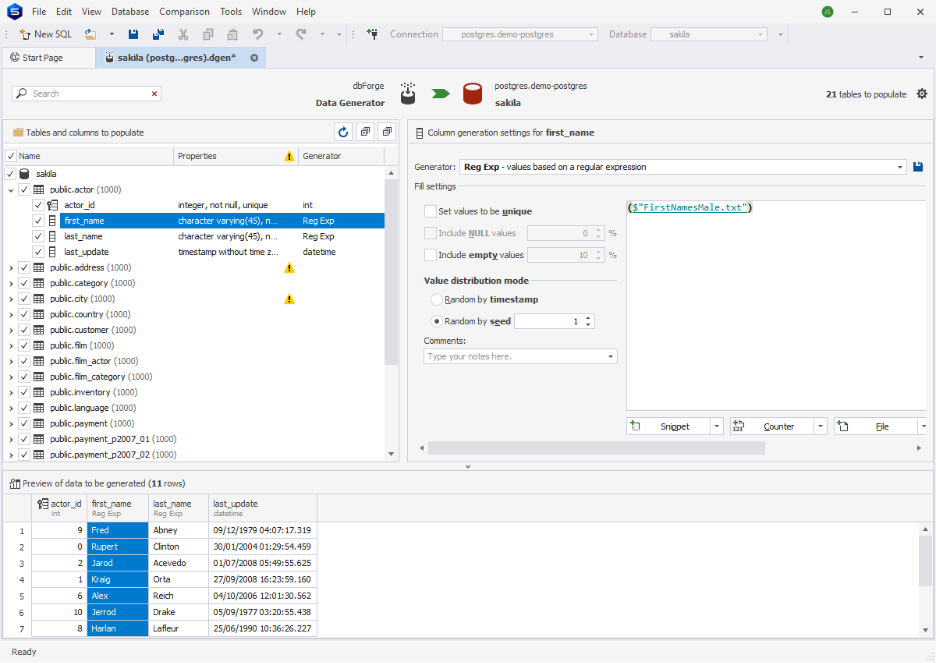
The awesome part is generating foreign key data based on your table relations. Nothing beats that.
Schema and Data Compare
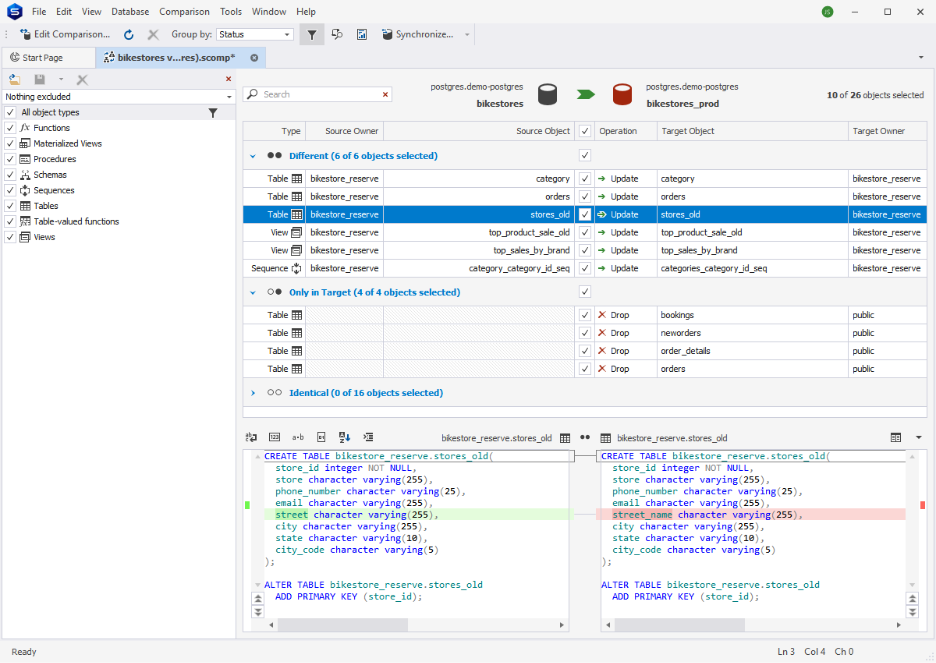
This is very useful during the deployment of database updates to test and production servers. It detects what schema changes were made in development and applies them in test or production. It can also pinpoint missing or changed data from the target.
See a sample of Schema Compare below:
Broad Compatibility
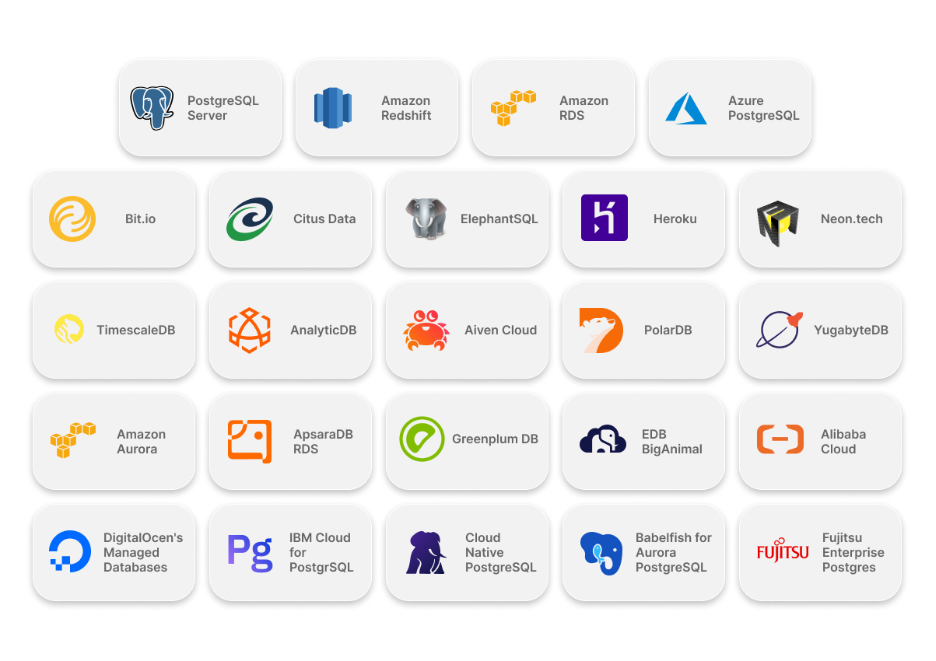
Whether it’s on-premises or in Azure, Amazon RDS, Google, or Heroku clouds, dbForge Studio for PostgreSQL can connect to it. You can check this link for the list of supported cloud platforms.
Data Reporting and Visualization
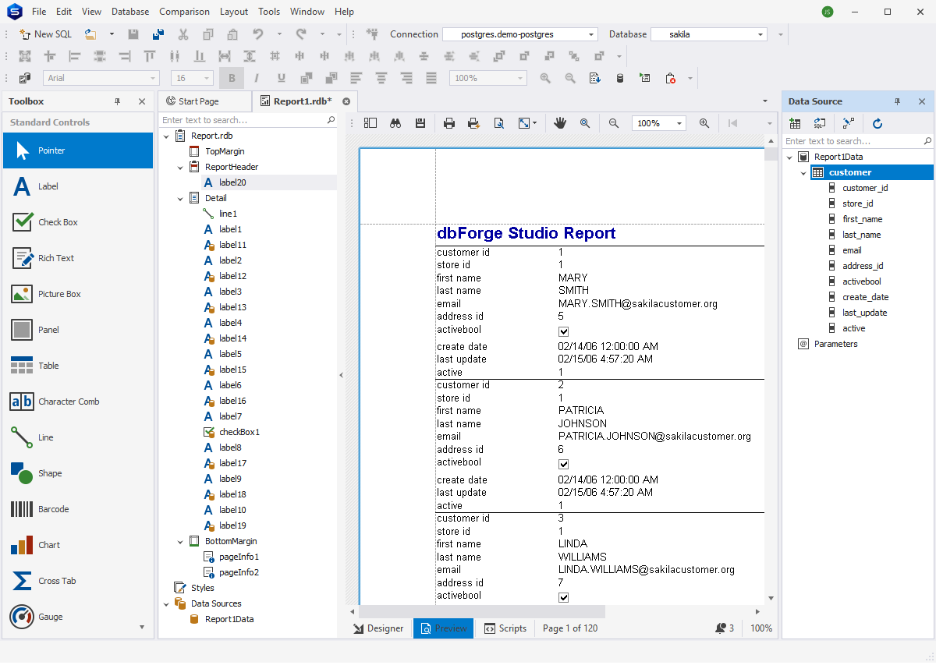
You can make those dull numbers and text into a stunning report with charts. I’m not using this one a lot but it’s there when I need it. See a sample below:
The features I miss because I’m also a dbForge Studio for MySQL user are the Table Designer, script generators, and database diagram. But I’m sure these are in the pipeline for future releases.
Conclusion
A good PostgreSQL client makes it easy to do daunting SQL tasks. It’s like your best work buddy that’s willing to give you an extra pair of hands. It’s a breeze to work within it because everything you need is in the right place. Coding is a joy and performance bottlenecks are easy to fine-tune.
It also helps you manage security and other database maintenance tasks like backup and restore easily.
If PostgreSQL is your chosen database platform, it won’t hurt to try dbForge Studio for PostgreSQL today for free. You have to try it to see and feel the difference. Download it here. And if you also work with other databases, MySQL, SQL Server, or Oracle, you can take things even further with dbForge Edge. It’s a powerful multi-database product that brings all these environments together under a single solution, so you can work seamlessly no matter which database you’re managing.
More articles
About The Author

Edwin Sanchez
NEXT UP


