Trending Topics

 Trending

Best AI website builder for freelancers building client sites: we tested four

From first prompt to final handover, these AI tools can automate complex productions
Disclaimer: This test was paid for by Hostinger but it had no say in the testing methodology or the choice of rival sites. All conclusions are based on testing by the author.
For freelancers and small agencies, AI website builders are dramatically speeding up the time it takes to go from idea to first draft – but that’s only the start of a client project. Real-world jobs will need to account for revisions, testing and ownership transfers, so we put four AI website builders through their paces to find out which ones were able to best meet the brief.
In our test of four AI website builders for client work, Hostinger AI Builder produced the best site with the least fixing at the lowest price, Lovable was fastest through a round of client revisions at 1 minute 36 seconds, and Wix had the most complete handover tools.
Hostinger AI Builder typically generates a complete website in a few minutes, depending on the project, with no coding needed. In our test, it took 6 minutes 2 seconds on average across two runs. Note that hosting comes in the same plan, with a domain and business email free for the first year (as of 2 November 2026).
All four could produce a credible site, but once revisions and handover came into play, the differences between them grew much wider; the right pick depends on who will be running the site once it’s live.
Please note that all prices quoted in this article are for the UK. See Hostinger AI Builder pricing in Australia and Hostinger AI Builder pricing in the USA for the latest prices in those regions.
How did we test the four AI website builders for client work?
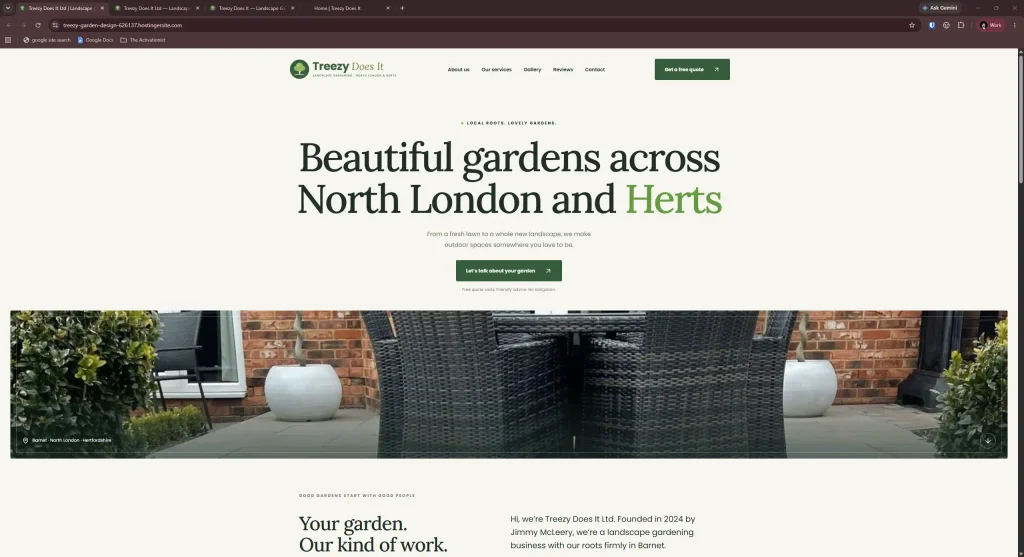
To see how these builders cope with real client work, we used each one to build a website for a fictional landscape gardening business. All four got the same prompt and follow-up instructions, including adding the client’s logo, photos, customer reviews and business details. Each builder had up to an hour to reach a finished state.
We then sent each builder the same client email asking for six typical changes: new brand colours and fonts, a new headline, a separate reviews page, a reordered menu and a holiday closure notice. We timed how long it took each builder to action the changes, including any fixes.
Finally, we looked at the handover process, including whether a client could take direct ownership of the site, pay for the plan themselves and make their own edits, both on desktop and on a phone. All four were tested on their cheapest paid plan with AI building included; Hostinger provided its plan free of charge.
Which AI website builder is best for freelancers building client sites?
| Builder | Average generation time | Time to finished site | Revision round | Changes right first time | Transfer to client | Code export |
| Hostinger | 6:02 | 19:07 | 7:00 | 4 of 6 | No | Yes |
| Lovable | 3:43 | 18:27 | 1:36 | 6 of 6 | Transfer between workspaces | Yes |
| GoDaddy Airo | 5:18 | 23:55 | 6:29 | 5 of 6 | Professional plan or higher | Yes |
| Wix Harmony | 4:56 | Not client-ready after 60 minutes | 9:20 | 4 of 6 | Yes | No |
Lovable was the quickest across both stages of the build, finishing the original site fastest and working through the client’s revisions in under two minutes. Beyond speed, though, the results split. Hostinger’s builder produced the cleanest site with the least fixing, but it’s the hardest to hand over, while Wix’s AI struggled at every stage yet offers the most complete tools for transferring a site to a client. GoDaddy sits in between, with a middling build, but the simplest day-to-day editing for clients once the site goes live.
How does each AI website builder handle client work?
GoDaddy, Hostinger, Lovable and Wix all offer AI website builders that are tuned to design complete websites. That means they can all handle client work well, with custom-made websites for a variety of business types. But our testing found that each performs very differently in practice.
Hostinger AI Builder
| Hostinger | |
| Plan | Premium |
| Price | £2.99 + VAT a month, paid 48 months upfront (£1.79 + VAT during Black Friday, 9 November to 6 December). Renews at £10.99 + VAT a month. |
| Client billing | Stays with the account holder |
| Client editing | Desktop and mobile; AI chat edits use credits; manual text and image edits are free |
| Credits used (revision round) | 115 (46% of the 250 signup credits) |
Is Hostinger AI Builder good for building client sites?
Hostinger proved to be the best overall choice for building client sites.
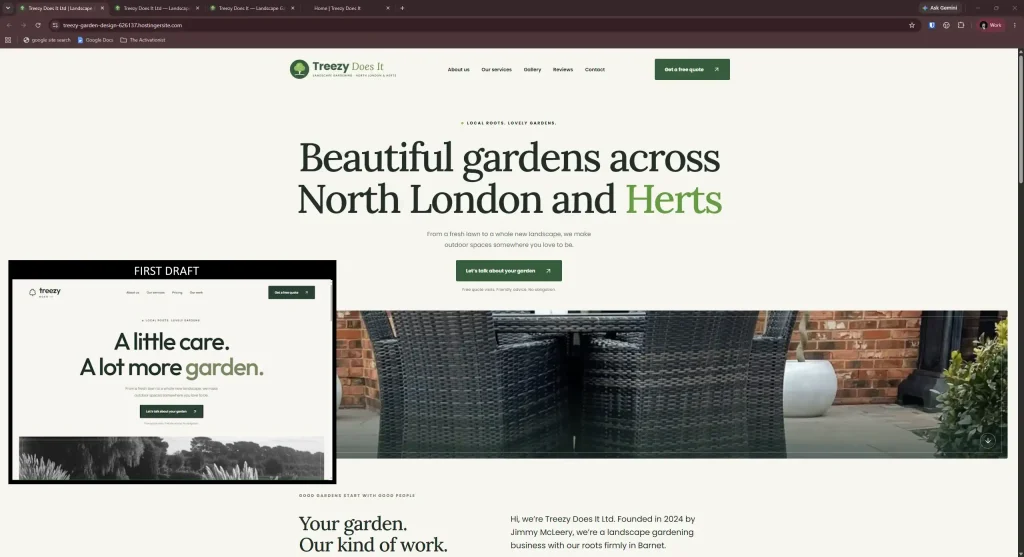
Its platform, Hostinger AI Builder, produced the strongest first draft of the four. AI Builder typically generates a complete website in a few minutes, depending on the project, with no coding needed. In our test, it took almost exactly 6 minutes on average. The result needed the least work of the four to finish, with almost nothing invented and nothing left to fix once our standard instructions were applied.
Hostinger AI Builder handled the client’s revisions well too, applying the exact brand colours and moving the reviews to a new page word for word. A couple of things broke along the way, though – the menu stopped working from the new page, and some text lost contrast against the new colours. One follow-up prompt fixed both, bringing the round to seven minutes.
However, it comes with important caveats for freelancers. The reason we could only run it twice was that it burns through AI credits quickly. Usually, the Premium plan includes 250 at signup, but during Hostinger’s Black Friday promotion (running 9 November to 6 December) this number is doubled to 500.
Our revision round alone used 115 AI credits, with every edit made through the AI needing credits, although text and images can also be edited by hand for free. Top-ups are cheap, at £17.99 + VAT for 2,500 AI credits (correct as of 2 November 2026), which would cover around 20 revision rounds like ours. Note that top-ups expire three months after purchase, so clients will need to keep their balance topped up; it’s the only platform not to include a regular monthly allowance.
Handover is another area where Hostinger slips somewhat. Sites made with AI Builder can’t be transferred to another Hostinger account (as of 2 November 2026), so billing stays with whoever built the site. The cleanest workaround is to build the site in the client’s own account from the start, using Hostinger’s account-sharing feature. If you need to transfer the site to a client entirely, however, the site’s code can be exported and hosted on a virtual private server (VPS).
Lovable
| Lovable | |
| Plan | Pro |
| Price | £22 a month (£18.33 billed annually) |
| Client billing | Client needs their own paid workspace |
| Client editing | Text free on desktop; images, layout and mobile edits through the AI chat |
| Credits used (revision round) | About 7 (mostly free daily credits; under 2% of the monthly allowance) |
Is Lovable Pro good for building client sites?
While it looks expensive compared to its rivals, there is a lot to like about Lovable’s AI builder.
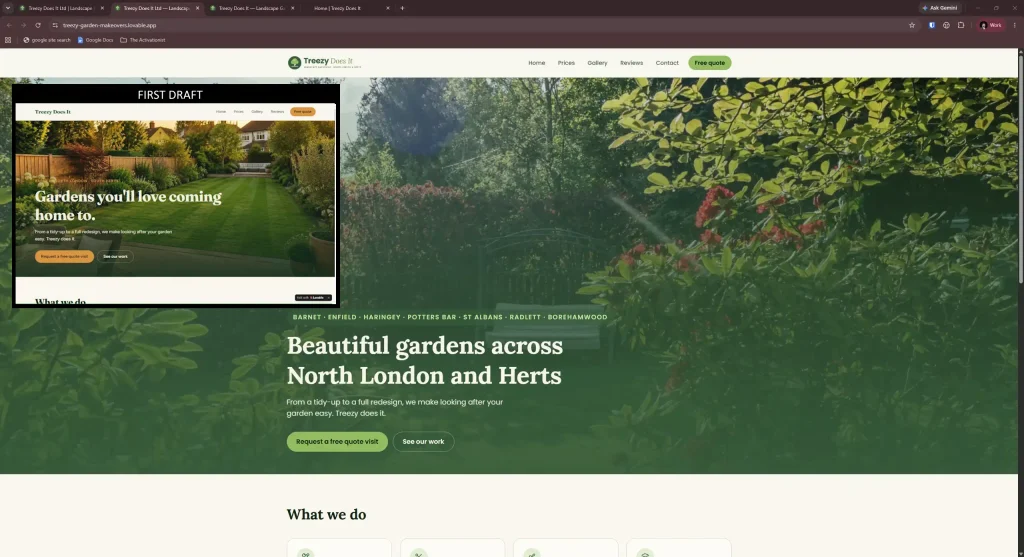
Lovable breezed through our client’s email, making all six changes correctly in a single pass in just over a minute and a half, the fastest of the four. It had a slight head start, having already built a separate reviews page as part of its first draft, but it was also the only builder to get every change right without being chased.
Day-to-day editing is more limited. Clients can tweak text directly on the page without spending credits, but changing an image or a layout means prompting the AI. Lovable’s mobile app works the same way, so edits on a phone go through the chat.
Handover takes some planning too. Projects can be moved between workspaces or passed to another workspace member, but the plan is tied to the workspace, so a client who wants to pay for their own site needs their own paid account. Quote form submissions are saved within Lovable, but email alerts need a verified domain. On the plus side, the full source code can be downloaded, which gives you a clean exit if a client wants to host the site elsewhere.
GoDaddy Airo
| GoDaddy Airo | |
| Plan | Starter |
| Price | £14.99 + VAT a month (£7.49 billed annually) |
| Client billing | Only by transferring the site, on Professional or higher |
| Client editing | Free, on desktop and mobile |
| Credits used (revision round) | 21 (14% of the monthly allowance) |
Is GoDaddy Airo good for building client sites?
GoDaddy Airo has ease of use in its favour: not so much during the creation process, but for less technical clients to run the sites once they’re built.
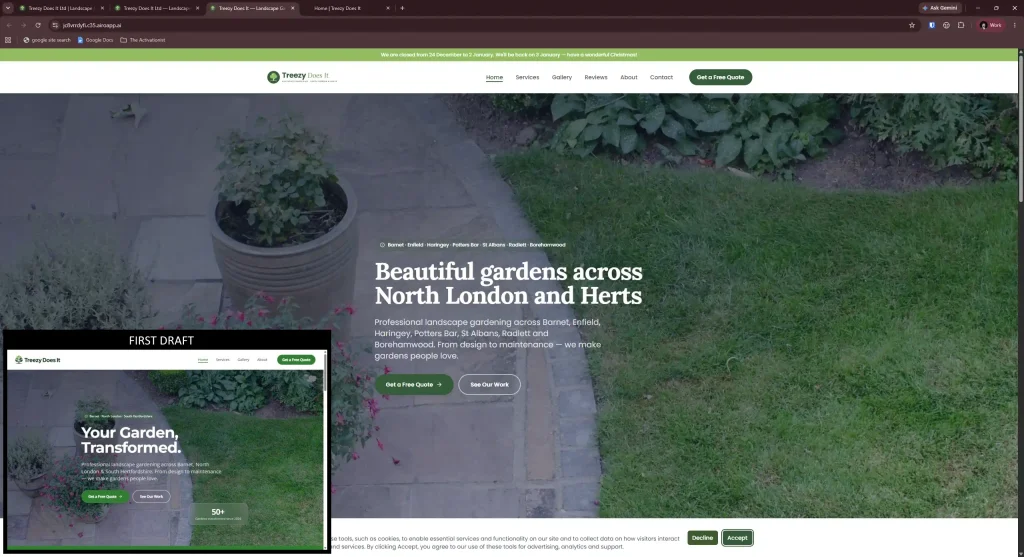
GoDaddy’s Airo builder got through most of our client’s changes quickly, applying five of the six on its first attempt. The exception was the new reviews page, which it initially left empty. Asking it to move existing reviews across produced a worse result, rewriting the text, inventing star ratings and a service the business doesn’t offer, and using poor-contrast colours. We ended up pasting the reviews in by hand, bringing the revision phase to around six and a half minutes.
Where Airo earns its place is in what happens after launch. Clients can edit text, images and layout directly on the page, on desktop or mobile, without spending AI credits, and form submissions reached our inbox without needing a custom domain.
Handing a site over is less straightforward. Airo projects can be transferred to a client’s own GoDaddy account, but only on the Professional or Ultimate plans, not the Starter plan we tested, and the site is taken offline and its domain disconnected during the move. However, you can download the full project as a ZIP file if you need to host it elsewhere.
Wix Harmony
| Wix Harmony | |
| Plan | Light |
| Price | £11.50 + VAT a month (£6 on a three-year plan) |
| Client billing | Client takes over; you can stay on as co-owner |
| Client editing | Free on desktop; no mobile editing |
| Credits used (revision round) | None (Aria editing is free) |
Is Wix Harmony good for building client sites?
Of the four services on test, we were least impressed by Wix Harmony when it came to building client sites.
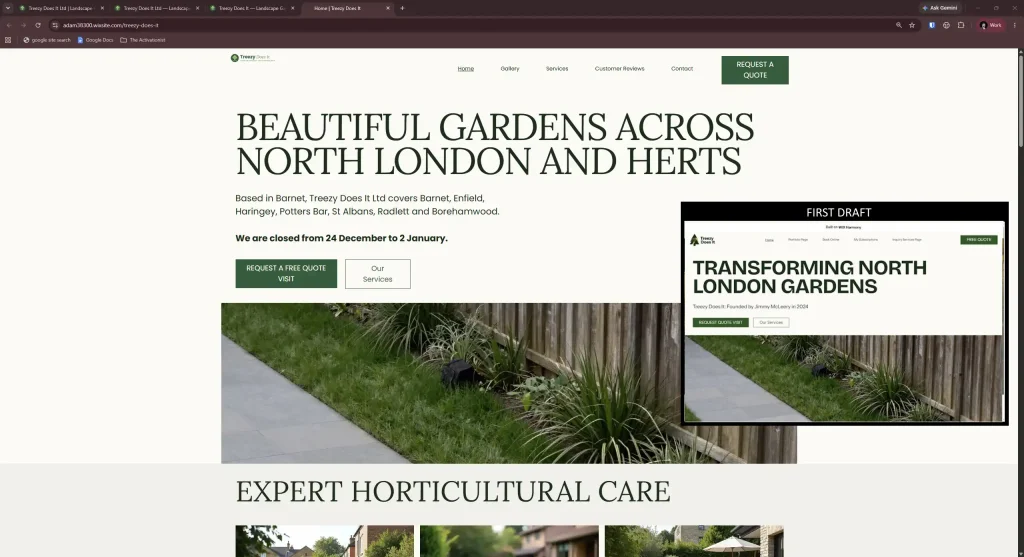
Wix was starting on the back foot, having failed to reach a finished site within our 60-minute limit. Wix’s Aria chatbot was similarly clunky in making our client tweaks; it initially left the new reviews page empty, gave the new pages placeholder web addresses, and never applied the second of our two brand colours, even after a follow-up prompt. It was also only able to make one of our two requested font changes, as the other wasn’t included in the default font library. However, the editor does include the ability to upload custom fonts, which was a smooth and straightforward process.
While Wix’s AI editor continues to let itself down, where the platform really shines is the more traditional account management and handover tools. Finished sites can be transferred to a client’s own Wix account along with their paid plan, after which the client takes over the payments, and you can stay on as a co-owner to keep making changes. The auto-generated brand kit is also handy for freelancers or agencies who may be working with other teams.
Clients can also edit the site directly without using up AI credits, and agencies juggling several clients can use Wix Studio, a separate platform with a single dashboard and a content mode that lets clients update text and images without breaking the design. However, sites can’t be edited on mobile, and there’s no ability to export the site’s code or design framework for transfer to another platform.
How do you hand over an AI-built website to a client?
Whichever builder you choose, a few checks will save headaches once a site changes hands. First, decide whose account the site will live in before you start building, as moving a finished site isn’t always possible, and on some platforms it means a pricier plan or taking the site offline during transfer. Also make sure clients are happy topping up AI credits after handover; where edits use credits, a client with an empty balance can’t fix so much as a typo.
Check that client content goes in exactly as supplied, as invented reviews and missing company details can land the business owner in legal trouble.
Finally, look over the details before you hand over the keys: make sure page addresses are tidy, and send a test enquiry to confirm form submissions actually reach the client’s inbox.
How much does each AI website builder cost to run for a client?
| Builder | Plan | Introductory price | Free domain | Business email | AI credits |
| Hostinger | Premium | £2.99 + VAT a month (48 months upfront); £1.79 + VAT during Black Friday, 9 November to 6 December | First year | 2 mailboxes per website, first year (source) | 250 at signup; top-ups extra |
| GoDaddy Airo | Starter | £7.49 + VAT a month billed annually (£14.99 + VAT monthly) | First year (annual plans) | Extra | 150 a month |
| Wix Harmony | Light | £6 + VAT a month on a three-year plan (£11.50 + VAT monthly) | First year (yearly plans) | Extra | Not needed for editing |
| Lovable | Pro | £18.33 a month billed annually (£22 monthly) | Not included | Not offered | 100 a month |
All prices correct as of 2 November 2026.
Introductory prices for web hosting can be heavily discounted, so it’s worth checking what each plan costs once the offer ends, as well as what’s covered. Wix and GoDaddy have higher monthly prices, but clients can edit their sites without paying for AI credits (as you can with Hostinger if you make manual edits rather than using AI chat), while Lovable charges extra for a domain.
Hostinger, meanwhile, is by far the cheapest way in, and the only one to include business email, although the headline price depends on a four-year commitment. It goes up at renewal: Premium renews at £10.99 + VAT per month for the same 48-month term (as of 2 November 2026).
Changes made through the Hostinger AI chat use credits, and the 250 included at signup don’t renew. Even so, four years upfront costs £143.52 + VAT, less than two years of Wix or GoDaddy on their cheapest terms. Even adding a £17.99 + VAT credit top-up every year would still leave it as the cheapest of the four over that period. And don’t forget that during the Black Friday sale the four-year cost is £85.92 + VAT.
Which AI website builder should freelancers choose?
Different builders will suit different ways of working; Lovable is the quickest from brief to finished site and handled client revisions almost instantly, making it a strong pick for fast-turnaround work, particularly for projects involving lots of code where you won’t mind setting up a domain and email separately. GoDaddy’s Airo needs closer supervision, but it’s the easiest for a non-technical client to run once you’ve handed it over. Wix offers the most complete handover tools, but its AI tool simply isn’t as effective as rivals.
Hostinger AI Builder produced the best site with the least fixing, at the lowest price, which makes it the strongest choice for freelancers who build and manage sites for clients on an ongoing basis. If clients will take over the site themselves, you can set it up in their own account from the start – and if a site outgrows it, its code can be exported to a Hostinger VPS. Despite its handover limitations, it offers the most polished starting point of the four for the lowest price.
You can try Hostinger AI Builder at hostinger.com/ai-builder.
About The Author