Trending Topics

 Trending
How do I increase my account security with 2FA?

Everyone could do with more security. Two Factor Authentication (2FA) is a simple way to increase the security of our online accounts and logins. Despite this, it’s often ignored as many users don’t even realise that it’s an option. As most online providers now implement some form of 2FA, this quick guide will help you manage 2FA accounts and give you some tips on resources and apps to help increase your account security.
What is 2FA?
Traditionally, our accounts are secured by a single form of authentication – a password. Unfortunately, passwords can be easily exploited if they’re too easy to guess or if they’ve been leaked online courtesy of a databreach. Many people also recycle a certain set of passwords or, worst of all, use the same password for every login. For some great tips on passwords, see our guide on how to create strong passwords.
2FA introduces a second form of authentication to our logins. This means that the password alone is no-longer sufficient and an additional factor of authentication is required. 2FA usually takes one of three forms:
- Something you know – like a PIN.
- Something you have – like your phone or a USB key.
- Something you are – fingerprint or face recognition (biometrics).
Having a 2FA layer means that when our details are inevitably leaked and posted online, it will be much tougher for our accounts to be compromised.
Actually, most people already use some form of 2FA but probably haven’t realised. If you’ve ever been sent an email with a code to log into an online account, you’ve used 2FA. An even more secure method is the card-reader many banks provide, which generates a code to be used for online banking.
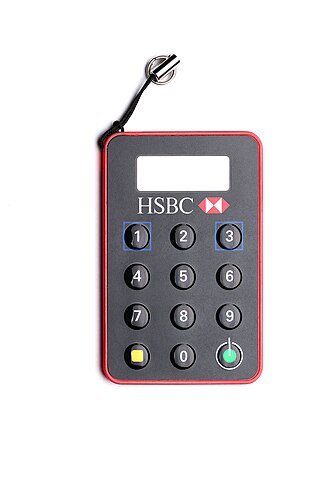
When we create accounts for online services, 2FA is usually disabled by default and can be easily overlooked. Moreover, owners of accounts created before 2FA was implemented usually don’t realise that the provider now has the option – or how simple it is to set up.
A fantastic resource is 2fa.directory which lists the 2FA options of many global websites. It shows which methods are available and provides links to instruction pages to help with setup.
How do I manage my 2FA?
Like a password, 2FA codes are just a string of alphanumeric characters. The major difference is that they’re time dependent and only remain valid for a set amount of time. To manage this fluidity and select the correctly generated code at the appropriate time requires some assistance.
The most popular method of receiving a 2FA code is via an app on a smartphone or tablet. My personal favourite is Authy which gives quick access to the 2FA codes and allows re-naming and colour co-ordination to help users select the correct codes.
Authy also makes device management very simple. For convenience, I use Authy on two devices and could lift the protection to enable it on more. However, if one of my devices is stolen or misplaced, it’s possible to remotely disable Authy on that device and stop the 2FA codes falling into the wrong hands. The Authy app can also be PIN protected.
Another popular app is Microsoft Authenticator, which speeds up access to Microsoft accounts and logins. When a login is attempted on a connected account, access will only be granted if the permission request is accepted on the Authenticator app.
One more digital option for you – Google Authenticator. Having been around for a while, it was initially only possible to use the app on a single device – which caused a problem if it broke/died/vanished – but it seems that Google has now resolved this issue.
Is there a physical option?
If you’re not keen on using your phone as a 2FA device, then you might be interested in a YubiKey. A YubiKey is a hardware device which attaches to a USB socket of your PC/Mac or uses NFC to to chat with your mobile phone. YubiKeys are available for many services and semi-automate the 2FA process. Once the device is registered, it can be inserted into a device (or tapped on a phone/tablet) to authenticate a 2FA request. YubiKeys can be centrally de-activated should you leave it in a taxi and it’s considered good practice to have a spare in case it goes missing.
What happens if I lose my 2FA device?
2FA is an additional layer of security, but that doesn’t make it infallible or unbreakable. When 2FA is added to an account, you’ll be presented with an option to generate some ‘recovery codes’. These are one-time access codes which can be used in lieu of a 2FA code to get you back into the specific account. Always make sure that your recovery codes are stored and hidden in an accessible place.
Not SMS then?
Receiving a 2FA code via SMS is extremely common, but it’s also deemed a bad idea. SIM card spoofing – where a phone’s SIM is cloned or a rogue third party persuades a provider to port a number to a different SIM – has been responsible for more than one high-profile account breach. Also, how many people get SMS notifications on the lock screen of their phone? If that’s you, then I only need to see your phone to get your 2FA code. Avoid SMS 2FA if you can, and if your account provider doesn’t provide alternatives, ask them why.

Conclusion
Anything that adds protection to our accounts should be given consideration. There’s no denying that extra security can elongate a login process, but that’s nothing compared to how long it takes to mop up the mess after an account has been compromised.
We’ve given you enough here to get started, so take some time to activate 2FA on your accounts. One day, you may be very glad that you did.
More tips from our cybersecurity experts
- LastPass warns of campaign to grab master passwords
- IBM X-Force Threat Intelligence Index reveals how cybercriminals are using AI – and how enterprises can fight back
- NETSCOUT warns DDOS attacks are spreading from enterprises to all sizes – no-one is safe
- The US router ban hammer has been wielded – here’s why it’s so stupid
- Nvidia makes the world’s most expensive Teams call
About The Author

Lee Grant
NEXT UP


