Trending Topics

 Trending
How can I see my next meeting in the Mac Menu Bar?

I don’t know about you, but I hate pop-up notifications. I run my Mac in Do Not Disturb mode because I despise the interruptions. However, I do quite like a permanent reminder of when my next appointment is. For that, you need an app that puts your next meeting in the Mac Menu Bar. Luckily, such an app exists. And you’ll never guess its name…
Which app puts your next meeting in the Menu Bar?
The wonderful little app that offers this feature is called Next Meeting. You’ll find Next Meeting here in the Mac App Store.
It’s a free app created by a chap called Nathan Spindel, and it’s only 10MB in size, which isn’t even going to ding your free storage space.
When you first install the app, you’ll need to give it permission to read the contents of your Calendar. The app assures you it won’t share the data, and I have seen nothing to suggest it does.
Once installed, it puts a text slug in your Menu Bar, showing when your next meeting is, like so:

If you click on that slug in the Menu Bar, it will display a drop-down menu showing your next few appointments:
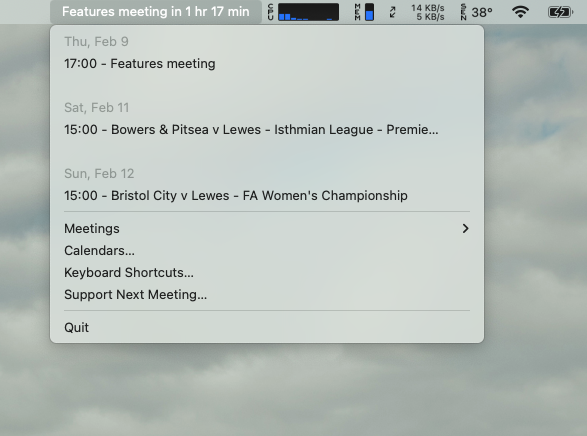
In the screenshot above, you’ll see a Meetings link. If you click on that, you’ll find various options, including one to adjust the length of the text slug, to prevent meetings with long titles from running right across your screen, which is a nice touch.
By the way, if you’re looking for an app to control what icons appear in your Menu Bar, I thoroughly recommend Bartender. It helps you keep everything neat and tidy up there, only displaying the items that you really want to see.
Additional explainers you might be interested in
About The Author

Barry Collins
NEXT UP


