Trending Topics

 Trending
Lenovo ThinkPad X9 review: first look at the sleek new ThinkPad that debuted at CES 2025

Lenovo has dared to think different with the design of its all-new Lenovo ThinkPad X9. Farewell TrackPoint, goodbye trademark black matte finish, and a big welcome to the sleek-industrial-chic metallic look that we associate with MacBooks.
Which is no surprise, as this is the audience Lenovo is targeting with the ThinkPad X9 in both 14in and 15.3in incarnations.
“So our customers wanted a metal theme, to offer a choice to their users,” Michael Ripp, Global Product Marketing for ThinkPad, told me at CES 2025. “We did a lot of research and industrial design was at the very top [of user requests].”
Why doesn’t the ThinkPad X9 have a TrackPoint?

One thing that wasn’t at the top of the list was a TrackPoint, the red “nipple” that typically nestles in the centre of ThinkPad keyboards. Familiar users will then use this to navigate, along with the trackpad. However, here Lenovo wants to attract a new type of user.
“We are definitely trying to attract a new audience,” said Ripp. “It could be the younger generation who are not familiar with the TrackPoint. They’re coming from Chromebooks and schools, maybe universities, with Apple products. So the purpose of this was to not confuse them, but to provide a very nice, clean transition from those products to this product.”
It also means that Lenovo can include a haptic trackpad in the X9, adding to its flexibility. The downside of this is that the haptic technology adds to the cost, but Ripp reckons this cost “probably nets out at about the same” as the TrackPoint with its pair of accompanying left- and right-mouse-click buttons.
I have no objection to Lenovo’s decision. The glass-coated touchpad is smooth to the touch, with an extended rectangular design that leaves plenty of space for gestures.
What about the ThinkPad X9 keyboard?
Lenovo has also revamped the X9’s keyboard compared to, say, the ThinkPad X1 Carbon Aero Edition that I covered at IFA 2024. Here, the keys have a greater distance between them and it feels more like a “normal” keyboard laptop.
Underneath, it uses the same scissor-style keys found in the ThinkPad X1 Nano. Ripp assured me that they use the same 1.35mm stroke and force curve, and while old hands like me might prefer the traditional feel of an ThinkPad keyboard the Nano’s keyboard scores higher in user research.
“It is a more modern, progressive design, again for the reasons that I’ve spoken about,” said Ripp. “But I use an X1 carbon at work and when I go home there’s an X9 14 on my desk, so I transition between the two, and I have not had any issues. I think if anybody transitions from the ThinkPad to this, within a day or two, they’ll be perfectly comfortable.”
A “unique engine hub” to keep the ThinkPad X9 cool
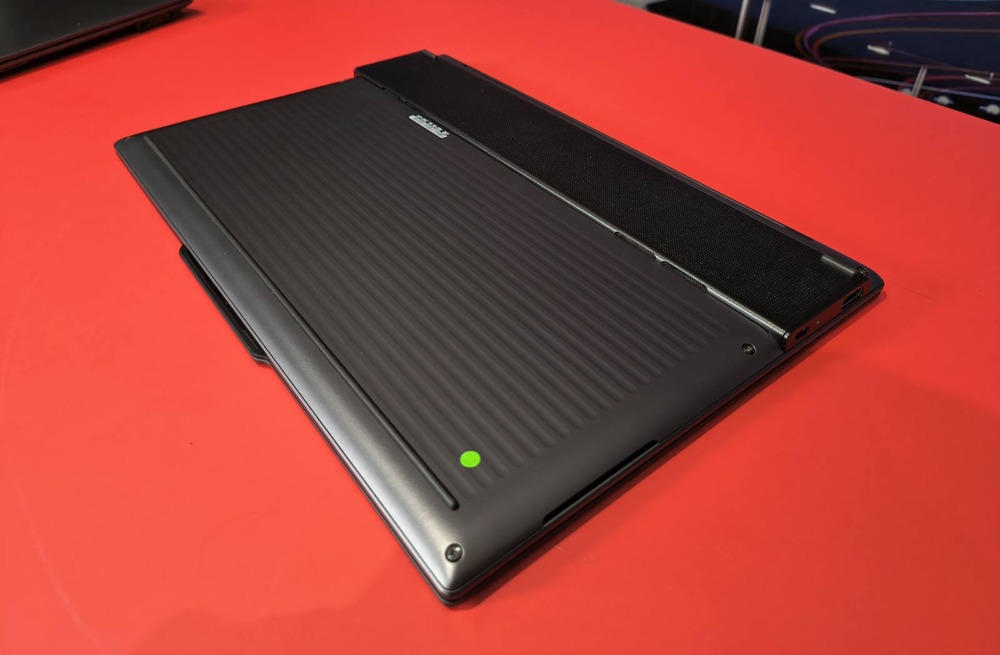
The Lenovo ThinkPad X9 includes one final unusual design feature – what Ripp calls “the engine hub on the bottom”.
Rather than having a conventional chassis, which tapers from back to front, “this time we looked at it a little different, and we put the CPU, the fan, the cooling, the I/O, all in this engine hub, and that’s allowed us to thin the rest of the machine down and create a much thinner profile.


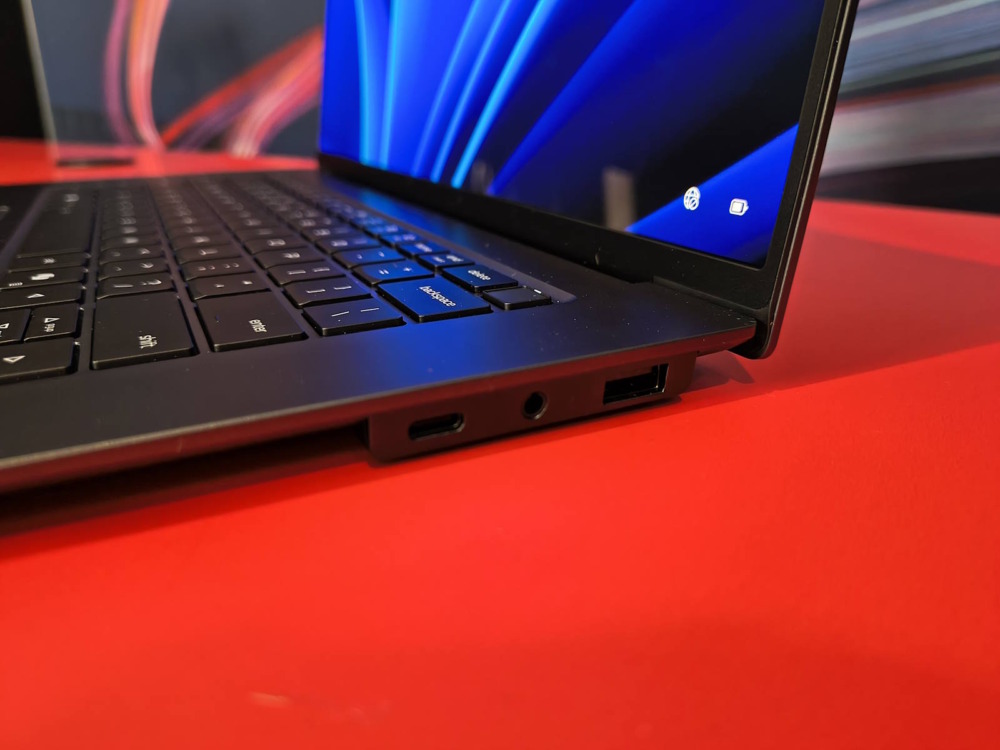

“So from the side – again, thinking of who we’re dealing with – it looks very, very thin.”
Alongside this cosmetic appeal, the engine hub means Lenovo can push the CPU faster than Intel’s reference design. “So it basically allows more air, more thermal distribution, which allows us to run it at a slightly higher TDP.”
Lenovo ThinkPad X9 key specs
| ThinkPad X9 14 | ThinkPad X9 15 | |
| Screen size & tech | 14in OLED touchscreen or non-touch, 120Hz | 15.3in OLED touchscreen, 120Hz |
| Screen resolution | Touch: 2.8K, non-touch WUXGA | 2.8K |
| CPU | Intel Core Ultra 200V vPro (up to Core Ultra 7) | Intel Core Ultra 200V vPro (up to Core Ultra 7) |
| Memory | Up to 32GB LPDDR5 | Up to 32GB LPDDR5 |
| Graphics | Intel Arc Xe2 | Intel Arc Xe2 |
| Storage | Up to 2TB PCIe Gen 4 | Up to 2TB PCIe Gen 4 |
| Battery | 55Wh | 80Wh |
| Webcam | 8MP | 8MP |
| Wireless | Wi-Fi 7, Bluetooth 5.4 | Wi-Fi 7, Bluetooth 5.4 |
| Ports | 2 x Thunderbolt 4, 3.5mm combo, HDMI 2.1 | 2 x Thunderbolt 4, 3.5mm combo, HDMI 2.1, USB-A |
| Dimensions | 12.3 x 8.3 x 0.3-0.7in 311.8 x 212.3 x 6.7-17.18mm | 13.4 x 8.9 x 0.3-0.7in 339.5 x 228.5 x 6.7-17.7mm |
| Weight | 1.21kg (2.66lbs) | 1.45kg (3.19lbs) |
Lenovo ThinkPad X9 – environmental credentials
As this was a ground-up fresh design, I hoped that Lenovo would have baked in superb environmental credentials. In particular, I asked, would it match the ThinkPad T14’s approach?
“Not to the same extent,” Ripp told me. “Obviously with the T14, there’s more room real estate to do different things. However, we do have a CRU [customer replaceable unit] battery in the X9, so if the battery runs out after, you know, three years, you can replace it yourself.”
The SSD is also replaceable by an end user, but Intel’s 200V series (Lunar Lake) integrates the memory onto the CPU package so the RAM can’t be replaced or upgraded. Lenovo also embeds the Wi-Fi/Bluetooth chip.
Here’s a full list of what’s recycled:
- Chassis: A, C and D covers 50% recycled aluminium
- IO Foot: 50% recycled aluminium
- Speaker Enclosure: 90% PCC recycled plastic
- Battery Frame: 90% PCC recycled plastic
- Battery Cell: 100%% recycled cobalt cell
- Keycaps: 85% PCC recycled plastic (backlit keyboard)
- AC Adaptor: 90% PCC recycled plastic case
- Packaging: 100% plastic-free primary packaging is made from bamboo and sugarcane fibre
Lenovo ThinkPad X9 review first look: webcam

Ripp told me that the “camera is an upgrade from our X1 camera. It’s a two-micron sensor, so it captures a lot better in low light. Also the HDR, so if you have a window behind you, you’re not [going to look] dark.”
There was a strong pink tinge to the lighting in Lenovo’s booth that made the webcam tricky to judge, but here’s the result when I tried it.

Early verdict on the Lenovo ThinkPad X9 Aero Edition
I should mention that the Lenovo ThinkPad X9 Aero Edition supports Lenovo’s Aura Edition technology, which it introduced (in tandem with Intel) at IFA 2024. This brings in potentially handy features, such as tapping your phone against the side to initiate photo transfers. I’m yet to be convinced by Aero Edition, but that could simply reflect my lack of time using it.
As for the ThinkPad X9 itself, I find myself sitting on the fence for now. I wasn’t wowed by the design, but I understand why Lenovo thinks it will appeal to a younger generation of users than traditional ThinkPads. And if benchmarking tests show that it ekes out more power from Intel’s 200V chips, then that’s all to the good.
What earns this laptop its “Best of CES 2025” award is that Lenovo is willing to shake things up. We’re here to reward innovation, after all. I look forward to testing it when models become available. Talking of which…
Lenovo ThinkPad X9 Aero Edition: price and availability
Lenovo says that both the ThinkPad X9 14 Aura Edition and X9 15 Aura Edition will be available in the USA from February 2025. The 14in version’s price is expected to start at $1,399, the X9 15 from $1,549.
We don’t yet have price or availability for other regions.
Related articles
About The Author

Tim Danton
NEXT UP


