Trending Topics

 Trending
First-look review: Acer TravelMate P6 14 AI (2026)

When it comes to objects that excite, business laptops sit near the bottom of most people’s list. I’m not one of those people, and neither was the Acer representative – who didn’t wish to be named, so let’s call him Trevor* – who showed me the 2026 update to Acer’s TravelMate P6 14 at a pre-Computex event in Taipei yesterday.
“Feel this,” said Trevor, prompting me to slide my finger along the laptop’s surface. I quickly realised why he was so keen, with a soft, almost fabric-like feel to the surface. “It has a molecular coating on there,” Trevor explained, “making it feel really comfortable for touching.”
And it isn’t just about comfort. We know from other manufacturers’ similar efforts – such as Asus’s Ceraluminum finish – that it also means the surface is exceptionally resistant to scratches. So not only will the Acer TravelMate P6 14 AI look good on the day you buy it, it will do so after five years on the road. It doesn’t show fingerprints, either.
Make no mistake: this is a gorgeous business laptop too. It’s 16mm thick (0.63 inches) and weighs a frankly ludicrous 960g. Acer achieved this by using carbon fibre in the lid while the rest of the chassis is made from a magnesium-aluminium alloy. All of which means the Acer TravelMate P6 14 AI is – by some distance – the sexiest business laptop Acer has ever built.
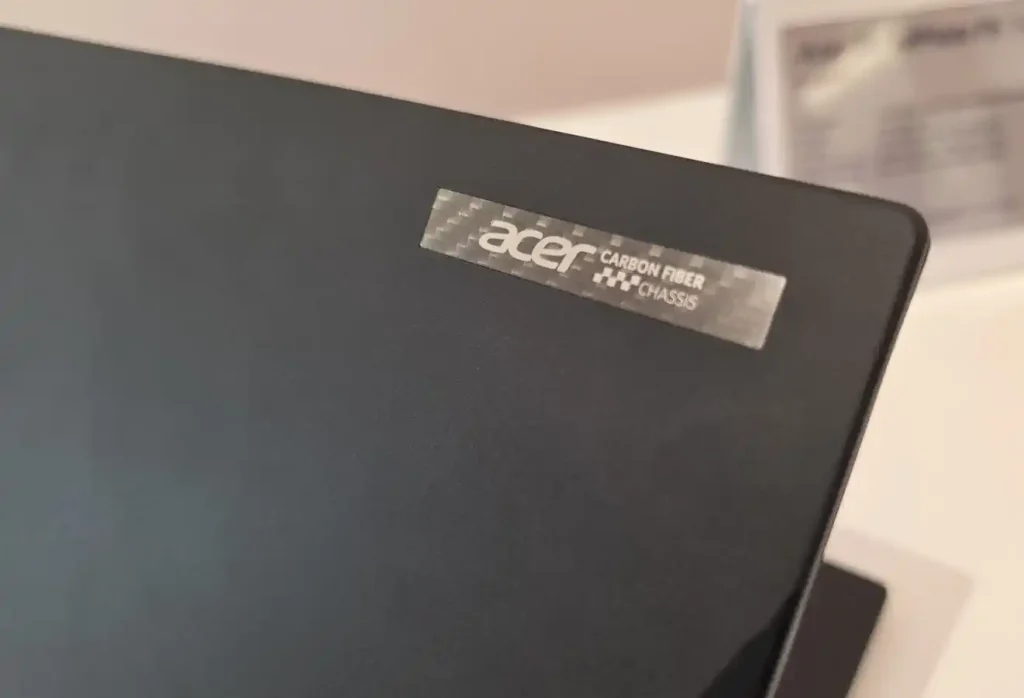
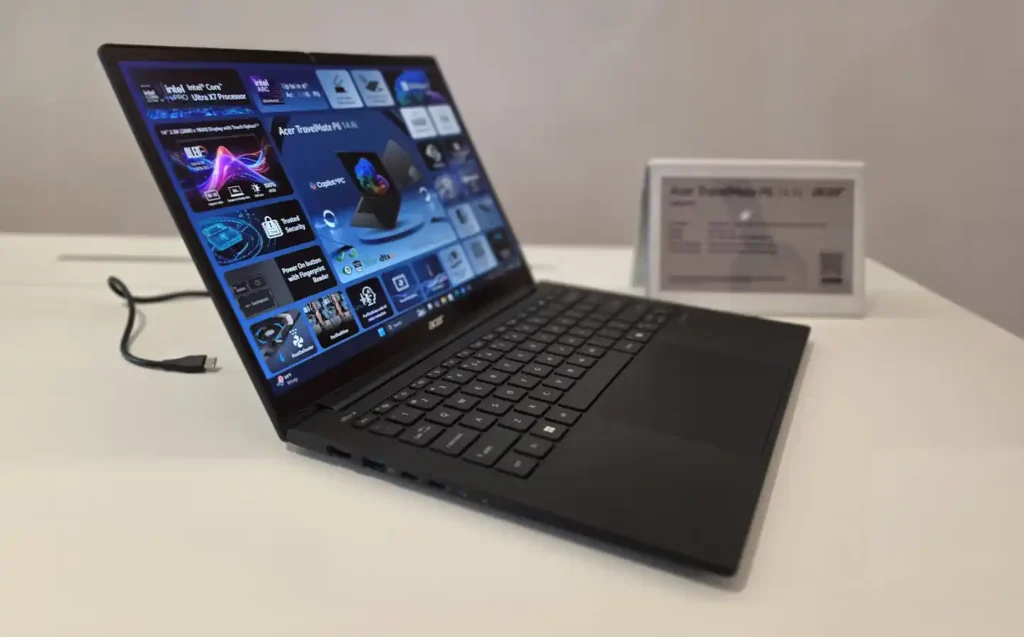

But its attractions are far from molecular-coating skin deep.
Glorious OLED touchscreen
Sticking to the subject of touch, make sure you buy the OLED version if you want a touchscreen. Actually, let me simplify that: make sure you buy the OLED version with a touchscreen.
Acer is offering two OLED panels, both of which cover 100% of the DCI-P3 gamut (as used by Hollywood so colours look great). Where they differ is that the non-touch version peaks at 400 nits while the touchscreen goes up to 500 nits. That won’t make much of a day-to-day difference, but could be useful in sunlight.
Even more useful is that the touchscreen version is protected by Corning Gorilla Matte Pro. I had a quick look to see if the overhead lights caused annoying reflections, and they don’t.
Both OLED screens have a 2,800 x 1,800 resolution while the third screen option, which uses IPS technology, only offers 1,920 x 1,200 pixels. That will still look okay in terms of sharpness, but if you’re going to splash out for a top-quality business laptop it doesn’t make sense to compromise here.
In short, just in case I haven’t been clear, buy the OLED touchscreen version.
Top-notch supporting cast: keyboard, touchpad and speakers
If you can tell that I love the screen, let me return to Trevor to talk about the keyboard. This is essentially the same one that was in last year’s TravelMate P6 14 AI, which was a big upgrade over its predecessor.
“When I first got a [2025] device, I immediately noticed my typing speed increased dramatically,” said Trevor. “I was so happy typing on it.” So happy, indeed, that he decided to write a summary of his experience to share with other Acer staff.
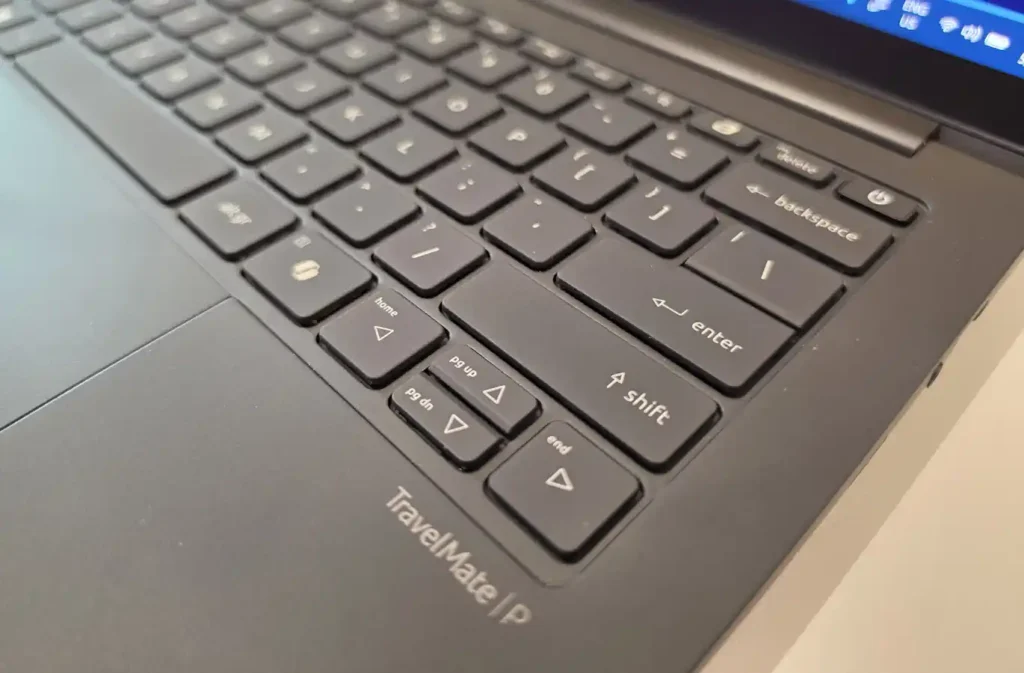
I’ll wait until I receive a full review unit to see if I share Trevor’s enthusiasm, but I suspect I’ll be happy. There’s a solid 1.4mm of travel to each key, and you can tell from the action that serious engineering has happened to make it feel pleasant to type on.
I don’t need hours of play to say that the trackpad is superb. It’s so large that when I splayed out four fingers they almost fitted within its confines. If you love Windows touch gestures, you’ll love this trackpad.
And Trevor would not be happy with me if I didn’t mention the speaker system. “It’s got four speakers built into the sides, but actually we’ve used some technology so you don’t get the huge vibrations you sometimes see,” he explained. “So one points up, one points down, and that means that it can go even louder without distortion.”
In the Acer specs it says “quad speaker with dual forces anti-vibration driver design,” which is rather duller. Again, I’ll come back to this in a full review.
Acer TravelMate P6 14 AI (2026) specifications
In terms of specs, the Acer TravelMate P6 14 AI (2026) comes with…
- Up to Intel Core Ultra X7 368H with vPro (there will be non-vPro options)
- Up to Intel Arc B390 graphics
- Up to 64GB RAM (soldered)
- Up to 1TB PCIe Gen4 SSD
- 71Wh battery (up to 30 hours video playback, Acer claims)
- Wi-Fi 7 and Bluetooth 6
- 5MP IR camera (supports Windows Hello and includes privacy shutter)
If you buy any laptop with an Intel Core Ultra X7 processor inside then it’s going to be fast. This is one of Intel’s latest Panther Lake chips and it packs 16 CPU cores, four of which are high-performance P-cores.
The Core Ultra X7 chips also stand out for their graphics performance, thanks to the Arc B390 graphics chip. I’ve seen it match Nvidia’s mobile RTX 4050 GPU in raw frames per second – and also in creative apps that take advantage. So the Acer TravelMate P6 will have plenty of 3D acceleration. Far more than any business laptop it’s likely to replace.
Two things will stop this laptop from being a true graphics powerhouse. The chief one is that this is a skinny laptop, and that means there simply isn’t much room for cooling. This is the inevitable compromise you have to make. If you have objections, chat with Isaac Newton about the laws of thermodynamics.
The other related issue is wattage. Even Trevor – and trust me, he knows everything else there is to know about this laptop – couldn’t confirm the maximum wattage the TravelMate P6 can supply to the CPU. I suspect it will be around 30W, but the Core Ultra X7 368H supports a dynamic boost of 80W.
Inside the Acer TravelMate P6 14 AI (2026)
Acer has made it relatively easy to replace the M.2 SSD that comes with the Acer TravelMate P6 14 AI, with six Torx screws standing in your way. If you’re worried about data theft, then Acer can configure the laptop with a tamper-proof alarm – this will let users know if someone has opened the chassis to access the SSD.
I did ask Trevor why this was necessary in an era of BitLocker encryption, but he pointed out that many organisations choose not to use this because it makes data recovery more difficult. And he also pointed out that pressing a keyboard shortcut launches Acer TravelSense, a suite of software that includes bonus security tools – such as hiving off a small section of your SSD for sensitive data that is then encrypted.
You can’t replace the memory as this is soldered onto the motherboard, at which point I asked about the battery. Was that replaceable? Technically, yes, but it wasn’t a selling point, Trevor felt, as the TravelMate’s battery should last for the life of the laptop. And again TravelSense includes tools to recalibrate the battery and to keep it chemically optimised – that is, to avoid overcharging it. You can even set your own thresholds for when you want it to start charging (such as 50%) and stop charging (such as 80%).
This is one area where my views part ways with Trevor’s, because I both want a laptop with a battery that’s easy to replace – and I want vendors such as Acer to make it easy for me to order a replacement battery. There’s plenty of Right to Repair legislation coming into law around the world that will place pressure on laptop manufacturers to make this easy. But I do agree that the main thing is to keep your existing battery last for as long as possible.
Two final things on longevity. First, that the Acer TravelMate P6 14 AI (2026) has passed key parts of the MIL-STD 810H testing. Second, that it include a clever fan that will help the CPU to stay cool for many years…
The Acer DustDefender
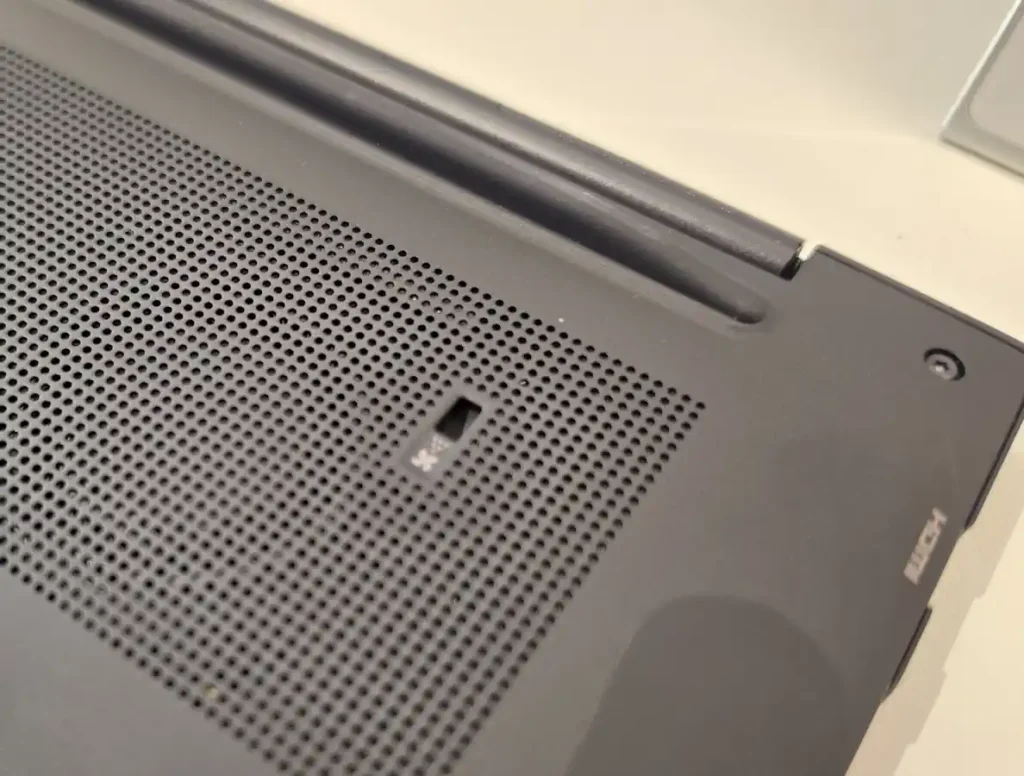
“With most laptops, a CPU fan’s dust accumulates over time,” said Trevor, “and therefore it’s not able to get rid of the heat as well as when you loaded it the first time.” As a result, the CPU will run more slowly and you’ll wonder why your laptop is so sluggish.
“With the Acer TravelMate P6, this will never happen, because its fan is able to do reverse rotation.” So, rather than keep going in one steady direction all the time, it will go into reverse rotation mode when waking from sleep. It does the same after working for an hour or so, too. And that’s enough to stop dust accumulating, with holes on the bottom of the chassis for dust to fall through.
Acer TravelMate P6 14 AI (2026) ports
Finally, let’s talk ports. All too often I see otherwise superb laptops – Apple and Dell, I’m looking at you – hampered by choosing form over function. That is, rather than add admittedly ugly USB-A and HDMI ports, they choose to include only USB-C ports, often bunging a USB-C to USB-A adapter in the box as some Frankenstein-inspired compromise.
Thankfully for Acer, it has Trevor on hand to stop the designers making such decisions. “I asked for two USB-A ports,” he told me, “because a couple of years ago we had a design with just one USB-A port. I said no, I want two.”
I’m with Trevor here. I often fill both USB-A ports on my laptop, with things like a thumb drive, an RF adapter for a wireless keyboard or mouse, a microphone, a webcam. My USB-C ports get even greater use (for external drives, port replicators, connecting monitors), but they aren’t a direct replacement.
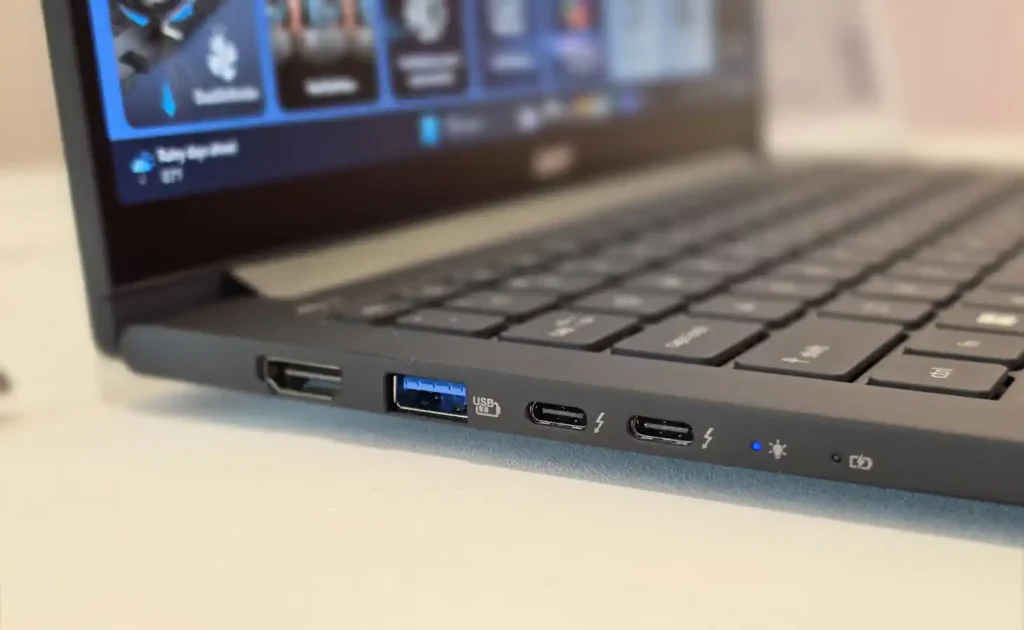
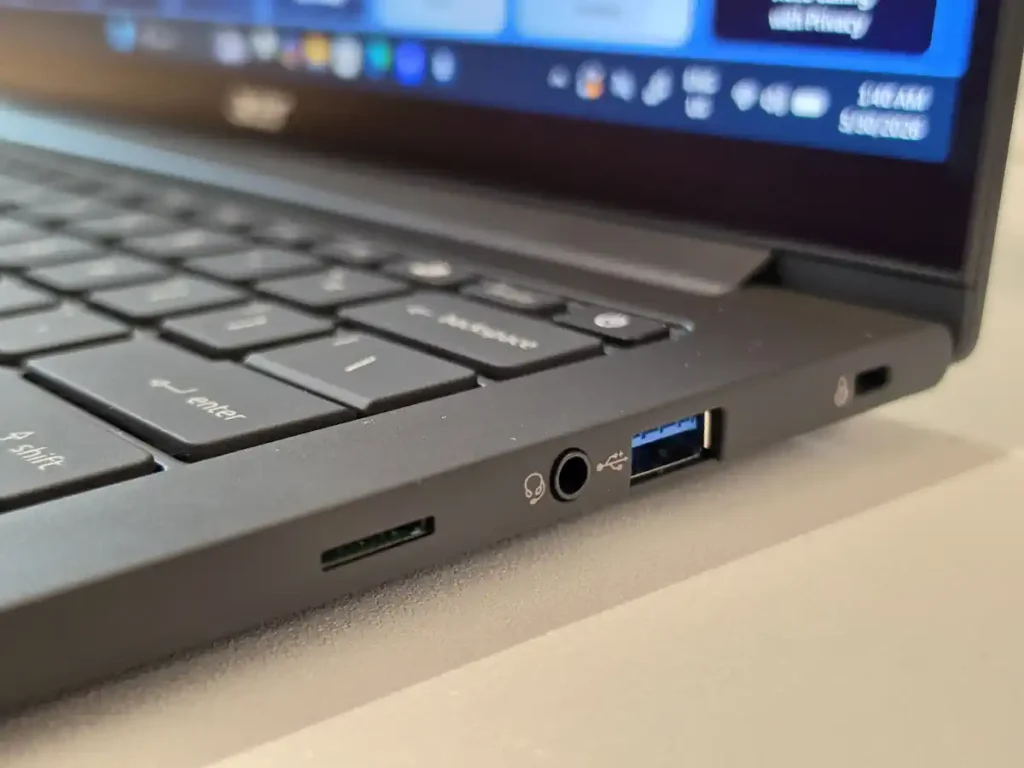
This is why it’s also great to see two USB-C ports on the left-hand side, both of which support versatile and speedy Thunderbolt 4. There’s also an HDMI connector here (again handy; I’m using my laptop’s HDMI output right now), while a 3.5mm combo jack and microSD slot complete the excellent line-up.
Acer TravelMate P6 14 AI (2026) ports (2026): price and availability
One of the reasons this is a first-look review is because Acer hasn’t yet supplied any details on price or availability for the P6. I suspect it will be this autumn, but maybe some regions will see it later this summer.
What I feel more confident about is that this 2026 update to the Acer TravelMate P6 14 AI will cost less, spec for spec, than the Lenovo ThinkPad X1 Carbon Gen14 that forms its natural opposition.
Even if it’s more expensive than I expect, make no mistake that Trevor was 100% right. This is the best Acer TravelMate ever. And this is a brand that’s been around for over three decades. It’s a great way to mark the company’s 50th anniversary celebrations.
*I’d love to provide his real name as I think “Trevor” is a brilliant advocate for Acer and he should be out there shouting about it. Also, note that in my direct quotes I’ve edited some of his word ordering, but none of his sentiment, to make it easier to grasp his points.
About The Author

Tim Danton
NEXT UP


