Trending Topics

 Trending
Which Amazon Echo do I have?

Table Of Contents−
Given Amazon keeps refreshing its range of Echo smart speakers every year, it can be hard to keep up with which one you have.
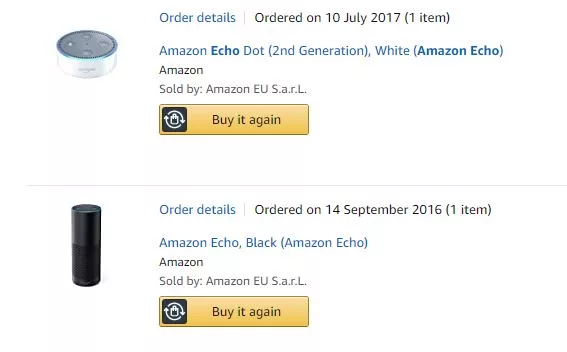
If you’re not sure which Amazon Echo you have, the easiest way of finding out is logging into your Amazon account and checking your past orders. Just type “Echo” into the search bar and everything will come up as below… assuming you bought from Amazon, of course.
If not, here’s a rough-and-ready guide to figuring out what Echo you’re packing in your home.
Which Amazon Echo do I have?
If it’s short and puck-shaped, you’ve got an Echo Dot.
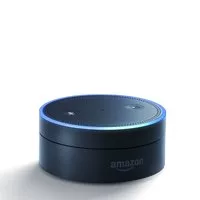
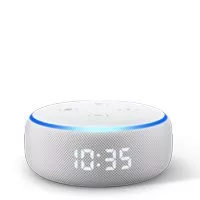
There are three generations of Echo Dot – and realistically you only have a second or third generation model, because the first-generation version wasn’t released in the UK. But for completeness’ sake, this is what it looks like:
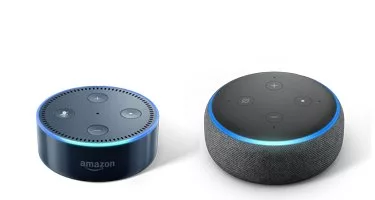
You’re far more likely to have one of the latter two. The second-generation version is hard plastic and has an Amazon logo embossed on the side next to the volume-down button. The third-generation version is more rounded, and has a fabric covering around the side with no Amazon logo. In truth, it’s pretty hard to get them confused.
There’s one final version: The Echo Dot with Clock. This looks identical to the third-generation model when switched off, but has an LED clock face when switched on, which is something of a giveaway. It’s also only available in the sandstone colour scheme.
If it’s tall and plastic, you’ve got a first-generation device
The original Echo was a tall plastic cylinder with a top that rotates to adjust the volume. This has gone out of style now, and Amazon doesn’t make ‘em like this any more.
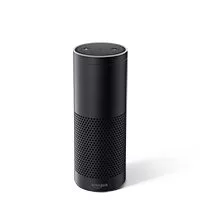
BUT there is one other possibility. You might have a first-generation Echo Plus, which looked identical but offered better sound quality and a built-in smarthome hub. According to Amazon, the only difference in form is the weight, with the Echo Plus weighing 954g to the original Echo’s 1,064g – I’m afraid you may have to get the scales out.
If it’s fabric covered, you’ve got a second or third generation Echo
Amazon added a fabric covering to the shorter, dumpier Echos from the second generation onwards. Imagine a slightly stretched-out tin of baked beans and you’ve got a rough idea of the dimensions.
At a glance, the second and third generation Echos look pretty similar, but there are differences. Most tellingly, the second-generation version keeps a small Amazon logo on the front near the bottom. This is dropped for the third, which also has a more rounded top.
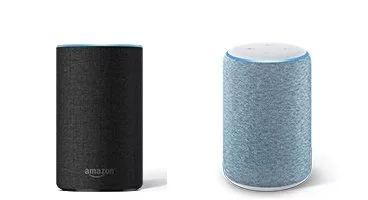
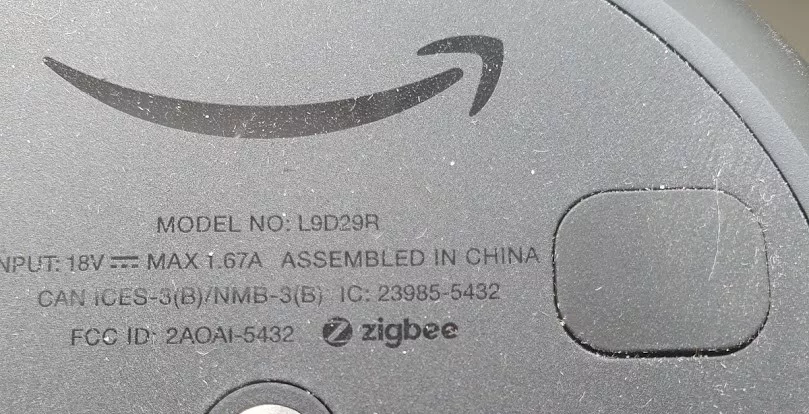
But once again, Amazon has been mighty unhelpful and made the second-generation Echo Plus look exactly like the third-generation Echo. This time, however, there is a quick way of telling: turn over the Echo Plus and you’ll find a small Zigbee logo, which isn’t present on the third-generation Echo.
What if it’s something else altogether?
Amazon has made a whole bunch of other Echoes, so if yours doesn’t look like anything above, it’s probably one of these.
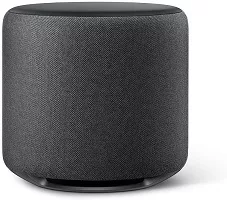
The Echo Sub is a massive chunky subwoofer that attaches to other devices to add bass. It’s pretty nondescript and won’t work on its own.
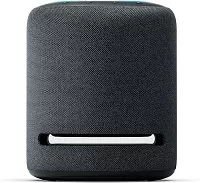
The Echo Studio is the top-of-the-range Echo compatible with Dolby Atmos and Sony 360 Reality Audio. It’s big and chunky, but the big giveaway is the cutout near the bottom of the device, which is intended to “maximise bass reproduction”.
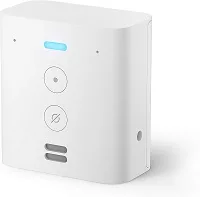
The Echo Flex, meanwhile, just looks like a plug. Because that’s what it is.
What about newer Echo models?
Since this guide was originally published, Amazon has released newer generations of Echo devices that are worth mentioning for anyone trying to identify what’s sitting on their shelf. The fourth-generation Echo and Echo Dot both adopted a distinctive spherical shape, making them much easier to recognise than earlier cylindrical models. If your Echo looks like a small or medium-sized ball, you’re likely holding a fourth or fifth-generation Echo or Echo Dot.
The fourth-generation Echo Dot is about the size of a large grapefruit and comes with a fabric covering and a flat base to stop it rolling away. Some versions also include an LED clock display behind the fabric, similar to the third-generation Echo Dot with Clock, but in a spherical design. The standard Echo (non-Dot) is larger, roughly the size of a small melon, with a downward-firing light ring at the base instead of the top.
In 2022, Amazon introduced the fifth-generation Echo Dot, which maintained the spherical shape but with improved sound quality and temperature sensors built in — handy for smart home routines. If you’re unsure whether you’ve got a fourth or fifth-gen Dot, the easiest way is through the Alexa app. Go to Devices, select your Echo, then check the Device Settings. The model generation is often listed there, or you can cross-reference the firmware version against Amazon’s support pages.
How many versions of the Amazon Echo have been released?
Amazon has released multiple generations of its Echo devices since the original Echo debuted in 2014. The standard Echo speaker has seen four generations:
- 1st Generation (2014): The original cylindrical design introduced Alexa to the world.
- 2nd Generation (2017): A more compact design with improved audio and interchangeable shells.
- 3rd Generation (2019): Enhanced audio with Dolby processing and a fabric-covered design.
- 4th Generation (2020): A spherical design with improved sound quality and a built-in Zigbee hub.
The Echo Dot, a smaller version of the Echo, has also seen several generations:
- 1st Generation (2016): A puck-shaped design with basic features.
- 2nd Generation (2016): Improved voice recognition and a lower price point.
- 3rd Generation (2018): A fabric-covered design with better sound quality.
- 4th Generation (2020): A spherical design matching the 4th Gen Echo.
- 5th Generation (2022): Maintains the spherical design with internal improvements.
Other Echo devices include the Echo Show series, which incorporates a display, and the Echo Studio, designed for high-fidelity audio. Each of these has its own set of generations and updates.
To identify which Echo device you have, you can check the device’s physical characteristics, such as shape, size, and materials. Alternatively, logging into your Amazon account and reviewing your past orders can provide specific information about your device model.
More explainers
- Why is Spatial Audio not working on my iPhone?
- How do you factory reset a Chromebook?
- Why is my AirTag battery level low, even with a new battery?
- What is object-oriented programming?
This article was updated on the 11th of June 2025 with additional info.
About The Author

Alan Martin
NEXT UP


