Slack is a multipurpose beast. Some workspaces you might use throughout the day, such as the one your company uses, for example. Others, you might only want to dip into now and again. But it’s those occasional workspaces that are often the noisiest when it comes to notifications, getting in the way of important notifications from work. You don’t want to turn all Slack notifcations off, in case you miss something important from work. So how do you silence notifications from a Slack workspace? Here’s how.
What is a Slack workspace?
You might think of a Slack workspace as an account. So you might have one Slack workspace for your company, another for a football team, another for a community for a certain app or game, such as the Raycast Community you see in the screenshots below. Not all of these are important enough to merit a constant stream of notifications, especially ones such as the Raycast Community which are used by thousands of people and are very active.
How to switch off a Slack workspace’s notifications
I’m going to show you how to do this from the desktop app (either Mac or Windows).
First, click on the workspace you wish to silence from the menu on the left of the Slack interface. Then click the workspace’s name at the top of the screen and select Preferences, as shown below:
Once you’re in the preferences menu, it should open on the notifications screen, but select it from the left if not. Then select the Nothingย option from the notifications section.
You might think that would be the end of the matter, but there’s another option you probably want to kill. If you keep scrolling down in the menu above, you’ll eventually come to an option that says Show a badge on Slack’s icon to indicate new activity. Deactivate that option and you won’t see the badge on the Slack icon in the macOS Dock every time something new happens in that workspace.
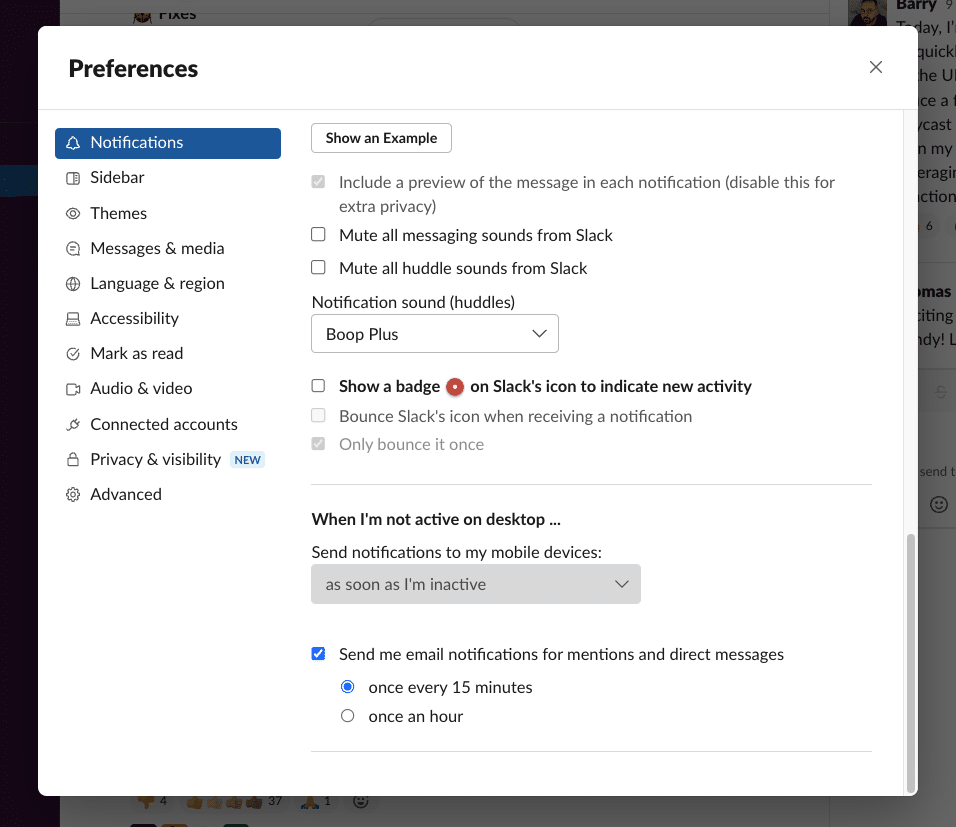
These settings only apply to that particular workspace, so you should continue to receive notifications and badges as normal from your other, more important workspaces.
Barry has 25 years of experience working on national newspapers, websites and magazines. He was editor of PC Pro and is co-editor and co-owner of BigTechQuestion.com. He has published a number of articles on TechFinitive covering data, innovation and cybersecurity.
To provide the best experiences, we and our partners use technologies like cookies to store and/or access device information. Consenting to these technologies will allow us and our partners to process personal data such as browsing behavior or unique IDs on this site and show (non-) personalized ads. Not consenting or withdrawing consent, may adversely affect certain features and functions.
Click below to consent to the above or make granular choices. Your choices will be applied to this site only. You can change your settings at any time, including withdrawing your consent, by using the toggles on the Cookie Policy, or by clicking on the manage consent button at the bottom of the screen.
Functional
Always active
The technical storage or access is strictly necessary for the legitimate purpose of enabling the use of a specific service explicitly requested by the subscriber or user, or for the sole purpose of carrying out the transmission of a communication over an electronic communications network.
Preferences
The technical storage or access is necessary for the legitimate purpose of storing preferences that are not requested by the subscriber or user.
Statistics
The technical storage or access that is used exclusively for statistical purposes.The technical storage or access that is used exclusively for anonymous statistical purposes. Without a subpoena, voluntary compliance on the part of your Internet Service Provider, or additional records from a third party, information stored or retrieved for this purpose alone cannot usually be used to identify you.
Marketing
The technical storage or access is required to create user profiles to send advertising, or to track the user on a website or across several websites for similar marketing purposes.
To provide the best experiences, we use technologies like cookies to store and/or access device information. Consenting to these technologies will allow us to process data such as browsing behaviour or unique IDs on this site. Not consenting or withdrawing consent, may adversely affect certain features and functions.
Functional
Always active
The technical storage or access is strictly necessary for the legitimate purpose of enabling the use of a specific service explicitly requested by the subscriber or user, or for the sole purpose of carrying out the transmission of a communication over an electronic communications network.
Preferences
The technical storage or access is necessary for the legitimate purpose of storing preferences that are not requested by the subscriber or user.
Statistics
The technical storage or access that is used exclusively for statistical purposes.The technical storage or access that is used exclusively for anonymous statistical purposes. Without a subpoena, voluntary compliance on the part of your Internet Service Provider, or additional records from a third party, information stored or retrieved for this purpose alone cannot usually be used to identify you.
Marketing
The technical storage or access is required to create user profiles to send advertising, or to track the user on a website or across several websites for similar marketing purposes.