Trending Topics

 Trending
How do I block someone on LinkedIn (without them knowing)?

Table Of Contents−
We’ve all got one of those contacts on LinkedIn who we worked with years ago and doesn’t stop spouting nonsense. LinkedIn has several ways to block or opt out of seeing updates from contacts, without alerting them to the fact you’re snubbing them. Here’s how to block someone on LinkedIn, along with the various other methods to make their output go away.
Block someone on LinkedIn
If you want to outright block someone from being able to follow you on LinkedIn, preventing them from seeing updates to your profile and other output, it’s relatively straightforward.
First, go to the person’s profile page on the LinkedIn website. Then click on the More button under their profile picture. You should then see the option to Report/Block that person, as shown below:

On the menu that pops up, you should see the option to block that user.
With one or two of our contacts, the option to block doesn’t exist. If that’s happening to you, try the option to Remove Connection (as shown in the image above first) before blocking.
How to block someone on LinkedIn without viewing their profile
One of the most annoying things about LinkedIn is that it tells someone when you’ve viewed their profile. If you’re planning to block someone, this could tip them off to the fact. That’s particularly troublesome if you’re blocking someone because they are abusive or because of a breakdown in a personal relationship, for example.
However, there is a way to visit someone’s LinkedIn profile and block them without tipping them off. In fact, it’s probably worth turning on this mode for general LinkedIn usage.
To prevent someone from being able to see that you’ve visited their profile, visit the LinkedIn website and click Me in the top-right corner. Now click Settings and Privacy and click Visibility from the left-hand menu.
Now click Profile viewing options and take your pick from the options listed, as shown below:
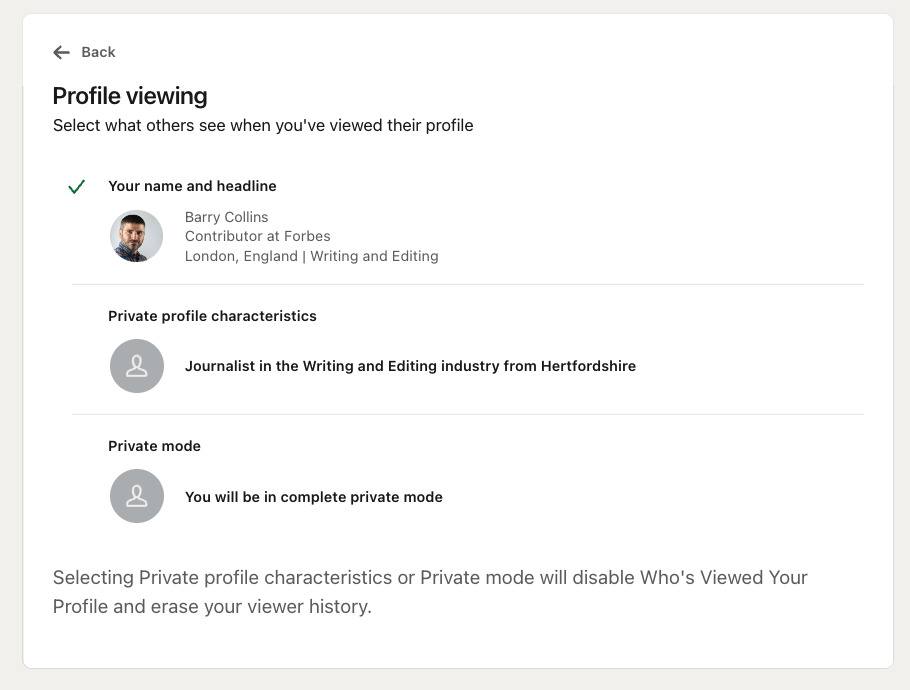
It says something about the accuracy of LinkedIn data that I’ve never worked or lived in Hertfordshire, and yet LinkedIn thinks I’m from there!
Once you’ve chosen Private profile characteristics or Private mode, you can then block someone using the method outlined above.
Unfollow someone on LinkedIn
If you just want to stop seeing someone’s posts on LinkedIn, but don’t want to disown them entirely, you can simply unfollow them. This stops you seeing their output, but maintains a connection, allowing them to still contact you. Crucially, contacts aren’t informed when you unfollow them, so if your boss is constantly posting rubbish on LinkedIn, this is one way to subtly silence them.
If you want to unfollow someone, follow the instructions for blocking at the top of this page, but choose Unfollow from the drop-down menu instead of Report/Block.
Remove a Connection on LinkedIn
As mentioned above, LinkedIn also provides the option to remove a connection. This means other people won’t see you as being in that person’s network, and any recommendations or endorsements you’ve made for that person will be removed. The other person won’t be informed you’ve removed the connection, although they may spot the missing endorsements, of course.
If you want to remove a connection, once again follow the instructions for blocking someone shown above, but select Remove connection from the drop-down menu instead.how to block someone on LinkedIn
About The Author

Barry Collins
NEXT UP


