Trending Topics

 Trending
Can you fit DDR5 to a DDR4 motherboard?

High intensity computer tasks can always use a few more resources to boost performance and upgrading the RAM on a PC remains a cost effective option. Memory technology continues to advance with DDR5 replacing DDR4 as the current standard, but is it right for your system? How can you fit DDR5 to a DDR4 motherboard?
Does DDR5 work in a DDR4 motherboard?
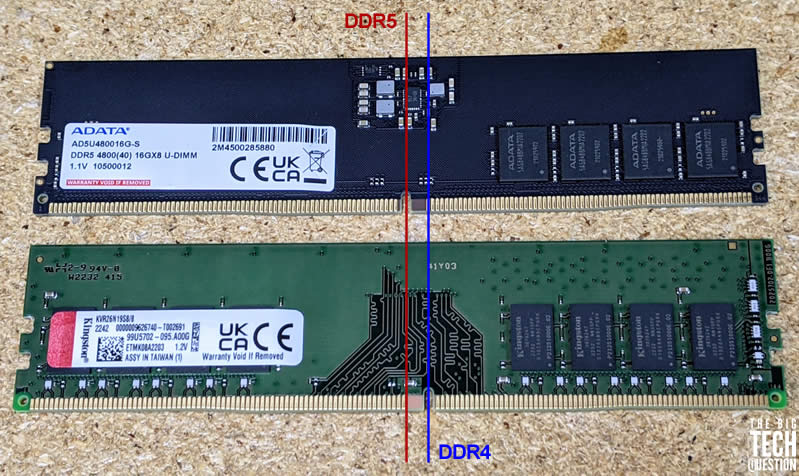
No, unfortunately, a DDR4 motherboard cannot accommodate a DDR5 RAM module. Although DDR5 is designed to replace DDR4, the two are not compatible.
DDR5 uses a different pin configuration so it won’t fit into a DDR4 motherboard. Although DDR4 and DDR5 both use a 288-pin configuration, there is a small notch in the PCB which corresponds to the motherboard’s RAM socket. The placement of the DDR4 notch is different to the DDR5 version. DDR5 is not backwards compatible with DDR4 motherboards and RAM modules, and you cannot fit DDR5 into a DDR4 motherboard.
What are the benefits of DDR5?
DDR5 boasts higher clock speeds and improved power efficiency. It also supports more memory channels and higher capacities than DDR4, but the cost of DDR5 is also higher.
| Feature | DDR5 | DDR4 |
| Data Rate | 4,800-6,400 Mbps | 2,400-3,200 Mbps |
| Total Bandwidth | 64 GB/s | 25.6 GB/s |
| Latency | CL17-19 | CL17-19 |
| Memory Capacity | Up to 256 GB | Up to 64 GB |
| VDD | 1.1-1.2V | 1.2-1.35V |
| VDDQ | 1.1-1.2V | 1.2-1.35V |
Although Intel’s 12th and 13th generation CPUs support DDR4 and DDR5, the motherboard dictates which can be used in your system. At least one motherboard manufacturer, Onda, produced a motherboard with both DDR4 and DDR5 slots, but these are extremely rare. If you are looking to upgrade your computer’s RAM to DDR5, then you will need to make sure that you have a compatible motherboard.
What are your tips for upgrading to DDR5?
Make sure to double check the specifications of your motherboard before buying a DDR5 RAM module. Additionally, keep in mind that DDR5 is currently more expensive than DDR4, so you should factor in the cost of the new RAM, as well as the cost of the motherboard.
Overall, upgrading to DDR5 can be a great way to improve the performance of your computer and get the most from it. However, it’s important to be aware of the incompatibilities between the different RAM types and the cost of the upgrade before making the decision.
Additional explainers you might be interested in
- Why won’t the computer’s USB port charge my phone?
- Overheating laptop? Here’s how to clean out the fan
- Why does my Dell laptop turn on when opening the lid?
About The Author

Lee Grant
NEXT UP


