Trending Topics

 Trending
Can I use an Amazon Echo as a computer speaker?

Table Of Contents−
As long as your computer has Bluetooth wireless, you absolutely can use your Amazon Echo as a computer speaker – and we’re going to show you how.
Using the Echo for computer audio is a smashing idea for several reasons. Firstly, the larger speakers – the £90 Echo and the £140 Echo Plus – have decent sound quality, every bit as good as most of the dedicated PC speakers you can buy for a similar price.
If you’ve already got an Echo in your office or computer room, like I have, then it saves you wasting electricity on a separate set of speakers and reduces the jumble of wires on your desk.
You can also still benefit from the full range of Alexa voice commands and services – the speaker doesn’t become a dumb slave to the computer once it’s connected.
So how do you use your Amazon Echo as a computer speaker?
Use Amazon Echo as a computer speaker in Windows
I’m going to assume you’re running Windows 10, because I am, you should be, and I’m nothing if not lazy. (Seriously, the process won’t be that different in Windows 8 or even Windows 7.)
First, go to Alexa’s homepage on your PC’s web browser and log in with your Amazon account details. Go to Settings, choose the device you wish to use as a speaker and then select Bluetooth. On the next screen, choose “Pair a new device”. It will start searching for available Bluetooth devices.
Now we need to make your Windows device available, the computing equivalent of putting yourself on Tinder. Search for “Bluetooth” in the Windows search bar and open the “Bluetooth and other devices settings” option that should appear in the search results.
Now click “Add Bluetooth or other device” and then click Bluetooth on the next Window that appears.
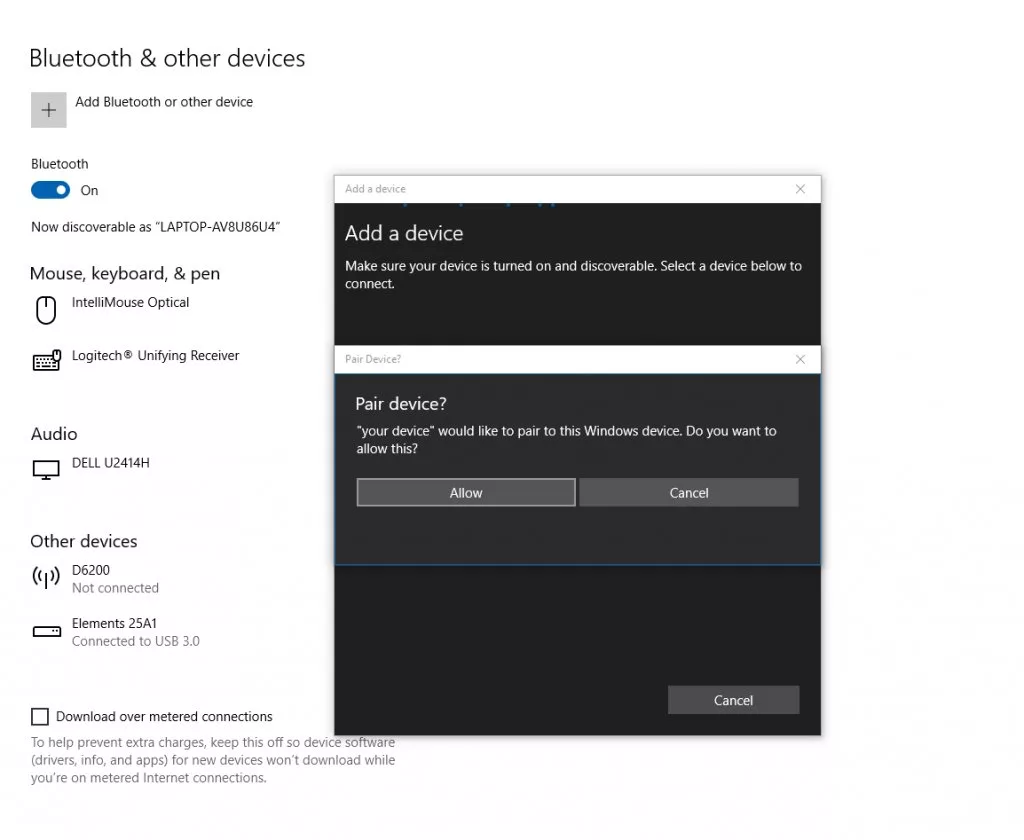
With a dose of luck and a fair wind, your two devices should see one another and form a loving relationship. Your Amazon Echo is now your computer speaker.
The Echo may blather some nonsense about telling the speaker to “Add phone” when you next want to connect, but you can largely ignore that. The two devices should find one another whenever they’re in range. If not, you might have to manually encourage them by saying “Alexa, connect to laptop” or whatever your computer device is called in the Alexa settings.
Pro tip: don’t tell Alexa to “add laptop” or you’ll end up with a laptop on your shopping list. That could prove expensive.
Use Amazon Echo as a Mac computer speaker
The process is pretty similar for the Mac. Once again, open the Alexa settings in the computer’s web browser, as described in the Windows section above.
On your Mac, click on the Bluetooth symbol ( ) in the menu bar and choose Connect. If you can’t see the Bluetooth symbol in the menu bar, go to the Apple menu, choose System Preferences and click on Bluetooth. Then select Show Bluetooth in the menu bar and connect from there.
The Mac will provide onscreen instructions for connecting your Echo speaker to the Mac.
Related content
About The Author

Barry Collins
NEXT UP


