Trending Topics

 Trending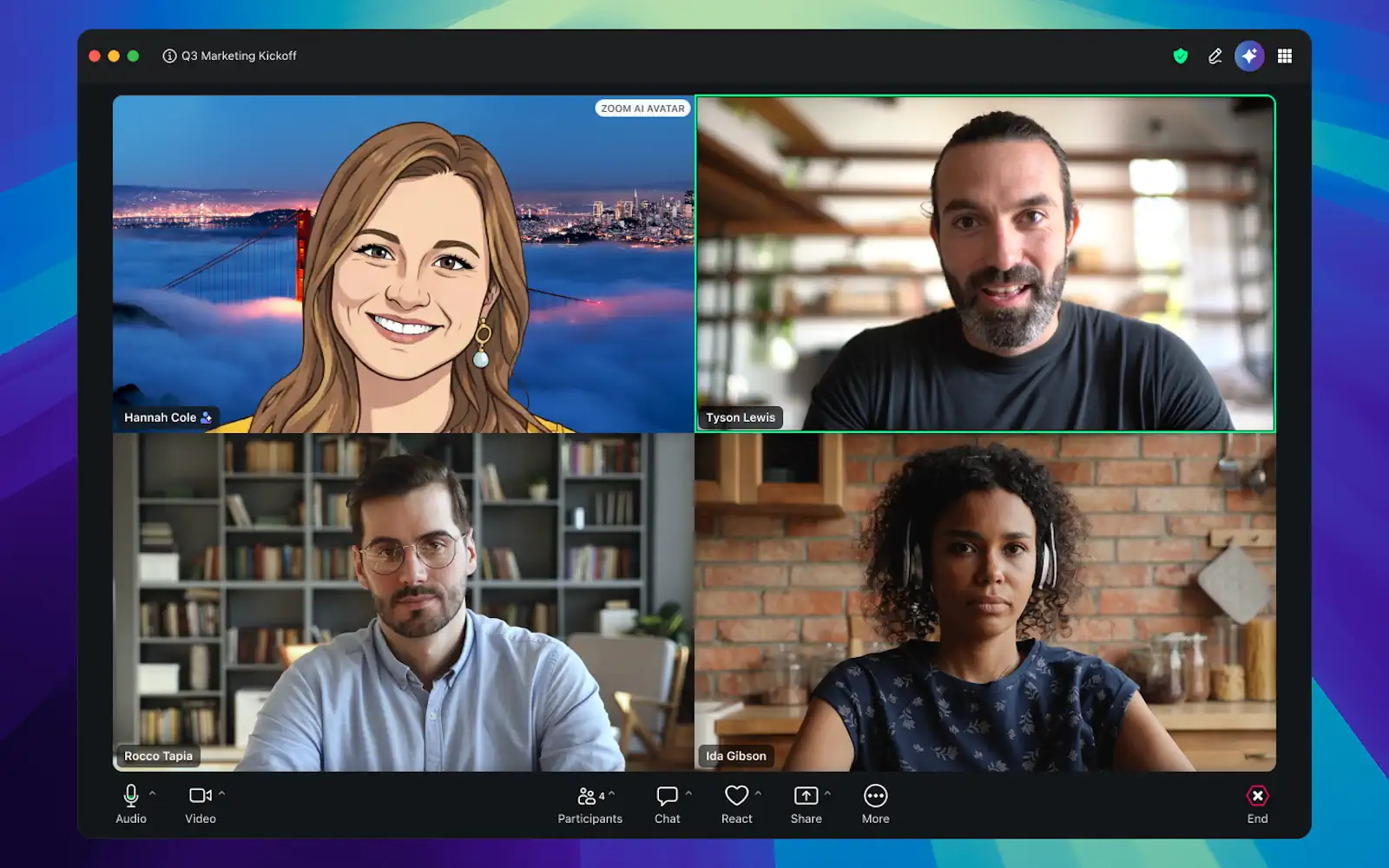
The story behind Zoom’s realistic AI avatar that will soon be rolled out to the world

Zoom has long used avatars – who can forget the Texan lawyer who accidentally appeared as a cat in a district court meeting back in 2021?
At Zoomtopia 2025, the company announced it would be offering photo-realistic avatars. The rollout started in beta earlier this year and is now being fully rolled out in the US, with other territories to follow.
The key idea is that your Zoom avatar will look and behave like you, for those times when you don’t want to be on-camera. For example, you’ve just come in from a run, or you’re simply having a bad hair day. It can also be useful for people who hate being on camera.
For transparency, a “AI avatar” strap will appear as part of your video stream.
We spoke to Ian Sleebe, Senior Solutions Architect within Zoom’s Global Architecture team, to find out more. “It’s going to allow you, as a user, to use not just the cartoony avatars that we’ve already had, like the pandas or the mouse or wolf,” he explained. “You’re also able to use cartoony avatars of yourself, and even photo-realistic avatars of yourself.”
How to set up your Zoom AI avatar
The first step, Ian told us when we spoke in March, is to take a recording of yourself. This will record you talking for 30 seconds to two minutes, depending on how accurate you want to be. You’re effectively validating your avatar so that Zoom knows it really is you.
“You would essentially do things like nodding your head, taking a quick picture of yourself, effectively making sure that we verify that this is the user,” he explained. “All of that will be hosted on the client side, so no one else is going to be using that avatar.”
By client side, Ian is talking about your Zoom account.
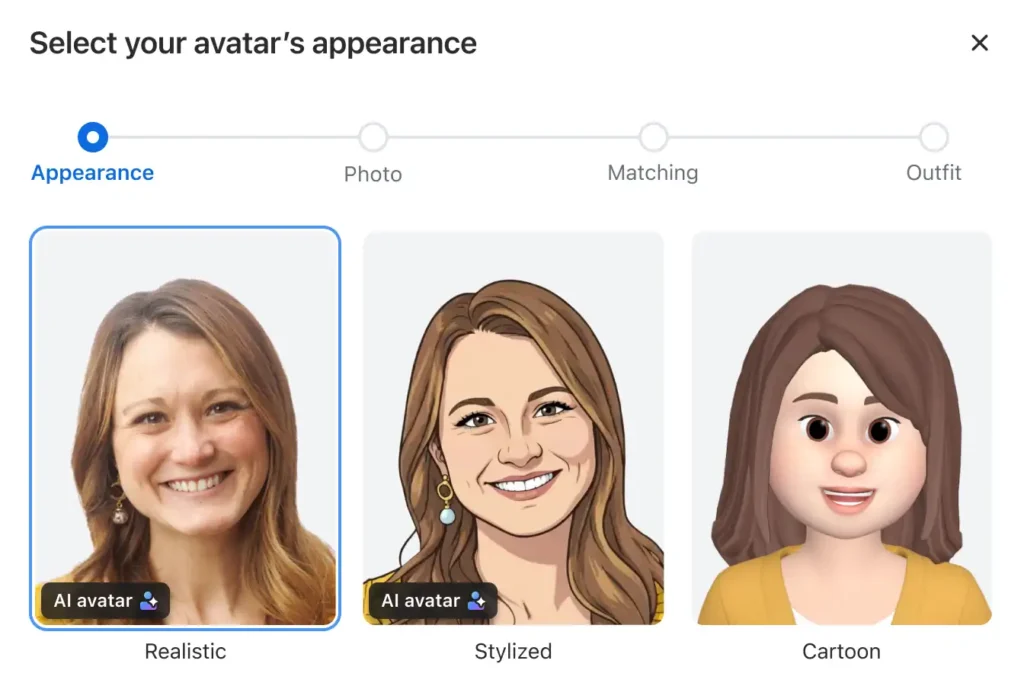
With this captured, you can choose whether to go for a photo-realistic image, a stylised version or a full cartoon version.
To get started, sign into your Zoom desktop app and click Settings at the top right. Then click Video & effects, then the Avatars tab. When you click the add icon, you should be offered the option to create your custom avatar.
If there is no such option, either the custom AI avatar isn’t yet available in your region or you’re on the free tier. The Zoom AI avatar is only available with paid Zoom Workplace plans.
Creating AI clips
Once you’ve created your AI avatar, you aren’t restricted to live calls. You can also record mini videos, such as this one we created during the pre-release phase. As you will no doubt be able to tell, this was based on written text with an AI voice reading the message out loud.
“Clips are essentially a way for us to allow you to quickly share snippets of videos to your teammates, whether that’s internal to your organisation or external as well,” said Ian.
“You could put anything in the script. You can even have a PowerPoint presentation to go along with this as well.”
You can also add virtual backgrounds if the real one – recorded during your enrolment – is as messy as mine.
“More importantly, it can even support multiple languages,” said Ian. “I can share this to other parts of the organisation that might want to hear it in their language.” Ian went on to show me an example where the AI generated the script in Portuguese and Korean.
In case you’re worried about accuracy, the latest figures Zoom had was 96% accuracy for translation. Not the ideal of 100%, but this is where transparency helps: Zoom will always make it clear when content is AI-generated, which will help a Korean speaker to work out if a word has been misrepresented.
And let’s not pretend that we all speak 100% correctly all the time…
The technology behind the Zoom AI avatar
I asked Ian where the processing actually happens. “It’s a combination of Zoom’s own AI models that we leverage in house, as well as ElevenLabs that we leverage for for some of the voice cloning,” he said. Also emphasising that any sensitive personal date will be stored in Zoom’s private cloud.
Ian also said that Zoom would never use your content to train Zoom or third-party AI models.
If you aren’t happy with your AI model, it’s possible to re-enroll, said Ian. “You can continuously resubmit,” he said. Currently, you can create up to ten. “So you could, for example, have one where you’re wearing a dapper suit, you can have one where you’re on the beach. You can have one that’s a bit more business casual.
“So you can pick and choose which ones you’re going to use. And if you’re not happy, you can simply just delete them as well, or rename them.”
Then there’s the fact we age or change in appearance. “I have quite a long beard,” said Ian. “Maybe in half a year, I don’t have this beard anymore, so probably I want to upload a new one as well. Maybe you’ll change your glasses. Maybe you’ll have a new hairstyle.
“Usually you want that reflected in your AI avatar. So I would say, you’ll update your AI avatar as your own fashion sense or depiction changes as well in real life.”
Staying authentic and helping a neurodivergent workforce
My final question to Ian was about authenticity. With so much concern over deepfakes and user ID theft, was there a danger that Zoom’s AI avatars could make things worse?
“I think people really appreciate it that if it’s not real, that you tell them, and that it’s transparent to the users as well,” he replied.
And it’s also important to think about the use cases, Ian added. “A very strong use case for me, at least, [is that] I myself am neurodivergent. I know quite a lot of neurodivergent people as well, and there can be a lot of anxiety being on video – constantly being fully on video – and you’re going to be quite conscious about looking at yourself. Am I doing the right thing?
“Things like this will help you. So essentially, have a mask without truly having a mask and be able to be fully integrated into that conversation. Not have to focus on, am I still looking okay? What am I doing with my face? Is what I’m doing here, right? So it’s really, really empowering for those people. I would say.”
This is one of the reasons why Ian is so excited about the release. “We’re really at the cusp of something new, where collaboration as a whole is going to change quite significantly. We’re already seeing that across enterprises, where the conversation is no longer will you do AI? It’s, how are you going to do AI and how are you going to make sure that it’s actually successful.
“So those are some very interesting conversations that we’re starting to have, and this is definitely a part of that conversation.”
About The Author